Linux – Kill a Process by Name

Update: Please read the comments or just use killall <appname>

If you know the command

ps -A

then tou will probable also know

ps -A | grep firefox

now you can manually kill this via

kill -9 <ID>

Where <ID> is from the last output. But how to do this in one line? If your ps command knows:

ps opid= -C firefox
(should print the <ID>)

Then you can simply do

kill -9 $(ps opid= -C firefox)

Embed JavaFX 1.2 into Swing with JFXtras ?

If you read through the comments of Amy Fowler’s Blogentry (nice post by the way)
steveonjava posted the following news:

“We are releasing a SceneToJComponent class that makes it easy to embed JavaFX Scenes in Swing applications as a part of the JFXtras 0.5 release. The final release will come out in a few days, but for now you can try out the beta here

Hopefully this is a reliable method which will work for the next javafx version too 🙂

Thanks for making this possible!

Installation of Miktex – a latex package manager – for Ubuntu

GraphHopper – A Java routing engine

karussell ads

Did you ever have hassle with manual installation of packages (.sty files) in latex under linux? If yes the following procedure will help you a lot to make the windows-latex-packagemanager called miktex working under linux. With this manager it is one command or one click to install a package without any websearches!!

  1. Download the .deb file from here.
  2. sudo dpkg -i ~/Download/miktex-tools-2.8_beta_2-1-i386-linux.deb
    Sometimes a sudo apt-get install libcurl3 was necessary
  3. initexmf --help
  4. sudo initexmf --admin --user-install=/var/lib/texmf/
  5. Now try to install the fltpage (and include it via \usepackage[rightFloats]{fltpage} into the .text source)
    sudo mpm --install=fltpage
  6. Sometimes I needed (sometimes not) to run the following command after I installed a package:
    sudo texhash
  7. to update all installed packages simply run
    sudo mpm --update
  8. to find a package you can use the following command
    sudo mpm --list | grep a0

    => a0poster

Thats all! And it is nice! A lot better than manual installation.

hibernate.cfg.xml settings for derby, oracle and h2

GraphHopper – A Java routing engine

karussell ads

It took me some time to collect the hibernate.cfg.xml data which is necessary for derby, oracle and h2. So here are the default settings for those databases:

  1. Apache Derby (network)
    You start the network server and specify the following options in the script:Linux: DERBY_OPTS=”-Dij.driver=org.apache.derby.jdbc.ClientDriver -Dij.protocol=jdbc:derby://localhost:1527/ -Dij.user=admin -Dij.password=admin”
    Windows: set DERBY_OPTS=”-Dij.driver=org.apache.derby.jdbc.ClientDriver -Dij.protocol=jdbc:derby://localhost:1527/ -Dij.user=admin -Dij.password=admin”

    <property name=”hibernate.connection.driver_class”>org.apache.derby.jdbc.ClientDriver</property>
    <property name=”hibernate.connection.url”>jdbc:derby://localhost:1527/databaseName;create=true</property>
    <property name=”hibernate.connection.username”>admin</property>
    <property name=”hibernate.connection.password”>admin</property>
    <!– no schema necessary –>
    <property name=”hibernate.dialect”>org.hibernate.dialect.DerbyDialect</property>

  2. Oracle (thin)
    <property name=”hibernate.connection.driver_class”>oracle.jdbc.driver.OracleDriver</property>
    <property name=”hibernate.connection.url”>jdbc:oracle:thin:@host:1521:databaseName</property>
    <property name=”hibernate.connection.username”>YOURSCHEMA</property>
    <property name=”hibernate.connection.password”>YOURPASSWORD</property>
    <property name=”hibernate.default_schema”>YOURSCHEMA</property>
    <property name=”hibernate.dialect”>org.hibernate.dialect.OracleDialect</property>
  3. H2
    <property name=”hibernate.connection.driver_class”>org.h2.Driver</property>
    <property name=”hibernate.connection.url”>jdbc:h2:path\databaseName</property>
    <property name=”hibernate.connection.username”>sa</property>
    <property name=”hibernate.connection.password”></property>
    <property name=”hibernate.default_schema”>PUBLIC</property>
    <property name=”hibernate.dialect”>org.hibernate.dialect.H2Dialect</property>

To make it complete here are the maven settings for the databases:

  1. Apache Derby (network)
    <dependency>
    <groupId>org.apache.derby</groupId>
    <artifactId>derbyclient</artifactId>
    <version>10.4.2.0</version>
    </dependency>
  2. Oracle (thin) no public version is available but you could install the jar file into your local repository or into an archiva repository via:
    mvn install:install-file -DgroupId=com.oracle -DartifactId=ojdbc6 -Dversion=11.1.0.7.0 -Dpackaging=jar -Dfile=/path/to/file<dependency>
    <groupId>com.oracle</groupId>
    <artifactId>ojdbc6</artifactId>
    <version>11.1.0.7.0</version>
    </dependency>
  3. H2
    <dependency>
    <groupId>com.h2database</groupId>
    <artifactId>h2</artifactId>
    <version>1.1.102</version>
    </dependency>

Thank You for Your Interests!

Thanks for your attention and comments the last months! Hope you will enjoy the next months …

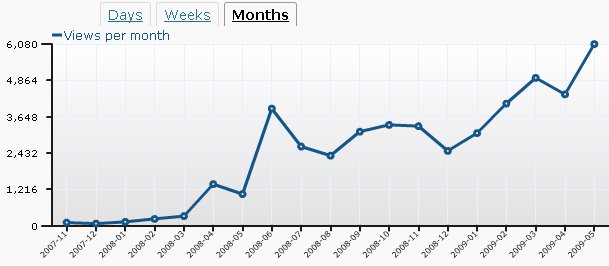
I started my blog in November 2007.  Now, May 2009 was the first month with more than 5 000 users (and even over 6000 -> 6080).

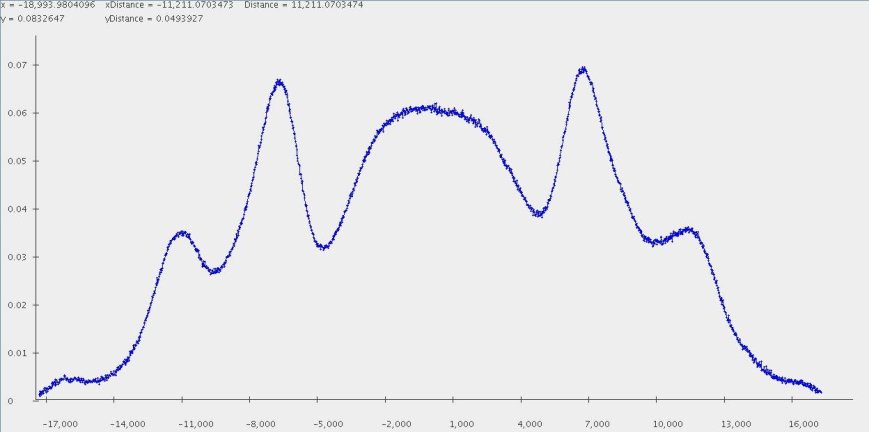
The monthly statistics looks a bit like the physical phenomena called ‘Maker-fringes’:

Stats:

stats-2009

Maker-fringes:

maker-fringes-gemessen

In my diploma thesis 2 years ago I studied this phenomena in detail.
BTW: this fancy 😉 picture I got with my performant Java genvlin plotter.

Code Quality Tools in Java

There are several tools to measure the code quality of my free timetabling software TimeFinder. Here are the tools I tried with success:

  • FindBugs (latest version 1.3.8) – uses static analysis to look for bugs in Java code. This is a great tool, it discovered possible NullPointerExceptions and a lot more bugs in my projects. Sometimes I asked myself how this program could have discovered this ‘complicated’ bug.With the maven plugin you can do:
    mvn findbugs:findbugs

    which will use version 1.3.8 out of the box

  • PMD (latest version 4.2.5) – scans Java source code and looks for potential problems. The rules are configurable, but at the beginning you will only need the provided one (and spend a lot of time to choose your favourites ;-))In NetBeans 6.5 this tool is well integrated and works like a charme (CTRL+ALT+P).With the maven plugin you can do:
    mvn pmd:pmd

    after you specified the following in the pom.xml under<reporting> <plugins> :

    <plugin>
      <groupId>org.apache.maven.plugins</groupId>
      <artifactId>maven-pmd-plugin</artifactId>
      <version>2.3</version>
      <configuration>
        <targetJdk>1.5</targetJdk>
      </configuration>
     </plugin>

Other tools could be

  • JarAnalyzerIs a dependency management utility for jar files. It’s primary purpose is to traverse through a directory, parse each of the jar files in that directory, and identify the dependencies between the jar files.
  • HammurAPIa code quality governance platform

but I didn’t tried them so far.

For Findbugs  and pmd there is a NetBeans plugin (SQE … software quality environment) which looks promising, but fails with a NullPointerException after I installed it via the update center and tried it on my project. Maybe I should use one of the snapshots. (BTW: I successfully used the pmd-plugin and findbugs in the standalone version).

Sonar is another interesting approach to use several code quality tools at a time. With Sonar it is possible to see the violations or possible bugs over das or weeks  – so, you are looking at the improvements and you will not get lost in the mass of bugs at the beginning. Another “multi-tooling” project is XRadar.

A little bit offtopic, but a great tool is proguard, which shrinks, optimizes, obfuscates and preverifies Java class files. There is even a maven plugin for that.

Microbenchmarking Java – Compare Algorithms

Have a look at this presentation where this post is presented as pitfall #3 !

Lesson learned. See comments 🙂

There are a lot microbenchmark tips out in the www. The intent of them differs from author to author.

Today I want to show how you could compare e.g. different algorithms. You could simply do:

int COUNT = 1000000;
long firstMillis = System.currentTimeMillis();
for(int i = 0; i < COUNT; i++) {
  runAlgorithm();
}
System.out.println("Mean runtime of algorithm in seconds:"+(System.currentTimeMillis()-firstMillis) / 1000.0 / COUNT);

There are several problems with this approach, which results in very unpredictable results:

  1. Make sure the variable COUNT is high enough (if runAlgorithm() is unexpensive). Then make sure you run this code several times. Additionally you should measure the RMS either for each runAlgorithm call or at the end of this code snippet for a better comparison with other algorithms.
  2. You should turn off the JIT-compiler with specifying -Xint as a JVM option, otherwise your outcome could depend on the (unpredictable) JIT and not on your algorithm.
  3. You should start with enough memory, so specify e.g.-Xms64m -Xmx64m. Because JVM memory allocation could get time consuming.
  4. Quit all other applications or at least you should use
    long firstNanos = mx.getCurrentThreadCpuTime();
    ThreadMXBean mx = ManagementFactory.getThreadMXBean();

    instead of

    long firstMillis = System.currentTimeMillis();
  5. Avoid that the garbage collector runs while your measurement: -Xnoclassg
    But make sure you have enough memory!

After this I got relative stable results: The difference of maximal and minimal value for the result is less then 4% after 10 runs.