Shame on Sourceforge?

Sourceforge restricts access from some more ‘evil’ countries. Read more here. This violates Open Source Initiative:

“5. No Discrimination Against Persons or Groups
The license must not discriminate against any person or group of persons.”

And if the license must not restrict this, the distributor shouldn’t as well! Its free software and not US software! 😩

So, if they argue with US laws I have the feelings that they shouldn’t or cannot provide free software hosting any longer. Maybe they should create a server outside the US?

Or should users from the affected countries use tor or should all developers migrate to alternative free software hosting projects?

But it is nice that they allow the comments to the link above, that’s good:

“sarcastic-man on January 25th, 2010
[…] Maybe one day Americans will wake up and realize that the world is a big place. […]

afsharm on January 25th, 2010
I am an Iranian (an innocent one) and I am not responsible for what ever my government is doing. As nawwark mentioned I’ve sometimes have contributions in SF.NET projects, so why you are denying me from my own works?
It’s against freedom and against FOSS.

bones_0 on January 26th, 2010
Just for the book: I want everybody to access my projects. Beeing a Swiss product (I am Swiss citizend and resident) it’s kind of crazy they are falling under US law now
 […]”
But also:
“meonkeys on January 25th, 2010
[…] maybe this will raise awareness of these laws and encourage people to get them changed
lukecrouch on January 26th, 2010
Disclaimer: SourceForge employee.
I speak for all of us here when I say we feel your pain. “Rub us the wrong way” is the nicest possible term for it – very diplomatic on Lee’s part. I host projects here on SourceForge too – ajaxmytop, peardbdeploy, and tangoiconsprite. So blocking these countries not only goes against the free flow of information, but it cuts down my potential audience and collaborators; not to mention that it removes hundreds of thousands of ad impressions from the business!
But at the end of the day, I’m a 20-something web developer with a wife and kid to feed and I have the amazing chance to do that AND try to give my own small contributions to open-source software.  […]”

Where is UML for NetBeans 6.8?

Flattr this to let me do an update for NetBeans 7.0!

————————————————————————

Recently I wanted the good and fancy UML editor for NetBeans 6.8 to display the class diagram of our twitter search jetwick, but I couldn’t find it in the update center.

The  solution seems is simple. I clicked here and got the zip called netbeans-6.8-200912091457-ml-uml.zip which needs to be extracted into your NetBeans installation. After this I was able to create an UML project from the project menu:

I created a project to reverse-engineer my java project where even maven (jar or war) was possible. Look here:

But at the time of NetBeans 6.5 the packages were filled with content! Now they are empty and no class diagrams can be easily generated from source code 😩

The import of the java files seems to work, because if I right click the project I could create a model report with all my classes and its dependencies.

Do you know my mistake? I just wanted to create a class diagramm from my project.

Update: There seems to be no solution for NetBeans 6.8. See StackOverflow.

Update2: No, wait. Read this.

Hidden Features of Java

This is a nice ‘question’ on StackOverflow: What are hidden features in Java?

I didn’t read about this nice one:


Integer integ1_a = 1;
Integer integ1_b = 1;
Integer integ1_c = new Integer(1);
Integer integ1_d = new Integer(1);

Integer integ128_a = 128;
Integer integ128_b = 128;

assertTrue (integ1_a   == integ1_b);   // again: this is true!
assertFalse(integ128_a == integ128_b); // again: this is false!
assertFalse(integ1_c   == integ1_d);   // again: this is false!

Read more about this issue by searching java’s pool of integer (internal ‘cache’ from -128 to 127 for autoboxing) or look into Integer.valueOf

Of course you can vote for my comment on stack overflow 😉

CRUD with Wicket + Guice + Db4o / NeoDatis

The journey began with a search for a database for my desktop application TimeFinder. It turned out that there are at least 3 candidates if I would choose a simple and only one tier architecture:

  1. GORM
  2. NeoDatis
  3. Db4o

One tier applications would only make sense for some special uses cases like in my case for high schools with one timetable admin. But it would be a lot better if I could use sth. like remote GORM, remote object persistence or even an ajaxified web application. Yes. Why not? What, if I rewrite the UI from scratch and move from ‘Swing Desktop’ to web? But then again: which web framework and which persistent architecture?

A lot of people would recommend Grails (myself included) if I need a simple CRUD web framework, but for me Grails is a bit heavy weight (~ 20 MB) and I will have to live with at least 6 languages: GSP, JS, HTML, ‘Spring-XML’, Java and Groovy. I will need Java at least for the performance critical part: the timetabling algorithm.

Okay. Then, why not GWT or Eclipse RAP? GWT has Javascript compilation, which I am not a big fan of and Eclipse RAP requires pure Eclipse development, I guess. So what else? There are a lot of Java web frameworks (with Ajax) as I discovered earlier. My choice now was simple: Wicket, which is Swing for the web. But what if you don’t like Swing? Then you will love the ‘Swing for the web’ 😉 !

Wicket Features

From what I learned in the last days and from blog posts; Wicket is outstanding in the following areas:

  • Separation of UI and code. You only have
    • pure HTML no new syntax required ala JSP, JSF, GSP, velocity, … the latter one was the reason for not choosing click. No Javascript hassle … if there are some, then I trust the wicket community to fix them in wicket itself
    • and pure Java. This is very good if you’ll someday refactor your code. And you’ll.
  • You can create your own components easy and fast. You can even create ajax components without xml and js… only Java.
  • A strong community (even a German book)
  • No route file necessary. (This can be a disaster for manually managed JSF apps)

Okay. And the persistent layer? That was the reason for this journey … hmmh, there are already several different persistent ‘technics’ for Wicket available:

Hmmh, but I only need a very simple persistent layer. No complex queries etc. As I mentioned earlier I can even live with xml (for datastorage). I decided to look into db4o again (used it in gstpl which is the antecessor of TimeFinder) and into the more commercial friendly (LGPL) object oriented database NeoDatis. The latter one has an option to export to xml and import the same, this would be great so that I don’t have to think about database migrations (some refactorings will be applied automatically. see 1.10 in the PDF docs). Migration in db4o should be easy too.

While I was thinking about that, I asked on the Apache Wicket mailing list for such simple persistent solution. Jeremy Thomerson pointed out that there are even some maven archetypes at jweekend which generates a simple Wicket app with persistence for me. I chose the Wicket+Guice+JPA template and updated this to use Guice 2.0 and the latest warp-persist according to this post. After that I needed to make db4o or NeoDatis working. For the latter one I needed warp-persist-neodatis and for the first one I only needed some minor changes, but they took a bit longer.

Resources

For those who want to see the results, here are the 2 independent maven projects (Apache License 2.0) within my subversion repository (revision 781):

To try the examples just type ‘mvn install’ and run ‘mvn jetty:run’. The resulting war file is amazing small: under 6 MB!

Now point your firefox or opera to http://localhost:8080/timefinderwicket/

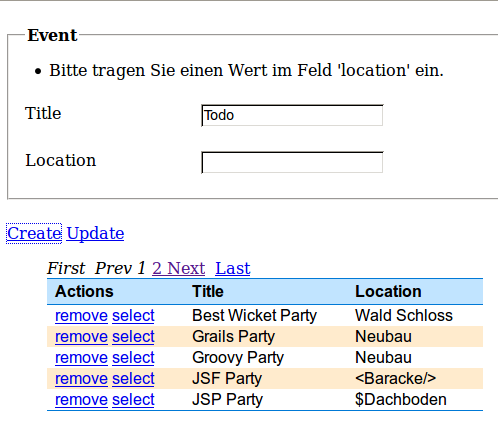
And here is the screenshot:

As you can see the localized warning messages are already provided and shown instead of “Please enter a value into the field ‘location'”.

To work with wicket is a great experience! In another project it took me about 10 minutes to convert a normal submit into an ajax one which updates only selected components. And then, in the NeoDatis project I initiallly developed my EventDataView against a completely different data item and moved the source nearly unchanged to the db4o project with the Event class! That is nice component oriented development. Okay, I did copy and paste rather then creating a maven submodule for the pageable list, but that wouldn’t be that difficult with wicket. Then as a third example I overwrote the navigation panel, which was easy too: Now instead of

<< < 1 2 ... > >>

it will be shown

First Prev 1 2 ... Next Last.

without touching the UI. You can even provide ‘properties’ files to apply easy I18n.

Coming Home

Wicket is like coming home ‘to desktop’ after some years of web development, especially in the UI layer. And guice perfectly meets my dependency injection requirements: pure Java.

To get all things right I had to tweek the initial example of jweekend a lot, but all necessary changes were logically and does not smell like a hack. As a first step I updated the versions of the artifacts and then I added a DataView from the repeater examples. The developed CRUD example is now built with dependency injection instead of the original locator pattern (ala DatabaseLocator.getDb()):

@Inject
Provider<ObjectContainer> oc;

Then the update mechanism and some other exception must be solved, but you only need to check out the sources and see what is possible!

As a side note

please keep in mind that there is a NetBeans Plugin for Wicket 1.4.x and an IntelliJ plugin for the same. For all NetBeans guys which are interested in ‘deploy on save’ feature you only need to enable ‘Compile on Save’ and then you can change code or HTML in Wicket, if you are running the application via jetty:run (jetty configuration is already done in the pom). Currently this works only with db4o as a standalone server. To my knowledge this way of UI prototyping can be even faster than with Grails, where it could take some seconds to be recompiled.

Conclusion

Dive into the world of Wicket right now!

Bahnhof der DB

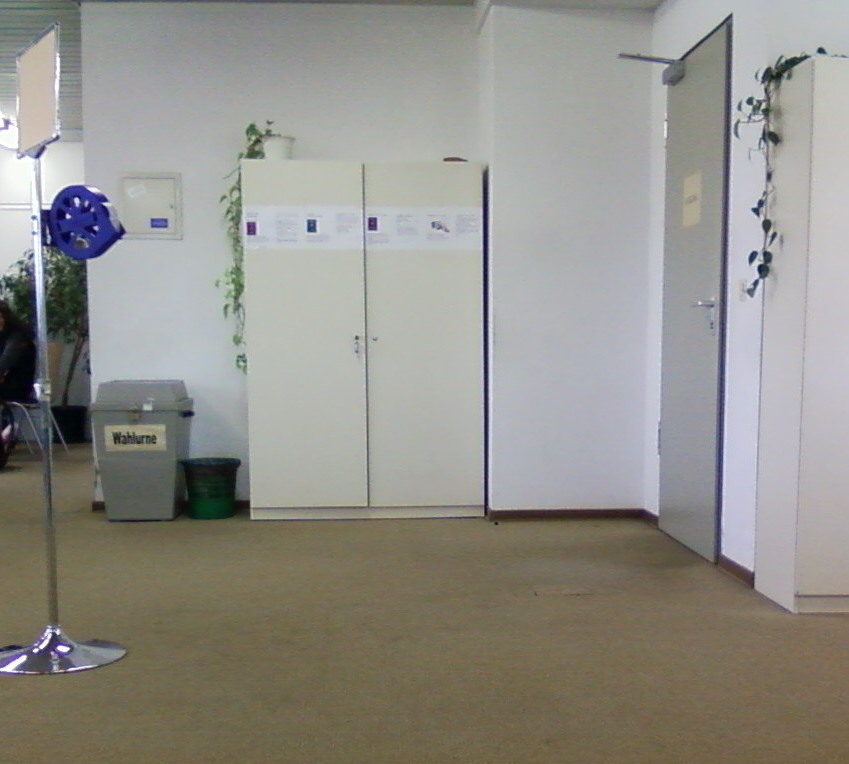
Da ich gerade einmal dabei bin meine alten Handyphotos zu durchstöbern … hier noch zwei, die ich auf der ungeplanten Zwischenstation Kirchenlaibach Ende Oktober 2009 gemacht habe. Der Franken Sachsen Expresse sollte eigentlich von Dresden direkt nach Bayreuth fahren. Er fuhr jedoch kurzfristig geĂ€ndert dann doch ĂŒber Kirchenlaibach um pĂŒnktlich in NĂŒrnberg einzutreffen, da wie immer  – die Neigetechniken kaputt war. (Kurzfristig geĂ€ndert und das obwohl das Problem schon vorher bekannt war.)

So weit so gut fĂŒr die Bahn. Der einzige Haken an der Sache fĂŒr mich war: der Anschlusszug der auf keinen anderen Zug hĂ€tte warten mĂŒssen, hat nicht mal 10 Minuten auf unseren Franken-Sachen-Express aus Dresden gewarten. So dass ich dann mit Kind 50 Minuten in der KĂ€lte (!) warten durfte. Aber zum GlĂŒck gab es ja noch die Wartehalle …

… dann entdeckte ich am gleichen GebĂ€ude noch folgendes …

PS: Der Zug aus Kirchenlaibach nach Bayreuth fuhr dann pĂŒnktlich ab. Der nĂ€chste Zug aus Dresden hatte >10 min VerspĂ€tung (und? deja vu?).

PĂŒnktlichkeit ist das oberste Gebot der Bahn.

Google Will Stop Censorship in China

From google blog:

We have decided we are no longer willing to continue censoring our results on Google.cn, and so over the next few weeks we will be discussing with the Chinese government the basis on which we could operate an unfiltered search engine within the law, if at all. We recognize that this may well mean having to shut down Google.cn, and potentially our offices in China.

Test-Driven Teaching – 4. User Interface / 5. More Game Features

This post belongs to some previous posts of this tutorial about “test-driven teaching”:

0. Overview article

1. Hello World

2. Initial Box Game

3. Object Oriented Programming – Refactoring!

Now will go on with the last two sections.

In Section 4

you can learn a bit how to code with Swing and how to draw lines etc. with the Graphics class. This section can be securely skipped.

It is only necessary for the reader to have fun; not to get lost in Swing development. Get the project under the following URL

https://timefinder.svn.sourceforge.net/svnroot/timefinder/branches/tdteaching/TestDrivenTeaching4/

The handling and painting will be improved a bit in the next section.

In Section 5

you will learn

  • Why and how to use inheritance
  • the keyword this
  • the switch-case construct

Get the project under the following URL

https://timefinder.svn.sourceforge.net/svnroot/timefinder/branches/tdteaching/TestDrivenTeaching5/

Let us examine the project. If you run it you will get a window with several black boxes and two colored one. The red is the enemy and the other could be controlled by the arrow keys (up, down, left, right) … its you. Try to capture the enemy like it is shown below:

There are some new classes and one interface called ‘Item’. Let me first explain the reason why I introduced a new Board class and then why we need this Item interface. Superclasses (and sub-classes) and also interfaces are directly supported in Java with its related keywords extends and interface, although you could write in an object oriented way even without native support of the language (e.g. in C), but this is for another topic…

Board Class

Instead of the borders I am using one object of the class Board where the different items will have its positions (of course there are other solutions to store different items at different positions, try thinking about them; email me if you think that you found one). Within the Board class a 2-dimensional array is used to hold all the objects at different locations. We need to duplicate the information of the position (x,y) within the Man class not only within the Board class, because this way the Board class does not need to know how to paint the different items: it just calls item.paintComponent().

Another change was to remove the move method from the Man class and put it into Board, because moving now does not only mean to change the position, it is necessary to check if the new position is empty etc.

Item Interface

As you can see in the project an interface has actual no function, it only provides a contract of methods (and static fields) which all classes should implement and other classes could rely on. A class can implement several interfaces via the implements keyword.

All objects implementing the interface ‘Item’ (here Man and Block) can be placed on the board.

I introduced the interface to avoid sth. like:

if(item instanceof Block) {
 drawTheBlockThisWay((Block) item, g);
} else if(item instanceof Man) {
 drawManThatWay((Man) item, g);
}

instead the Board class just needs:

item.paintComponent(g)

And as explained earlier the additional setters/getters for x and y are necessary within the paintComponent of each item: “the man or the block must know its position to draw itself”.

Inheritance

To avoid re-implementing the “x and y”-functionality for every Item-implementation again and again, I chose to write a common super class called ItemImpl which provides this functionality for all Item subclasses. Look into the code to understand that now the variables x and y are available in the Man and Block class although they do not declare them directly. This leads to less duplicated code. This extension mechanism is called inheritance.

Note three things here:

  1. Not always the object oriented way is the golden way, e.g. in this case it leads to more classes and could lead to more problems in other areas (e.g. database schemas).
  2. Testing the class ItemImpl is ok, but not necessary as I think: “Test only what will go wrong or what went wrong”. In this case we only have to getters and setters – all should be fine.
  3. Inheritance should be avoided where composition or sometimes delegating could be used.

This, Switch and More

Some setter-methods use the this keyword. E.g. in the setX method of ItemImpl it is necessary to distinguish between the method parameter x and the local variable this.x. The keyword this means that you want to refer to the current object. You could also refer explicitly to the super class’ methods or variables via the keyword super: ‘super.someMethod()’

Now look at the code in the BlockGameSwing class (method Thread.run) there I used the switch-case construct. Instead of several if-then-else statements I prefer using this construct if the type is integer or char. Please look in the class SwitchCaseTest under the test package to get the exact syntax and to directly compare with an if-then-else statement.

Two side-notes:

Future Tasks

The open task will be to decrease the energy if the man is colliding with an enemy.

  1. Introduce the energy variable within the BlockMan class and
  2. Uncomment the line with the energy in the method paintComponent of the BlockGameSwing class
  3. Additionally you should introduce movable blocks to catch the enemy without loosing energy

Other important concepts that are not covered in this tutorial:

In this section you have learned a lot of things. Maybe not as good explained as elsewhere, but with unit testing 😉 And please comment on this post to show where more explaination should be added!

If you like programming ‘the man’ you will love programming a robot. Warning: within the robocode project is very difficult to write unit-tested code. Although there exist other approaches to test a robot, I think the unit-testing would be very important.