Reply via JavaFX on: Shadow Motion Effect in 5 Lines Of jQuery

I took the opportunity to see how easy or difficult it is to implement a “shadow motion effect” in JavaFX. The effect is described in a post from Lam Nguyen and he implements it in jQuery in 5 lines.

What do we need to do this in JavaFX? Is this possible at all?

Yes it is possible and it was easy, fast (~10 min) and IMHO it looks nice. BTW: It is not only an animation – you can drag it:

1. Create a new JavaFX project in NetBeans and choose ‘Drag and Drop’.

2. Then adapt the DragBehaviour to the following. The necessary changes are minimal and marked with HERE:

 // HERE: change 1 line
 public var targetGroup: Group;

 public var targetWidth: Number;
 public var targetHeight: Number;
 public var maxX = 200.0;
 public var maxY = 200.0;
 var startX = 0.0;
 var startY = 0.0;

 init {
 // HERE: +1 line
 var target = targetGroup.content[0];

 target.onMousePressed = function (e: MouseEvent): Void {
   startX = e.sceneX - target.translateX;
   startY = e.sceneY - target.translateY;
 }

 target.onMouseDragged = function (e: MouseEvent): Void {
 var tx = e.sceneX - startX;

 // HERE +7 lines
 var cloned = Duplicator.duplicate(target);
 insert cloned into targetGroup.content;
 FadeTransition {
   node: cloned fromValue: 1 toValue: 0 duration: 0.5s repeatCount: 1
   action: function () {
      delete cloned from targetGroup.content;
   } }.play();

 if (tx < 0)
    tx = 0;

 if (tx > maxX - targetWidth)
    tx = maxX - targetWidth;

 target.translateX = tx;
 var ty = e.sceneY - startY;
 if (ty < 0)
   ty = 0;

 if (ty > maxY - targetHeight)
   ty = maxY - targetHeight;

 target.translateY = ty;
 } // onMouseDragged
 } // init

3. Drag it yourself  or try it out now:

A KISS Desktop UI Implemented in JavaFX

Some minor, probably not very impressive ideas, came to my mind the last weeks to adapt the common desktop UI experience to my needs. If you like those ideas then sorry, this was not indented.

I am not familiar with Apples OS which are known to provide good UI and could have already implemented my ideas. If this happens this post is only here to show some effects and components implemented in JavaFX. Note that I am not a specialist for a good looking UI! I never read any UI guidelines, even not before this post and I am not proud of that. For specialists refer to Kirill Grouchnikov (-> pushing-pixels), Joshua Marinacci (-> blog), Jonathan Giles (-> blog), …

More Intuitve Items to Log-Off

The first change is to show all the possible log-off possibilities with more intuitive icons and not only in raw text. The user should be able to determine the right thing faster (on mouse over or click a description could pop up)
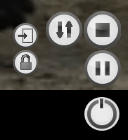
In clockwise direction or from left to right:

  1. lock screen
  2. user log out
  3. restart
  4. save to disc
  5. save to RAM
  6. and the last one: shutdown.

Some of the icons were taken from the great amarok player some were backed by my crude designer heart.

Tags instead Menu

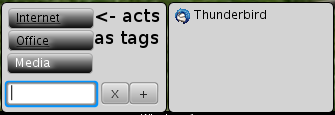
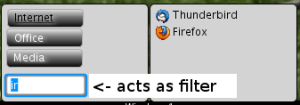
Another idea was that the normal application menu is somewhat complicated to use. Even in Vista/Win7 or Kde 4 you need to browse through the menu if you don’t know the name of the application, although I had to admit that I really like the search functionality in Vista/Win7 (BTW that was the only thing I liked about Vista). The point is that the menu items should be clickable and then filter the application list on the right side. So the menu items behave like tags:

… select ‘Internet’ and ‘Office’ to find my email client:
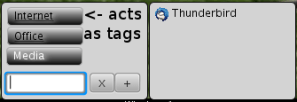
The textbox can be used to further filter the applications by name:
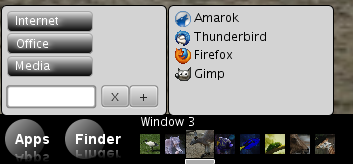
Taskbar == Application Chooser

The next idea is a taskbar which is at the same time the application chooser which is normally triggered from ALT+TAB. So instead of the known taskbar (here kde):

and the application chooser (gnome/kde):

I want to have only one unified bar to keep things simple (see KISS). In the first try I though I will put the unified taskbar on the bottom like it is normally done with the ordinary taskbar:

— first try of unified taskbar —

In this example I used some images to fake application content. The images were taken from a JavaFX example.

The window switching and menu-pop-up is triggered from a simple ‘mouse over’ not from a time consuming mouse click. Or sometimes I prefer keyboard then I can use ALT + LEFT/RIGHT. Now the desktop is like I wanted it, but what should be shown when I close all apps? And there is a lot of unused space between the last icon and the log-off menu which is ugly. But moving this menu to the left could cause a lot of trouble for the user. Then one solution could be to move it where it does not fit: into the finder or apps menu (like some OS vendors did).

Second Try With Desktop Ground

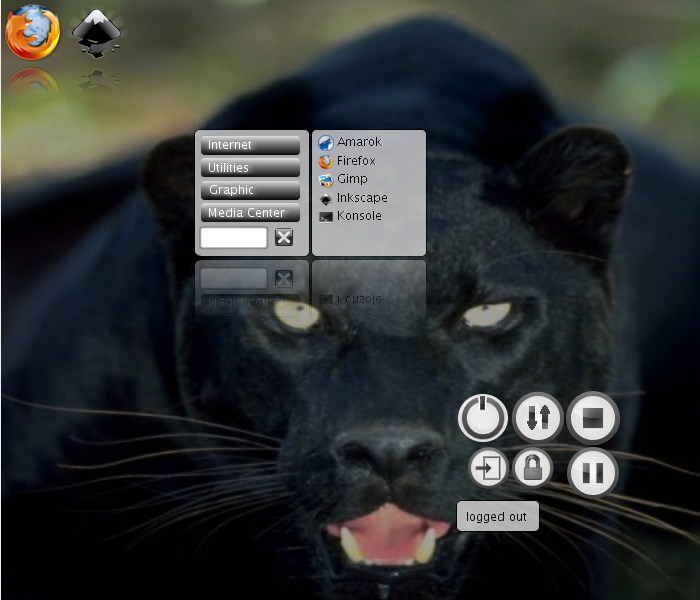
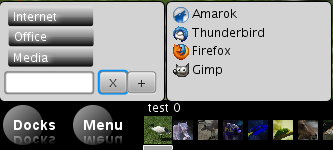
So we need to introduce the desktop ground as a special window available from the taskbar to make things even more simple. All the ‘starter’-icons from the Apps-menu then will go onto our dockable desktop ground. Even the finder-menu and the log-off menu will be there as docked apps which can be arranged like the user wants it. The idea of ‘docks’ is stolen from my current window manager called Window Maker. Of course those docks could be used to display weather, stocks, tweets, ….

To further improve the experience for me as a developer I will put the unified taskbar in the center of the screen. OMG, what? Yes, this bar is only displayed on e.g. ubuntu key (at the moment this is implemented with the ALT key instead). I guess, this is the point where UI experts would like to hit me, but I think this is a good solution – at least for me, because:

  1. It is simple
  2. The average distance from any point to the center is less than to the bottom of the screen, so we have faster acces to any of the current running applications.
  3. We save pixels because our taskbar is not omnipresent

So here a screenshot of this centered unified taskbar:

— second try of unified taskbar —

Always Fullscreen

We even could go further to avoid bars on the top of each application window. To close an application we could put a small ‘close’-icon (like it is the case for tabs for your browser) on each preview image of the unified taskbar. So the applications could then be always full screen like it is the case for mobile devices. Hmmh, but then we cannot see two apps at the same time!? For that we could implement resizing applications in the unified taskbar via mouse scroll and dragging via ubuntu key+mouse dragging. Now the desktop has two states:

  • Editing mode, where the taskbar is shown and application windows (except the desktop) could be closed, resized, moved and we can switch applications
  • Application mode, where normally only one application is visible in full screen

So now look at the applications’ desktop where each of the docks (two icon docks, the find-menu dock and the log-off dock) could be dragged around to suit your needs:

— final version —

Click here to start the webstart version.

The things which are currently not implemented in the JavaFX application:

  • Closing, resizing and dragging of application windows
  • If the user hits ENTER in the find-menu dock it should start that command and if this command does not exist it will start a desktop search
  • ALT+TAB does not work with JavaFX so I had to use ALT+LEFT and ALT+RIGHT
  • The current time could be displayed instead of an icon for the desktop

Conclusion

I would really like to see some of my UI ideas in Kde or Gnome. I think those ideas are simplifications and usage boosts and not only eye catchers in my humble opinion. Like the most UI ‘improvements’ were in the last time … keyword: compiz.

Update: The following projects comes really close to that what I had in mind:

And are there developers of JavaFX out there who read this?

Then first of all: Thanks a lot for JavaFX!

And secondly:

  • Why do I need a compiler for JavaFX?? I would really like to ‘press F5’ and see my minor layout changes or see my minor code changes. This is not a nice to have. This is a must-have, I think. This should be possible!
  • The language reference should be improved with examples otherwise it is senseless to the intented audience: developers and UI designers. And I couldn’t found the for loop!? Only the for expression … strange.
  • The toolkits (ie. NetBeans) need further, if not a lot, work . These words are a bit harsh, I know, but I am a fastidious Java developer and know how well IDEs could work.
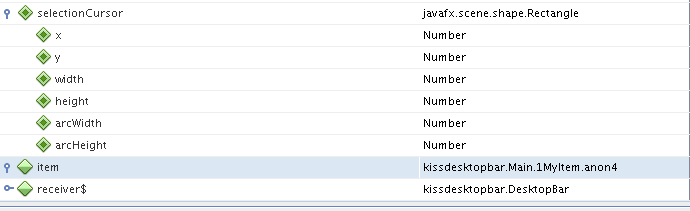
    First of all the most pain is the debugger. I know how well this works for Java, but I only needed the content of my variable at a specific moment, but NetBeans wasn’t able to show this, although it shows the content of ‘native’ objects like Rectangle:

    So I needed to use println(“{item}”)
  • Unit tests should be as easy as for normal Java projects
  • Other anoying bugs occured: if you format e.g. the sourcecode of AppItem where some brackets (of a function) will move one column to the right on each format call. The same appears for e.g. ‘public-read var width;’ where the semicolon moves to the right, too. Problems while operating within strings and variables in the string. The code completion is case insensitive :-/ The “if else” construct is not that nicely formated if you don’t specifythe brackets. There was no javadocs for ‘native’ javaclasses. There are no boolean operations for sequence like ‘and’, ‘or’, …. which would be nice to have.

So that’s a too lengthy list, but to be honest: while working with JavaFX I had fun! Try it out!

Resources

Clone the latest and greatest status of the project here:

hg clone http://timefinder.hg.sourceforge.net:8000/hgroot/timefinder/desktopbar/

(source code is under public domain but the pics shouldn’t be reused)

or try it out now

Re: Firefox add-ons you should consider

This is a short blog post triggered by this post from Jonathan Giles. It is more a list of plugins I consider than what others should consider. But hopefully at least one plugin of interests is in the list. Feel free to comment, add your own favplug.

  • With All-in-One Sidebar you will have fast access to plugins and browser history etc … to get opera feeling on firefox
  • Add to search bar makes it easy to add any search (e.g. wolfram, topsy.com, …) with on click to your quick search box
  • ScrapBook can take lots of notes and bookmarks (again like opera)
  • Firebug is the well known army knife for web developers
  • Mouse Gestures (again like opera)
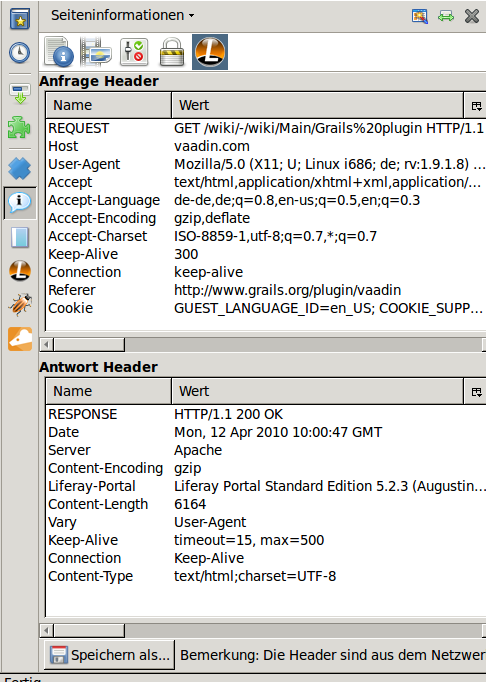
  • Live HTTP headers interesting for developers
  • FoxyProxy could be interesting for your home office work or sth else

Constant Complexity For Reversing of a List

I am reading this question on stack overflow and it was irritating for me that the most people say: reversing a linked list is possible only in O(n). Okay, this is true for a single linked lists, but not for double linked lists like I will show you with my quick and dirty CarouselList:

The key point is the incrementer/decrementer:

static class Incrementer<T> {

 Node<T> getNext(Node<T> node) {
   return node.next;
 }

 Node<T> getStart(Node<T> head) {
   return head;
 }
}

static class Decrementer<T> extends Incrementer<T> {

 @Override
 Node<T> getNext(Node<T> node) {
   return node.previous;
 }

 @Override
 Node<T> getStart(Node<T> head) {
   return head.next;
 }
}

This way the ‘iteration order’ can be easily switched in O(1). Of course this comes to the cost of a bit more expensive iteration but this is another issue …

If the implementation could use an ArrayList (not a linked list) it would be more simple: return different iterators based on a ‘reverse’ attribute. Then either return an iterator with counter++ or return one with counter– if reverse == true

Fast O(n) Integer Sorting Algorithm!

Update: This post was reposted @ dzone with lots of upvotes – Thanks!

Yesterday I learned that there is an O(n) integer sort algorithm (I should have read this before in a basic algorithm book :-/).

Now I wondered: is this necessary in real applications? E.g. somewhere in Java? Today I have taken the counting sort and I can argue: yes, you should use integer sort especially for large arrays!

And when in detail should you apply the fast integer sort? Apply it if

  • you have positive integer values to sort. The requirement ‘positive’ and ‘integer’ is necessary for the listed O(n) algorithm, but not if you implement your own possible better solution.
  • you have a limited interval for the integer values (preferable min and max=M should be known before you sort)
    E.g. if you know the maximum integer number in your array will be M=10^7 then you should use the integer sort if the array length n is roughly greater than M/2500 = 40000. This linear equation should hold true (for some values ;-)), because quick sort is nearly independent of M and the time-offset for integer sort increases nearly linear with M as you can see in the graph

Now take a look at the graph where y=time in seconds for 10 runs and x=array length:

Conclusion

I would apply this sorting algorithm only for n>10^7 where the difference between quicksort and integer sort could lay in the range of seconds. The memory consumption was not measured but should be ~twice times higher for the fast integer sort.

Java Sourcecode

//class LinearSort
public static void main(String[] args) {

 // init jvm
 new LinearSort().start(1000, 10000, 10000);
 new LinearSort().start(1000, 10000, 10000);

 // run performance comparison
 for (int maxInteger = 1000; maxInteger < 100000000; maxInteger *= 3) {
  for (int arrLength = 1000; arrLength < 100000000; arrLength *= 3) {
   System.gc();
   new LinearSort().start(arrLength, maxInteger, 10);
  }
 }
}

 private Random rand = new Random();

 // stop watch for integer sort with *unknown* range. marked as Lin in the plot
 private SimpleTimer linearStopWatch = new SimpleTimer();</pre>

 // stop watch for integer sort with known range. marked as Lin' in the plot
 private SimpleTimer linearKnownStopWatch = new SimpleTimer();

 private SimpleTimer qSortStopWatch = new SimpleTimer();

 private void start(int arrLength, int maxInteger, int times) {
 for (int count = 0; count < times; count++) {
   int[] list1 = new int[arrLength];
   for (int i = 0; i < arrLength; i++) {
     // do only allow positive integers until the specified 'max'-value
     list1[i] = Math.abs(rand.nextInt(maxInteger));
   }
   linearStopWatch.start();
   LinearSort.sort(list1);
   linearStopWatch.pause();

   int[] list2 = Arrays.copyOf(list1, arrLength);
   qSortStopWatch.start();
   Arrays.sort(list2);
   qSortStopWatch.pause();

   list2 = Arrays.copyOf(list1, arrLength);
   linearKnownStopWatch.start();
   LinearSort.sort(list2, 0, maxInteger);
   linearKnownStopWatch.pause();
 }

 System.out.println(maxInteger + ";" + arrLength + ";" + linearStopWatch
 + ";" + linearKnownStopWatch
 + ";" + qSortStopWatch); // + ";" + qSortListStopWatch);
}

 static int[] sort(int[] array, int min, int max) {
   //the range is useful to minmize the memory usage
   //countIntegers holds the number of each integer
   int[] countIntegers = new int[max - min + 1];

   for (int i = 0; i < array.length; i++) {
     countIntegers[array[i] - min]++;
   }

   int insertPosition = 0;
   //fill array in sorted order
   for (int i = min; i <= max; i++) {
     for (int j = 0; j < countIntegers[i - min]; j++) {
       array[insertPosition++] = i;
     }
   }
   return array;
 }

 static int[] sort(int[] array) {
   int min, max = min = array[0];
   //determine the max and min in the array
   for (int i = 1; i < array.length; i++) {
     if (array[i] < min)
       min = array[i];

     if (array[i] > max)
       max = array[i];
   }
   return sort(array, min, max);
 }

 //class SimpleTimer

 private long lastStart = -1;
 private long time;

 public void start() {
   if (lastStart != -1)
     throw new IllegalStateException("Call stop before!");

   lastStart = System.currentTimeMillis();
 }

 public void pause() {
   if (lastStart < 0)
     throw new IllegalStateException("Call start before!");

   time = time + (System.currentTimeMillis() - lastStart);
   lastStart = -1;
 }

 public String toString() {
   return time / 1000f + "";
 }

Weird Rails Gem

After updating rails I got an error ala `require_frameworks’:RuntimeError: RubyGem version error: rack(1.0.0 not ~> 1.0.1)

The solution is simple:

$ sudo gem install rack –version 1.0.1

2. problem: libxml2 is missing.  try ‘port install libxml2’ or ‘yum install libxml2-devel’

Solution

$ sudo apt-get install libxml2-dev

I also needed libxslt-dev to install the ruhl gem after that nokogiri-1.4.1 and ruhl-1.3.4 were successfully installed.

The only problem is now that ruhl woudn’t work with jruby 😦 …

Internetmusic with Java

A small group on twitter started a funny (or stupid?) mem #internetmusiker (which is internet-musician in English). The initial idea came from FR31H31T. The task was to slightly change a name of a musician, band or song and get a phrase which sounds like an internet- or computer-technical phrase. The results were sometimes very funny and my favourite examples are:

Nine inch Mails, Modem Talking, Deftunes, Wii valdi oder iValdi and Sudo Lindenberg

Look here for the full list!

Now I wanted to know which phrases were the most retweeted once and I wrote a small Java application which uses the twitter4j API to do this task.


Twitter twitter = new Twitter(login, pw);
for (int page = 1; page < 1500; page++) {
 Query query = new Query("internetmusiker");
 query.setPage(page);
 query.setRpp(50);

 try {
   QueryResult res = twitter.search(query);
   if (res.getTweets().size() == 0) {
     log("No more tweets found");
     break;
   }
   log("page:" + page + " found " + res.getTweets().size() + " tweets");
   for (Tweet twe : res.getTweets()) {
      allTweets.add(twe);
   }
 } catch (TwitterException ex) {
   log("End of search reached", ex);
   break;
 }
}

To avoid a full search for the next time I saved the results via my small helper object StoreableTweet to a text file and used ‘query.setSinceId(maxId);’ while querying.

To calculate the retweets there is no API provided (or am I wrong?) so I needed to parse for a ‘RT @name text’ and look up the text within all the tweets. For that I created a hash map with the text content as keys.


 Map<String, StorableTweet> mappedTweets = new HashMap();

 for (StorableTweet stw : allTweets) {
   String key = stw.getTextToRetweet();
   if (mappedTweets.containsKey(key))
     log("Mapped tweets collection already contains tweet:"
         + stw.toPersistentString());

   mappedTweets.put(key, stw);
 }

 for (StorableTweet stw : allTweets) {
   if (stw.getOrigRetweetedText().length() > 0) {
     StorableTweet retweet = mappedTweets.get(
       stw.getOrigRetweetedText());
     if (retweet == null)
       log("Skip retweet: cannot find retweet "
          + stw.toPersistentString());
     else
       retweet.addRetweet(stw);
   }
 }

Again you can look here for the resulting html file. So start your own with #internetmusiker oder even #internetmusician?

Css Design Contest

On the wicket mailing list they annouced a design contest. Read the email for more details:

Hi

Someone mentioned that we could have a better look & feel for wicket, since there are no designers in the core team. I proposed a contest, to make the coolest slickest css for wicket. So please feel free to apply.

Requirements:

your css should be compatible with the basic browsers, Firefox , IE , Safari etc. And retain heavy use of embedded js. And it should be a drop on, using existing id’s & hierachy for design.

Practical info:

The contest ends in 2 months April 2nd.

Get the wicket examples here:
http://svn.apache.org/repos/asf/wicket/trunk/wicket-examples/

If you need it you can put your css in svn at wicketstuff, write to this
list for details on howto get commit rights, you should add your css to
sandbox and sf user name (https://wicket-stuff.svn.sourceforge.net/svnroot/wicket-stuff/sandbox/ ).

Yes as with all contest there is a prize, you can win the wicket t-shirt along with the honor if your css are the winner. This
http://www.cafepress.com/apachewicket.317298148
or this
http://www.cafepress.com/apachewicket.317298083 depending on your age 🙂

Just reply to this thread to enter the contest.

Regards Nino on behalf of the Wicket People

To join the thread in the mailing list send a mail to

users-subscribe@wicket.apache.org