Very Small Hints for ActionMailer

Hi, I lost some hours to figure out, what the problems were to make sending via smtp working.

Here is a list you should check if something does not work:

  1. To enable raising exceptions during email sending make sure you add the following line into environment.rb:
    config.action_mailer.raise_delivery_errors = true
    Or put it into the test.rb or development.rb which will overwrite the settings specified in environment.rb
  2. Enable real email sending in test environment is possible in test.rb via
    config.action_mailer.delivery_method = :smtp
    instead of
    config.action_mailer.delivery_method = :test
    or directly use the following line in the test code
    ActionMailer::Base.delivery_method = :smtp
  3. if you get for your yahoo accout sth. like: EOFError: end of file reached.
    Or for your gmx account:
    Net::SMTPFatalError: 550 5.1.7 This server does not accept an empty envelope from ( http://portal.gmx.net/serverrules ) {mp038}
    You should check that the ‘from’ property is really only the email not anything else! (See the next point)
  4. If you use the restful_authentication plugin you can use the following code in user_mailer.rb:

    def setup_email(user,subj=nil)
    recipients  “#{user.email}”
    from        “#{FROM_EMAIL}”
    subject     “[#{SITE}] #{subj}”
    sent_on     Time.now
    body        :user => user
    end

    In environment.rb directly after the rails gem version constant add:

    SITE = ‘http://domain-you-like.de’
    FROM_EMAIL = ‘fromemail@gmx.de’

    And in the ‘Rails::Initializer.run do |config|’ block do:

    config.action_mailer.default_charset = “utf-8”
    config.action_mailer.delivery_method = :smtp
    config.action_mailer.smtp_settings = {
    :address => “mail.gmx.net” ,
    :port => 25,
    :domain => “localhost” ,
    :authentication => :login,
    :user_name => FROM_EMAIL ,
    :password => “donotshare”
    }

My stony way to find a ruby on the rails

Ruby is a great language. All can be expressed so short and readable. That’s one side.

The other side is: you have to learn a lot of exceptions to common stuff that you already learned in another languages (In my case Java).

So today I will explain things where it took me a lot of time to understand how to do this and what ruby (and rails) does. Let us start with the very basics: installation and then the pure ruby language.

Setup MySql

If you use debian as OS it is quite simple to install mysql:

sudo apt-get install mysql-server

Then create a database with the following lines

mysql -u root -p
type the following in the mysql shell:

CREATE DATABASE mydb;
GRANT ALL PRIVILEGES ON mydb.* TO 'admin'@'localhost' IDENTIFIED BY 'admin' WITH GRANT OPTION;
FLUSH PRIVILEGES;
quit;

Later on you can log into the mysql database via
mysql -u admin -p
[now type the password ‘admin’]

SHOW TABLES FROM mydb;

I suggest you to use http://www.squirrelsql.org/ to view and even manipulate the database. The nice thing about this java program is: you can simply install the jdbc drivers for your database (e.g sqlite or mysql) and after configuring them you can browse the databases in a nice way!

Install Ruby and Rails

To be independend from Java or if you don’t want to use JRuby you have to install ruby on your machine:

sudo apt-get install ruby libzlib-ruby rdoc irb

Now install gems …

sudo apt-get install rubygems
sudo gem install mysql

… and rails

sudo apt-get install rails

Create a Skeleton Application

Optionally install NetBeans 6.1 (and Java >1.5 before) to get some handy functionality.

Be sure that you choose a package with rails or install the rails plugins via: Tools->Plugins.

Now you should able to create a rails application: New Project->Ruby On Rails Application. Click Next and choose your ruby system. (Or do ‘rails testapp’ on the command line).

You will get a list of created files. To quickly navigate to a file in NetBeans press ALT+SHIFT+O (Oh not zero) and type in the name. Now I will go through some of the generated files:

app/controllers/application.rb

This is the base class for all of our controllers. To study the Model-View-Controller pattern visit wikipedia. In our controllers we put in all of our application logic. For example the password encryption when one of our user logs in.

app/helpers/application_helper.rb

In this helper modul we define some convinient methods for our view

test/test_helper.rb

With this class it is easy to test the implemented (helper) methods. Read “Agile Web Development with Rails” to be surprised that unit and even integration tests are very easy (and fast) to write.
config/database.yml
The generated content looks like:
development:
# your database server:
adapter: mysql
encoding: utf8
database: mydb
username: admin
password: admin
timeout: 5000
# necessary if you are on debian:
socket: /var/run/mysqld/mysqld.sock

config/routes.rb
Here you will define later more fine grained navigation rules for the pages of your web application.

In NetBeans (with rails of course) database-migrating is very easy: right click the project->Migrate Database->To [misc] Version or Clear…

Start the web server with F6 in NetBeans or type

ruby script\server

Then go to http://localhost:3000/ with your browser and you should see ruby’s welcome page.

Now we want to replace the index.html with an erb (like jsp) file. To do this we will remove the public/index.html file and do

script/generate controller home index

add the following to the routes.rb

map.home '', :controller => 'home', :action => 'index'

To add some more functionality to our rails application there are a lot of plugins available. One of them is the restful_authentication, where a tutorial plugin (or here) exists which itself references to a bunch of other useful plugins. Check them out!.

Now some comments on setting up the restful_authentication plugin: Add the following resource to your repositories if you need this plugin (and others from the author):

script/plugin source http://svn.techno-weenie.net/projects/plugins/script/plugin install restful_authentication

or simply do

script/plugin install http://svn.techno-weenie.net/projects/plugins/restful_authentication/

On my machine it took a lot of time and finished with an timeout error so I did:

sudo apt-get install git-corecd vendor/plugin && git clone git://github.com/activefx/restful_authentication.gitmv restful-authentication/ restful_authentication/ && cd ../..

Now generate the necessary classes:

script/generate authenticated user sessions --include-activation --stateful

My (unsorted) Comments

Try getting started with rails and come back here to read the following comments (or post your own!) if you figured out sth. worth enough to be said for beginners.

  1. For restful_authentication:
    Be sure that you ignore the config/initializers/site_keys.rb in your subversion!! But save it, because you will need it for your application!
  2. If need a login snippet like the one from the authentication tutorial:
    app/views/users/_user_bar.html.erb in your start up weü page app/views/home/index.html.erb
    Use the following line:
    <%= render(:partial => “users/user_bar”) %>
  3. If you need ssh2 try:
    # require ‘digest/sha1’
    require ‘digest/sha2’
    def User.mydigest(str)
    Digest::SHA256.digest(str)
    #Digest::SHA1.hexdigest(str)
    end
  4. What the hell is this string with a colon? I mean the ‘:password’ here:
    update_attributes :password => ‘secure’
    It is called symbol and is the name of a variable e.g. of a class. Where ‘secure’ is the value of the variable password. So with this method call e.g. within the User class you do password = ‘secure’.
    Example:
    var = { ‘a’ => ‘b’, 1 => ‘c’}
    assert_equals(‘b’, var[‘a’])
  5. And what is the :password => ‘secure’ statement?
    This is a key => value expression without the {} braces of the hash (Map in Java) , which are optional if the hash is the last parameter. This is very handy if you have several properties to set.
  6. What is ‘self’? It depends! Read more about self here!
    • global variables begins with @@
    • object variables begins with an @ (All the instance methods of a class can access this variable. So every object has its own set of object variables.)
    • local variable begins with a lower case character (except ‘self’)
    • constant variables begins with an upper case character (except ‘:symbol’)

    Warning: if you don’t add self in front of you object variables, ruby assumes that they are local!?

  7. What is attr_accessor :name? This will create a getter and a setter for the variable ‘name’.
    Or define a setter manually (via operator overloading)
    def volume=(vol)
    leftChannel = self.rightChannel = vol
    end
  8. Where is the constructor of User? Do
    user = User.new
  9. escape html in the view via h(user_input).
    For more security related stuff look here, here and here.
  10. The following line is not always secure (‘mass assignment’)
    User.new(params[:user])
    To make it secure do:
    attr_accessible :name
    Now only the variable name can be change via url parameters.
  11. The following statement is unsecure
    User.find(:all, :conditions => [“name like ‘%#{params[:query]}%'”])
    Use
    :conditions => “name like ?”, ‘%’ + params[:query] + ‘%’
  12. add filter_parameter_logging :password to application.rb
    => all fields with names like “password” will get [FILTERED] in the logs
  13. Rails add a very handy method to objects:
    o.blank?
    An object is blank if it‘s false, empty, or a whitespace string. For example, “”, ” “, nil, [], and {} are blank. Taken from here.
  14. There is no counter++
    Use counter += 1
  15. Swapping variables:
    a, b = b, a
    This work in methods too! E.g. return a pair of variables via
    def meth
    return a, b
    end
    Now call the method
    b, a = meth
  16. if sugar – ‘the other wayround’
    puts ‘hello world’ if str == ‘name’
  17. defined? var
    will return true if there is a field named var
  18. You can use ‘hello’ or “hello”
    The only difference for those strings is the expression evaluation like “#{var}”
    This will work only in “”
  19. comments are like in bash: #
    Or use this to comment several lines:
    =begin
    here is comment
    here too. WARING: =begin and =end has to be the first characters on the lines!
    =end
  20. Default values for method parameters via
    def meth(param=’test’)
    end
  21. def see_how_to_throw
    begin
    # Do something nifty
    raise SomeError, “This is the error message!”
    rescue SomeError
    # This is executed when a SomeError exception is raised
    # to rethrow do
    # raise $!
    rescue AnotherError => error
    # Here, the exception object is referenced from the
    # `error’ variable
    else
    # This is executed only if no exceptions were raised
    ensure
    # This is always executed, exception or not
    end
    end
  22. A very useful tool for testing is autotest:
    gem install ZenTest
  23. It is eays to test with rails! Very easy to write unit and functional testing of your controllers and the pages.
    In NetBeans press ALT+F6 to start them.
  24. use %{ } for xml strings directly unescaped in the code! Very handy.
  25. Time sugar:
    3.minutes + 3.hours
    returns the result in seconds! Much more …
  26. counter ||= 0
    This statement will only be executed if counter is nil. Useful for singletons you think? Use self for this!
  27. Unicode support is not that good. Use Chars instead of the built in String class. Or convert to Chars before working with strings.
  28. Why are there named routes in routes.rb?
    These routes are accessible from the view. E.g. the following line is a named route (map.hello instead of map.resource)
    map.hello ‘/fhello’, :controller => ‘users’, :action => ‘hello’
    So the method hello will be invoke if the user click the link in the view which is generated via <%=hello_url%>
    One special name ‘map.resources’ indicates that rails should create 7 standard routes (4 of them are the CRUD methods). For example map.resources :articles will create the following routes:
    /articles (GET=>shows all, POST=>create a new)
    /articles/new (shows html for new article)
    /articles/1 (GET=>shows the first article, PUT=>update, DELETE=>deletes the article)
    /articles/1;edit
  29. parsing invalid xml with require ‘rubygems’ and require ‘rubyful_soup’. Then do:
    xml_data = Net::HTTP.get_response(URI.parse(url)).body
    doc = BeautifulSoup.new(xml_data)

Testable HibernateUtil

I have seen many projects using the HibernateUtil which was proposed in the docs.

This class is not really testable because for example you cannot configure that it should use the test database. Normally I would suggest you using Spring and avoiding the singleton pattern, but there is a also a simple work around: introduce a setConfiguration and you will have a better HibernateUtil class:

public final class HibernateUtil {
    private static final Class<?> mappedClasses[] = new Class<?>[] { Bla1.class, Bla2.class };
    private static Configuration cfg;
    private static SessionFactory sessionFactory;
    private static final Logger log = Logger.getLogger(HibernateUtil.class);

    /** Returns the configuration object. configure() was already called.  */
    public static synchronized Configuration getConfiguration() {
        if (cfg == null) {
            log.debug("Configuring from annotations");
            AnnotationConfiguration annoCfg = new AnnotationConfiguration();
            for (Class<?> c : mappedClasses) {
                annoCfg = annoCfg.addAnnotatedClass(c);
            }
            cfg = annoCfg.configure();
        }
        return cfg;
    }

    public static void setConfiguration(Configuration config) {
        cfg = config;
    }

    /** Drop and recreate the schema */
    public static void recreateSchema() {
        SchemaExport schemaTool = new SchemaExport(getConfiguration());
        schemaTool.drop(true, true);
        schemaTool.create(true, true);
    }

    /** This method returns a session-factory. */
    public static synchronized SessionFactory getSessionFactory() {
        if (sessionFactory == null) {
            sessionFactory = getConfiguration().buildSessionFactory();
        }
        return sessionFactory;
    }
}

Now you can use the following junit (v4) test as a base class for all test classes that will use HibernateUtil:

public class HibernateTestCase {
 protected Logger log = Logger.getLogger(HibernateTestCase.class);
 private Session session;
 private static SessionFactory sessionFactory;

 static {
    // H2 database works only if Bla.id has one of the following annotations:
    // @GeneratedValue(strategy = GenerationType.SEQUENCE) or GenerationType.TABLE
    HibernateUtil.setConfiguration(HibernateUtil.getConfiguration()
     .setProperty("hibernate.connection.driver_class", "org.h2.Driver")
     .setProperty("hibernate.connection.url", "jdbc:h2:mem:bla-test-db2")
     .setProperty("hibernate.connection.driver_class", "org.h2.Driver")
     .setProperty("hibernate.connection.username", "sa")
     .setProperty("hibernate.connection.password", "")
     .setProperty("hibernate.default_schema", "MY_SCHEMA")
     .setProperty("hibernate.dialect", "org.hibernate.dialect.H2Dialect")
     .setProperty("current_session_context_class", "thread")
     .setProperty("hibernate.cache.provider_class", "org.hibernate.cache.NoCacheProvider")
     .setProperty("hibernate.show_sql", "true"));

  sessionFactory = HibernateUtil.getSessionFactory();
  Session session = sessionFactory.getCurrentSession();

  assertFalse(HibernateUtil.getConfiguration().getProperty("hibernate.connection.driver_class").equals(
				"specify here you driver used in production"));
  // We only need to create the schema for in-memory databases and for newly created databases!
  boolean freshDatabase = true;
  if(freshDatabase) {
  	session.beginTransaction();
  	String CREATE_SCHEMA = "create schema MY_SCHEMA";
  	session.createSQLQuery(CREATE_SCHEMA).executeUpdate();
  	session.getTransaction().commit();
  	session = sessionFactory.getCurrentSession();
  }

  session.beginTransaction();
  HibernateUtil.recreateSchema();

  if (session.isOpen()) {
  	session.close();
  }
 }

 @Before
 public void setUp() throws Exception {
  session = sessionFactory.getCurrentSession();
  session.beginTransaction();
 }

 @After
 public void tearDown() throws Exception {
  session.getTransaction().rollback();
  if (session.isOpen()) {
  	session.close();
  }
 }

 public Session getSession() {
  return session;
 }

 public void commitAndCreateNewSession() {
  session.getTransaction().commit();
  session = sessionFactory.getCurrentSession();
  session.beginTransaction();
 }
}

Security in Java Enterprise

This week I attended the conference “herbstcampus” in Nürnberg (Germany). There were several great sessions and workshops about Java and the like.

One great session was from Arne Limburg from OpenKnowledge about security access controlling and management in Java. In this very clear and unbiased comparison he lists solutions for

  1. user based access control (JAAS)
  2. role based access control (EJB and Spring Security)
  3. access control lists (Spring Security)

They have different advantages and problems. Now the point of this post is that he develops the JPASecurity (Apache 2 license), which solves the problem that you sometimes need to restrict the access on objects (not only on classes).

One example why I think this is a great tool:

With JPASecurity it is possible to receive only those objects from the database (via JPA) which are allowed for the current user. That means it does not load all objects into memory and filters the unallowed. It simply queries only the necessary objects! Get started with his tutorial.

Timetabling Software List for Universities, Schools, …

Do you want to know which timetabling software is on the market?

Then you can visit my page to find open source, freeware and commercial solutions for the timetabling problem. Keep in mind that I am the author of the Open Source (free) timetabling software TimeFinder.

This list contains at the moment only software with automatical optimization algorithms:
5 open source, 4 freeware and 20 commercial tools for timetabling.

Do not hesitate to contact me or post a comment here for any new suggestions etc.

One Interface. Several Implementations. And only one Test? Yes!

Maybe others already use this testing-technique or pattern (Hey, we could call it OISI-test pattern ;-)). But I would like to share this information with you.

It is again my timefinder project where I had this kind of problem. I developed different implementations of the assignment algorithm for my heuristic ‘NoCollisionPrinciple’ which optimizes a timetable for universities. See track2 of the international timetabling competition for more information on that subject.

I created these implementations to compare the quality and performance of the heuristic which uses only the AssignmentAlgorithm interface.

While developing a new implementation the main question for me was:

Should I really write all the test code again?

The answer is simple: Nope!

I put all the test code in one abstract test class called AbstractAssignmentAlgorithmTester which uses only the interface in the normal testing methods (see the additional comments). Later I added the following method:

protected abstract AssignmentAlgorithm createAlgorithm();

Then I created an almost empty subclass which extends AbstractAssignmentAlgorithmTester for every new implementation. For example this one:

public class KuhnMunkresAlgorithmTest extends AbstractAssignmentAlgorithmTester {
    @Override
    protected AssignmentAlgorithm createAlgorithm() {
        return new KuhnMunkresAlgorithm();
    }
}

Now you can run every single test class which extends the abstract class. In NetBeans you can do this by going to the class and pressing SHIFT+F6. Or simply press ALT+F6 to run all tests.

Another problem I had to solve was the case of a faster approximation algorithm. The quality of the results were not always optimal and so certain tests will fail, even if the algorithm was correctly implemented. The solution is simple: overwrite these failing methods with stub methods to exclude them from the run. For example add the following method to TooSimpleApproxTest:

@Override
public void testCalculate() { /* we will get 6.0 instead of the best minimal total sum = 1.0 */ }
Additional comments:
  • The reason for the ‘strange’ name (…Tester) of the abstract class is that junit shouldn’t execute the abstract class (which would result in an error if we name it …Test). The testing tools testng and junit will hopefully make it easier in the future to test against interfaces and not only implementations. They could support testing abstract classes by looking for sub-test-classes and running all of them instead of the abstract class (and printing an error).
  • You can grab the source (Apache2 licensed) via:
    svn checkout https://timefinder.svn.sourceforge.net/svnroot/timefinder/trunk timefinder
    Look in the package timefinder-core/src/main/java/de/timefinder/core/algo/assignment

    To build it you have to use maven.
    And at the moment it is necessary to check out the latest revision of mydoggy (hopefully 1.5.0 will be released soon).

  • One example for a method in the abstract test class is the following:
    @Test
    public void testAssignmentCalculation() {
     // look in the following matrix for that specific assignment
     // which has the minimal sum. which should be 15.
     float matrix[][] = new float[][]{
       {4, 6, 1, 2},
       {5, 6, 7, 6},
       {7, 4, 5, 8},
       {4, 4, 6, 8}
     };
     // One of the best results is the following assignment:
     // Use the '4' in row_3 (room) and colum_0 (event)
     // Use the '4' in row_2 and colum_1
     // Use the '1' in row_0 and colum_2
     // Use the '6' in row_1 and colum_3
     // Do you find a better one ;-)
     int expResult[][] = new int[][]{{3, 0}, {2, 1}, {0, 2}, {1, 3}};
     int result[][] = algorithm.computeAssignments(matrix);
    
     // resSum should be 15. this is the sum over the assignment entries
     float resSum = AssignmentHelper.calculateSum(matrix, result);
    
     // resSum should be the same as the expected sum:
     float expSum = AssignmentHelper.calculateSum(matrix, expResult);
    
     assertEquals(expSum, resSum);
    }

Mavenized projects in NetBeans 6.1

Some weeks ago I mavenized timefinder to allow developers coding in other IDEs than NetBeans. I am new to all the maven stuff, but NetBeans 6.1 support is good (I have not compared it e.g. to eclipse :-/)

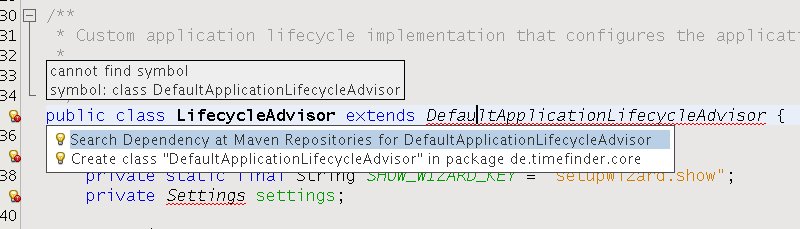
Now I explored a really great feature within NetBeans: you can resolve dependencies very easy: hit ALT+Enter. For example:


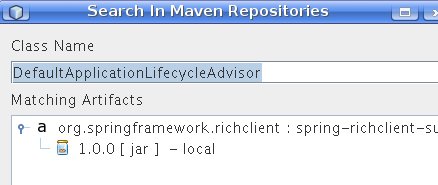
and hit "Search Dependency at Maven Repository".

Then choose a repository and hit add. After installing the jar in your local maven repository you will be able to resolve this particular dependency via CTRL+SHIFT+I. That’s it!

One big problems remains: you cannot profile maven projects. So, I thought it would be good to create a separate ‘pure’ NetBeans-Project where I link the source which are already used from the mavenized project. But this isn’t allowed! I don’t know why. So I hacked it under linux. This is straightforward:

create symbolic links from the pure-netbeans project to the mavenized one!

go into the ‘pure’ NetBeans-Project ‘mkdir source && cd source’  then type:

ln -s ../../../timefinder-core/src/main/resources/ core-res
ln -s ../../../timefinder-core/src/main/java/ core-src
ln -s ../../../timefinder-core/src/test/resources/ core-test-res
ln -s ../../../timefinder-core/src/test/java/ core-test-src

After this step right click the pure-project and add the source and test folders to the project


One more reason to do this is that compilation (clean & build; without tests) and
starting (until the first log statement) are slower with mavenized projects.
In my simple project with approx. 100 files you get with jdk 1.6:
     pure project compilation: max. 3 sec
mavenized project compilation: > 15 sec
             pure project run: max. 1 sec
        mavenized project run: > 4 sec

That's why I like the eclipse approach of mvn eclipse:eclipse 😉 but this has other disadvantages ...

Encoding issues. Solutions for linux and within Java apps.

Puh, encoding! Did you ever have trouble with it? No? You must be a lucky guy!

Even none-developers should have problems with it e.g. if they use different operating systems.

What is encoding? And what’s so difficult with the encoding?

First encoding (better: character encoding) defines how characters have to be saved to be displayed correctly in your editor or look at the wikipedia definition to be correct. Update: here is a nice introduction.

For example if your editor only reads ASCII files all is very simple: it will use every 8 bits of the bitstream to get a number. Then it will interpret this number according to the ASCII-table. So, if it finds a 97 (this is 0x61 in hexadecimal) it prints ‘a’.

(BTW: look at this nice ASCII-art.)

But what if the encoding is another one? Or if even the bitstream should be splitted into 16-bits-packages instead of 8-bits-packages?

Then the user won’t see the correct information!

Second: On linux everything is in UTF-8. Windows uses CP 1252. and so on. Not good!

(With everything I means: clipboard, default file encoding, …)

How can you (as an end user) handle this under linux?

There are at least 4 programs that helps you with encoding issues under linux:

  • There are command line utilities in linux where you can determine automatically the encoding of a file: enconv and enca or open the file in firefox and go to View -> Encoding and view the detected encoding!
  • To change the encoding of file-content the editor kate is really great:
    Go to extras -> encoding and try it out.
  • Change the encoding of the content of several files which come from windows and you want to have them in linux then use recode:
    recode CP1252..UTF-8 *
    recode ISO-8859-1..UTF-8 *

    do the following to backup the original files:

    mkdir test && cp * test/ && cd test
  • Another command line utility is iconv (or here)
  • Change the encoding of the filenames with convmv (files e.g. from windows).
    To preview the change do:

    convmv -f cp1252 -t utf8 *

    To do the change:

    convmv --notest -f cp1252 -t utf8 *

How does Java handle encoding?

Java is platform independent one should think, but it isn’t regarding to the encoding.

For example: if you read a file correctly under linux, this could fail if you don’t specify the encoding explicitly, because it assumes it is utf8 and under windows it will use another default!

To override the default use: ‘java -Dfile,encoding=UTF-8’ or be explicit with the encoding! E.g read characters from a stream with the following lines:

BufferedInputStream iStream = new BufferedInputStream(urlConn.getInputStream());
InputStreamReader reader = new InputStreamReader(iStream, "UTF-8");

Another issue could be Java source files. They can have different encoding. You should use UTF8, because this is the encoding Java uses for its Strings.

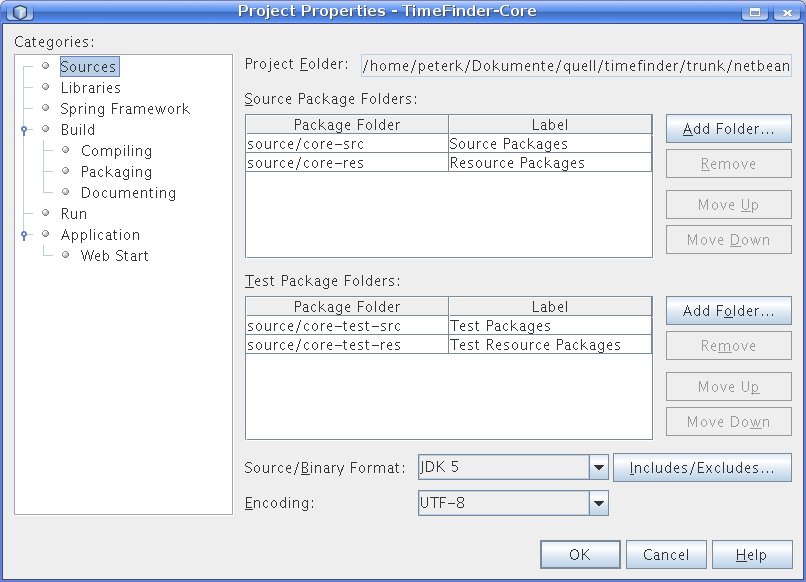
In NetBeans 6.1 change it in the project properties (right-click on the project->properties)->Source->Encoding

In Eclipse 3.4 go to the preferences (menu Window) -> General ->Workspace->text file encoding

But this is only useful for desktop applications like my open source timetabler. But what if you do web development? All fine there? No not really. Then you might get additional problems with url encoding or xml parsing. For the latter one the fix is simple:

  • XML: <?xml version=”1.0″ encoding=”UTF-8″?>

But for url encoding the following does not really work:

  • JSP: <%@page contentType=”text/html; charset=UTF-8″ language=”java”%>

Apropos JSP – I had an encoding issue with the request. Try the following:

<% out.print(“RESPONSE character encoding=” + response.getCharacterEncoding() + ” “);
out.print(“REQUEST character encoding=” + request.getCharacterEncoding() + ” “);
out.print(“JVM encoding ” + System.getProperty(“file.encoding”) + ” “);

//EVEN here we get request parameter in wrong encoding
bean.setRequest(request);
%>

You will see that the request is null if I am not wrong. And then Java will use utf8? NO!

It will use ISO-8859-1! Why? It is written in the standard!

A simple request.setCharacterEncoding(“UTF-8”); would help if all browsers would send its request according to the header of the jsp. But this isn’t actually working for my use case. So I grabbed the strings from the request via this helper method:

private String toUTF8(String str) {
        try {
            return new String(str.getBytes("8859_1"), "UTF8");
        } catch (UnsupportedEncodingException ex) {
            return str;
        }
}

Update 1: Read this or this to get a better workaround with a javax.servlet.Filter, webserver parameters and jsp configs.

Update 2: The following snippets could be useful if you are using maven and want to make the application UTF-8 aware:

<plugin>
<artifactId>maven-compiler-plugin</artifactId>
<configuration>
<source>1.6</source>
<target>1.6</target>
<encoding>UTF-8</encoding>
</configuration>
</plugin>

<plugin>
<groupId>org.apache.maven.plugins</groupId>
<artifactId>maven-resources-plugin</artifactId>
<configuration>
<encoding>UTF-8</encoding>
</configuration>
</plugin>

Update 3:

A good side with a lookup table for Unicode characters

http://unicode.coeurlumiere.com/

Summary

I invite you to post all your experiences with encoding problems in java.
E.g. how to force jboss or jetty to use utf8?
Canon ip 4200 under linux

My experiences under linux with the canon printer are great. Installation works like it is described in the manual for Suse 10.0 (I tried it only for 10.1).

One strange thing you have to know under linux, if you refilled the printer. The printer will stop printing if it was refilled. One button of the printer will blink, which normally indicates missing paper, so I was confused that pressing on the button does not help. So, what was wrong?

You have to press the button a long time (5 seconds or so). This way Canon makes sure you read the message (which will pop up under windows only) and you confirm that you will lost the warranty with that action.

Nice, isn’t it? Hmmh …

The installation of your canon ip4200 printer under kubuntu 8.04.1

looks like described here.

I will try to translate it into English now:

  • Download the tar file (with rpms) from this site.
  • sudo alien -c cnijfilter-common-2.60-1.i386.rpm cnijfilter-ip4200-2.60-1.i386.rpm
    You should get the following info:
    “cnijfilter-common_2.60-2_i386.deb generated
    cnijfilter-ip4200_2.60-2_i386.deb generated”
  • Now install the transformed packages:
    sudo dpkg -i cnijfilter-common_2.60-2_i386.deb
    sudo dpkg -i cnijfilter-ip4200_2.60-2_i386.deb
  • Restarting cups should give you an okay:
    sudo /etc/init.d/cupsys restart
  • The driver file is located at: /usr/share/cups/model/canonip4200.ppd
    Specify this while configuring your printer in KMenu->Systemeinstellungen (Systemproperties?)->Printer
    Define it as standard printer
  • Now you can install an additional program to see more details of your printer:
    sudo apt-get install escputil

The clue about this installation is that you have more options in resolution and color models than in Suse 10.1