Metaframeworks to create UI from model easily or automatically

For my project at the University Bayreuth (AI4) I need a Java framework which makes it easy to create the UI from the domain classes. So that we can easily add new ‘things’ and have not to worry about the changes to the UI. At the moment we use JSF (myfaces) and hibernate.

There are several projects out there, which could replace our technology. I found the following:

Here are some more project. Please let me know if you know other candidates.

Simplistic Texteditor for Your Next Ruby On Rails Webapplication

Introduction

Do you want to come to the metaparty? Okay it is not a party tool it is a political site in German where the party member itself create the party platform. The vision is: if you vote for metapartei you will get representative candidates which supports the oppinion of the nation – not of a specific lobby. As a member of Metapartei you can create concepts (ideas) and vote for them. At some day the set of all voted concepts will be our party platform.

Metapartei.de was written entirely with rails and with the help NetBeans as IDE (I could displace aptana ;-)). It is and it was really fun. Especially the database migrations in rails are fantastic for production! Okay sometimes ruby wasn’t that much fun. For example the following passes (very strange!):

assert_equal 2, "ÄÄa__".mb_chars.index("a", 4)

In the meanwhile we have to decide how the user can input some more than only text. If you would allow pure html then you would introduce a big security hole! For example someone could then insert any javascript function he likes with e.g. the <script> tag. So we need a rich text editor. But which one? There are a lot of editors out to allow the user to mark up the text. See the appendix for some we had evaluated. But we finally choose

Control.TextArea

from Ryan Johnson, because it is very small and highly customizable. See here for a life example. The small trade-off we had to pay was that we had to implement the conversation from wiki text to html. But this was relative easy. See The ruby code (under public domain) for the WikiText class, which implements the following behaviour:

  • ”bold” to bold
  • ”’italic”’ to italic
  • line breaks to <br />
  • and links like [http://www.metapartei.de Metapartei – a great idea] to Metapartei – a great idea

You can simply add other things (just let me know if you implement lists ;-)). But how you can embed the javascript with ruby? Here is the answer:

TextArea within Rails

Get the textarea.js from the TextArea bundle and put it under public/javascripts. Then create a file textarea_init.js from the code in the The javascript code section. Then insert

<%= javascript_include_tag 'textarea' %>

into app/views/layouts/application.html.erb (<head>HERE</head>). Then directly before the closing </body> tag write

<%= javascript_include_tag 'textarea_init' %>

Additionally you have to add a mark_down specific css file get it from the TextArea project too.

Now you can use it where you like. E.g. in the new template of the comments controller. Within new.html.erb add the following line as the very last:

<div id="markdown_formatted"></div>

But be sure that you specify at least one id for the text content (e.g. like we did: comment_content). See the javascript code section.

That’s it. Hope you enjoy it!

The ruby code

class WikiText
  def initialize(str)
    # process umlaute correctly
    @text = str.mb_chars
  end

  def to_html
    str, ii = process_sub_tag(nil, 0)
    str
  end  

  # returns the resulting string and the processed characters
  def process_sub_tag(until_tag_name, from_index)
    ii = from_index
    if(until_tag_name != nil)
      found_tag_index = @text.index(until_tag_name, from_index)
      if(found_tag_index != nil)
        until_index = found_tag_index + until_tag_name.length
      else
        return "", 0
      end
    end
    until_index = @text.length if until_index == nil

    result = ""
    while(ii < until_index)
      # F... ruby: '\n' != "\n"
      if (@text.at(ii) == "\n")
        result << "\n<br />"
        ii += 1

      elsif check_chars(ii, "'''")
        ii += 3
        if(until_tag_name == "'''")
          break
        end
        str, p_chars = process_sub_tag("'''", ii)
        result << "<b>" + str + "</b>"
        ii += p_chars

      elsif check_chars(ii, "''")
        ii += 2
        # closing tag
        if(until_tag_name == "''")
          break
        end
        last_index = @text.index("''", ii)
        if(last_index != nil)
          str, p_chars = process_sub_tag("''", ii)
          result << "<i>" + str + "</i>"
          ii += p_chars
        end

      elsif check_chars(ii, "]")
        ii += 1
        break;

      elsif check_chars(ii, "[")
        ii += 1
        last_index = @text.index("]", ii)
        if(last_index != nil)
          res = @text[ii, last_index-1].split(' ')
          if(res.length > 1 && !res[1].blank?)
            ii += res[0].length+1
            str, p_chars = process_sub_tag("]", ii)
            result << '<a target="_blank" href="'+ res[0]+'">'+str+"</a>"
            ii += p_chars
          end
        end
      else
        result << @text.at(ii)
        ii += 1
      end
    end
    return result, ii - from_index
  end

  # returns true if the specified chars match directly from the current position
  def check_chars(index, chars)
    len = chars.length
    #if (index > 0 && @text[index-1, 1] == chars.at(0) ||
    #      index + len < @text.length && @text[index+len, 1] == chars.at(0))
    #  return false
    #end
    @text[index, len] == chars
  end
end
# WARNING: with unicode it will not work 100%. See the strange assertion at the beginning of the blog post

The JavaScript code

/**
 * @author Ryan Johnson <http://saucytiger.com/>
 * @copyright 2008 PersonalGrid Corporation <http://personalgrid.com/>
 * @package LivePipe UI
 * @license MIT
 * @url http://livepipe.net/control/textarea
 * @require prototype.js, livepipe.js, textarea.js
 */

if(typeof(Control.TextArea) == "undefined")
    throw "Initialization requires Control.TextArea to be loaded.";

var idOfComponent = 'comment_content';
if($(idOfComponent) == null) {
    idOfComponent = 'concept_content';
}

if($(idOfComponent) != null) {
    var textarea = new Control.TextArea(idOfComponent);

    var toolbar = new Control.TextArea.ToolBar(textarea);

    //for css styles
    toolbar.container.id = 'markdown_toolbar';

    //buttons
    toolbar.addButton('Italics',function(){
        this.wrapSelection("''","''");
    },{
        id: 'markdown_italics_button'
    });

    toolbar.addButton('Bold',function(){
        this.wrapSelection("'''","'''");
    },{
        id: 'markdown_bold_button'
    });

    toolbar.addButton('Link',function(){
        var selection = this.getSelection();
        var response = prompt('Enter Link URL','');
        if(response == null)
            return;
        this.replaceSelection('[' + (response == '' ? 'http://link_url/' : response).
            replace(/^(?!(f|ht)tps?:\/\/)/,'http://') + ' ' + (selection == '' ? 'Link Text' : selection) + ']');
    },{
        id: 'markdown_link_button'
    });

    toolbar.addButton('Help',function(){
        window.open('/documents/wiki_text');
    },{
        id: 'markdown_help_button'
    });
}

Appendix

For more editors look here.
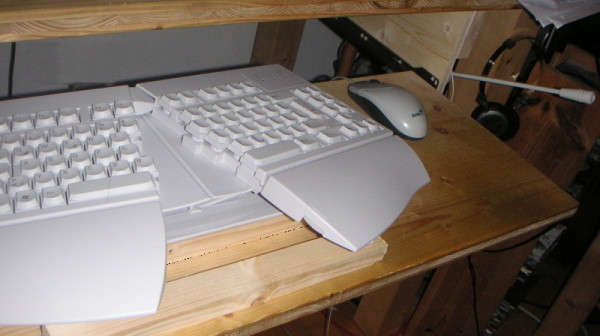
Taboo-breaker: 10 Hints for Reducing the Pain in Your Hands

  1. Use a splitted/ergonomic keyboard to reduce the bending of the wrist (I could recommed you a relative cheap one). And place the keyboard in the correct high, so that the elbow forms a right angle (or more than 90°). Avoid steep angle of the keyboard – see picture below where I used an additional stick in the front to flatten the angle. And don’t forget to sit in a correct position.
  2. Some people have better results with ordenary, thick keyboards, but some with thin
  3. Prefer skype or telephon over emails and use voice recognition for emails
  4. Use pads before the keyboard to put your thumb and your ball of the thumb there (and your elbows). But don’t use these pads while active writing. Avoid too high armrests – they should be adjustable.
  5. Use a joystick or an other mouse replacements if you have problems with the right index finger or arm. And if you have money you could buy a tablet pc (or palms that support handwriting recognition)
  6. Avoid cold hands e.g. use cropped gloves
  7. If you have to implement an algorithm use a pencil and a paper (and you brain of course) for the initial version
  8. Hack into the keyboard like a pianist (not ‘pressing’ but accelerate your fingers before) and avoid long nails (I guess the most programmers havn’t this problem ;-))
  9. Streching and relaxation of arms and hands (thumb!) every hour. While this procedure you should relax your eyes and you could use a finger trainer from guitarists.
  10. Less programming i.e. read a good book or look videos/DvDs or meet your friends in reality 😉

erg-kb1

JavaFX – Some Clarifications

JavaFX Script, puh! What a hype you might think, as I thought some weeks ago. I have some tears in my eyes while reading that Sun is not really improving good old Swing. Instead they push a lot of energy and money into JavaFX.

Are this bad news?

I will put here some facts, my notes, my thoughts and some links to give you a basis for your next JavaFX program.

Some Facts

  • JavaFX 1.0 is still not released. It should be released on 2nd December (integrated in NetBeans 6.5). (I am a bit confused about the versioning terms but the current version should be 1.0 pre1)
  • You will be happy with the current version of JavaFX only if you use NetBeans 6.1 (!), Java 1.6 and Windows or Max OS for development. But this means: your clients will need a jvm like they do for Swing!
  • The current version of JavaFX is under GPL
  • JavaFX is not Java but you can mix it with Java. See the language introduction. JavaFX is a declarative programming language. E.g. the initialization is in the style of json (->yaml).
  • Be sure you read the migration guide before googling for examples! And use the shipped examples in the current version as starting point. (They switched from interpreter version to OpenJFX compiler)
  • Project Nile tries to exports a layered graphic from Adobe Illustrator (into JavaFX code). The projects offers libraries to import the exported files as well. It also provides a SVG converter.

The first intention of JavaFX is to improve Swing (not only in my opinion, see from page 22). But Swing could be improved only in two ways

  1. improve the library and merge awt, swing, java2d and more (1,2) into one consistent library WITHOUT breaking backward compatibility
  2. and enhance the language to provide such nice features like property binding (via bind)

Nice features in the programming language JavaFX or the API

  • ruby style durations: Duration t = 2m + 20s;
  • C# style operations: insert, delete … and this is nice:
    for (element in group where element.length() < 4) {
    println({element});
    }
  • // localization
    var localizer = StringLocalizer{ key: “Hello, World!” };
    // This prints localized text for “Hello, World!” for the default locale
    System.out.println(localizer.localizedString);
  • javafx can still be used as interpreted language: FXEvaluator().eval(String)
  • … a lot more!

Some drawbacks of JavaFX (only the current version?):

  • GPL
  • no tables or tableNodes!? use this. Where is the Table and TableColumn gone?
  • println(String); does not work although documented in the api. You will need to use System.out.println(String) + import java.lang.System.
  • The Photoshop exporter is not properly working for me. The .fx file does compile and even after I changed some lines the created UI looks damaged.

Conclusion

JavaFX is a great language which offers some nice features. But the current version is far from perfect and you should wait until the final release in December. But then: try it out! Hopefully they will made a linux version for me 😉

Ressources

5-Line-Replacement of Apache Ant

rm -rf build/
mkdir build
jars=$(find ./lib/ -iname "*.jar" | tr  '\n' ':')
find ./src -iname "*\.java" > files.txt
$JAVAC_CMD -d build/ -cp $jars @files.txt

Okay, it is a very very unfair blog title – only an eye catcher!

But now you can bookmark this useful code snippet to compile your project without installing ant or even an IDE.

… and you could say: “Hey man – this is not platform independent!”.
But then I would say: “Oh yes it is! For windows you should install cygwin of course!”

Keep smiling 😉

Update: on windows with cygwin you have to replace the colon : with a semicolon ;

good to know about ubuntu (x-mas time)

Did you know that you could run ubuntu directly from windows? No? Then try out wubi!

And check out the following pages if you already are an interested (k)ubuntu user:

  • Playing DVDs, flash etc was a nightmare under suse 10.1. Under ubuntu > 8.04 it is a one-liner:
    sudo apt-get install ubuntu-restricted-extras

    Taken from here.

  • With VirtualBox you could try out new releases of ubuntu (or other OS’s). I used version 1.6.6 from here – the latest .deb package didn’t work for me.
  • Did you ever want your own customized ubuntu? Yes, the the following pages/projects are for you
  • UCK“is a tool that helps you customizing official Ubuntu Live CDs to your needs. You can add any package to the live system, for example language packs, or applications.” – taken from the website.
  • Very good tutorial to create your customized LiveCD. I tried it – really nice. In this way you can ‘present’ somebody with linux software 😉

Hope you have other ideas/pages for ubuntu and x-mas!

Hints for Mavenization of Java Web Applications

I discovered that it is not that easy to transform a web application from a native eclipse/netbeans project to a maven project.

Here are some hints which can make your life easier:

  1. To create the project structure for the web application use this command:
    mvn archetype:create -DgroupId=de.mycompany.app123 -DartifactId=mywebapp -DarchetypeArtifactId=maven-archetype-webapp
    Be sure you replaced the 2.3 header with
    <web-app version="2.5" xmlns="http://java.sun.com/xml/ns/javaee" xmlns:xsi="http://www.w3.org/2001/XMLSchema-instance"
      xsi:schemaLocation="http://java.sun.com/xml/ns/javaee http://java.sun.com/xml/ns/javaee/web-app_2_5.xsd">
    this was helpful for fixing this issue:
    "The selected Java EE version does not support selected JavaServer Faces version" + restart netbeans!
  2. To use jdk 1.6 do
    <plugin>
    <artifactId>maven-compiler-plugin</artifactId>
    <version>2.0.1</version>
    <configuration>
    <source>1.6</source>
    <target>1.6</target>

    <encoding>UTF-8</encoding>
    </configuration>
    </plugin>
    Maybe for you it is necessary to use tomcat 5.5 for myfaces 1.1. Therefor you probably have to change the <source> element to 1.5 … Here you can determine the class format version
  3. use
    <repositories>
    <repository>
    <id>java.net</id>
    <name>java.net</name>
    <url>http://download.java.net/maven/2/</url&gt;
    </repository>
    </repositories>
    for the missing dependency in hibernate org.hibernate:hibernate:jar:3.2.1.ga: javax.transaction:jta:jar:1.0.1B
  4. All libraries which you need at compile time but not on the server (like the following) should get an scope=provided
    <dependency>
    <groupId>javax.servlet</groupId>
    <artifactId>servlet-api</artifactId>
    <version>2.5</version>
    <scope>provided</scope>
    </dependency>
  5. All libraries which you need for your tests (e.g. junit or hsqldb) should get an scope=test
    <dependency>
    <groupId>com.h2database</groupId>
    <artifactId>h2</artifactId>
    <version>1.1.102</version>
    <scope>test</scope>
    </dependency>
  6. If your tests are temporarly broken or if you want to speed up testing do:
    <plugin>
    <artifactId>maven-surefire-plugin</artifactId>
    <version>2.4.3</version>
    <configuration>
    <skip>true</skip>
    </configuration>
    </plugin>
    (See this post for a better solution.)
  7. To invoke the tomcat plugin (‘mvn tomcat:run’) the following code can be necessary
    <plugin>
    <groupId>org.codehaus.mojo</groupId>
    <artifactId>tomcat-maven-plugin</artifactId>
    <configuration>
    <url>http://localhost:8080/webapp/</url&gt;
    </configuration>
    </plugin>
    This plugin uses tomcat5.5, to use tomcat 6.0 compile it for yourself or run the project from within your IDE with maven plugins.
  8. To invoke the jetty plugin (‘mvn jetty:run’) the following code can be necessary
    <plugin>
    <groupId>org.mortbay.jetty</groupId>
    <artifactId>maven-jetty-plugin</artifactId>
    <version>6.1.10</version>
    </plugin>
  9. You get an exception like the following in NetBeans??
    [ERROR]Runtime Exception thrown during execution
    [ERROR]null

    Solution 1 -> use external maven (command line)
    Solution 2 -> try to recompile the project from command line
    Solution 3 -> try to recompile another maven project + restart the IDE (works only sometimes)

  10. if you want to mavenize jar files -you can use this
  11. to set up you own maven repository you can try this tutorial
  12. And last but not least: Be Warned!

Read the following hints if you are an IDE-guy

  • Install the NetBeans plugin. Installation of this is easy -> Options->Plugins->Install Maven Plugin. To use this plugin simply open the pom.xml directly.
  • Installation of the EclipsePlugin:
    • install tomcat 6.0 server (>6.0.16)
    • you will need WTP >2.0.2
    • add http://m2eclipse.sonatype.org/update/ to your update pages; I didn’t tried q4e
    • and install m2eclipse
    • select the necessary packages (scm and mylyn didn’t worked for me …)
    • if not already done add a jdk as default virtual machine to eclipse
    • specify the same java exe in the eclipse.ini file:
      -vm
      C:\Program Files\Java\jdk1.6.0_07\jre\bin\javaw.exe
    • restart eclipse

Some people want to avoid the stuff related to IDEs – they can!

  • Install maven2
    • Under debian you can simply ‘apt-get install maven’.
    • Under windows you have to add the bin folder of maven to the PATH variable.
  • Type the following in the root directory
    1. mvn install
    2. mvn tomcat:run
  • Then go to http://localhost:8080/yourapp/ with you favorite firefox 😉

Now, my two questions to the readers are:

  • How can change the default tomcat-users.xml under target/tomcat? (for the command ‘mvn tomcat:run’)
    If I would require the user to login (security-constraints in the web.xml) I cannot login …
  • How can I use a master (or parent) module with web applications? I need an example! I already have one for a desktop application.

Skip Executing the Tests of Mavenized Projects

In my project I want to skip that the tests are running on every execution. I know this is not ‘good style’, but I want to execute the tests when I want. I do not recommend this technic on you build server …

One way to achieve this behaviour is to disable the tests in the

<build><plugins>

</plugins><build>

section via

<plugin>
<artifactId>maven-surefire-plugin</artifactId>
<version>2.4.3</version>
<configuration>
<skip>true</skip>
</configuration>
</plugin>

But now even if we want to run the tests explicitly they will be skipped. Is there a solution for this?

I found a better and very simply solution for NetBeans. Right click the mavenized project in NetBeans, then click on Actions. Now click on an entry; e.g. Run project and select “Skip tests”. This cheat you can apply on all the listed actions (even customized one …).

Do you have a more IDE-independend solution for this?

Codeweaver for free, to run windows programs under linux or mac

Only today you can get a license for free for the commercial wine version. Normally approx 40 EUR (to run window applications on linux). Why this? Read here.

I already bought this nice piece of software some months before 😦 to run origin under linux – and: it works 🙂

It was (relative) easy to get it working! I had only problems with the greek fonts and I simply copied those into linux – using suses font management.

Update

Now I got a license key. To install it under ubuntu try:

sudo dpkg -i crossover-standard_7.1.0-1_i386.deb

Then run

/opt/cxoffice/bin/cxbottlemanager

to install windows software under linux