There are few use cases for connecting a transmitter to multiple receivers.
One use case is “failover”, which ensures that a malfunctioning receiver won’t crash your model. For this use case the channels of the transmitter are all mapped to the same channels for all receivers, i.e. some kind of a “parallel” binding type:
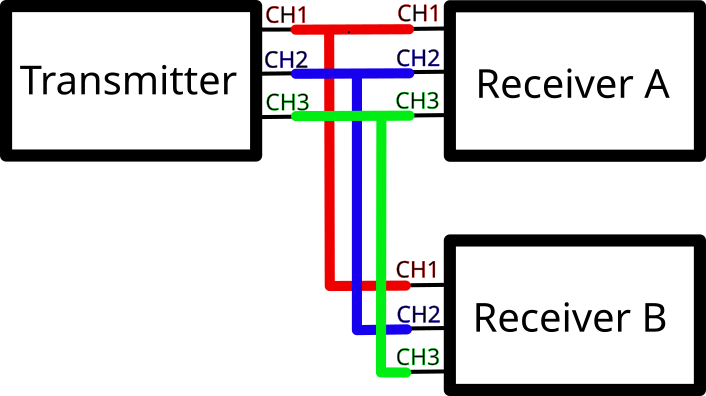
(Of course the coloured wires are just for illustration purposes and represent logical connections only.)
Another use case is when you want to control multiple vehicles with a single radio control. In an ideal world you can “expand” the channels, i.e. some kind of a “sequential” binding type:

I learned that this seems to be possible with some newer and more expensive FrSky radio controls, but I don’t own one, so I needed a different solution.
Several decades ago, when radio controls operated on MHz frequencies the first use case was easy to implement: all that was needed was the same frequency for the quartz. The second use case was to my knowledge only possible with special handcrafted hardware or with a “trick” where you leave the first channels of receiver B empty (as they are used for receiver A and should be independent). Of course this is only possible if receiver B has enough channels:
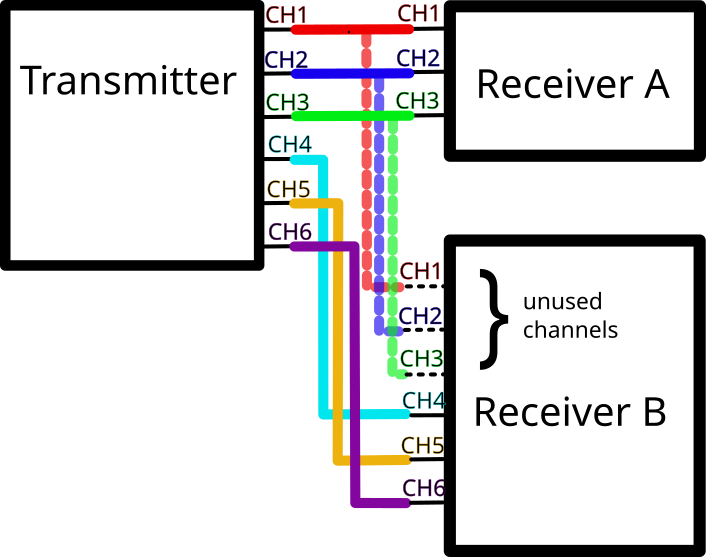
Now with the Flysky FS ST8 radio control you can bind multiple receivers too and so this “trick” is possible too. You just need to know this as it isn’t clear from the documentation as this is one of the purposes of the 1WAY binding mode, I think. In their general FAQ (39.) there is only this cryptic statement:
In one-way mode the radio can be directly paired with multiple receivers. However in two-way mode, make use of the models function to pair with multiple receivers.Likely this means that for “2WAY” it only works when creating one model profile per receiver but then controlling two models at the same time is not possible (important if you have a boat and its jollyboat).
Here is how you bind multiple receivers via “1WAY”, one receiver after another:
- Go to “Bind Settings” and then under “RF Standard” change “2WAY” to “1WAY”
- Put transmitter (i.e. your radio control) into bind mode
- Put receiver into bind mode. Usually the receiver will automatically in bind mode for a few seconds after powering on (when not already bound) or press the bind button or similar.
- Now the important step is that once the receiver was successfully bound the radio control won’t notify you and instead the LED will only flash slower at the receiver side. Then you exit the binding mode of the transmitter and power off the receiver. Only when you turn the receiver on again it will be bound. Somehow the description in the manual was contradictory for this important step and initially I had problems to make it working but now works fine. (Will try if at least 1 receiver could be put into 2WAY mode somehow, to get battery status from at least one receiver.)
I’m curious to learn from people with more knowledge for FS-ST8 (or even other devices!) if there is a simpler way of binding multiple receivers or maybe even the “sequential” binding type. Let me know 🙂 !
 Navigatone