Running Shortest-Path Algorithms on the German Road Network within a 1.5GB JVM

Update: With changes introduced in January 2013 you only need 1GB – live demo!

In one of my last blog posts I wrote about memory efficient ways of coding Java. My conclusion was not a bright one for Java: “This time the simplicity of C++ easily beats Java, because in Java you need to operate on bits and bytes”. But I am still convinced that in nearly every other area Java is a good choice. Just some guys need to implement the dirty parts of memory efficient data structures and provide a nice API for the rest of the world. That’s what I had in mind with

GraphHopper

GraphHopper does not attack memory efficient data structures like Trove4j etc. Instead it’ll focus on spatial indices, routing algorithms and other “geo-graph” experiments. A road network can already be stored and you can execute Dijkstra, bidirectional Dijkstra, A* etc on it.

Months ago I took the opportunity and tried to import the full road network of Germany via OSM. It failed. I couldn’t make it working in the first days due to massive RAM usage of HashMaps for around 100 mio data points (only 33 mio are associated to roads though). Even using only trove4j brought no success. When using Neo4J the import worked, but it was very slow and when executing algorithms the memory consumption was too high when too many nodes where requested (long paths).

Then after days I created a memory mapped graph implementation in GraphHopper and it worked too. But the implementation is a bit tricky to understand, not thread safe (even not for two reading threads yet), slower compared to a pure in-memory solution. But even more important: the speed was not very predictable and very ugly to debug if off-heap memory got rare.

I’ve now created a ‘safe’ in-memory graph, which saves the data after import and reads once before it starts. At the moment this is read-thread-safe only, as full thread safety would be too slow and is not necessary (yet).

Now performance wise on this big network, well … I won’t talk about the speed of a normal Dijkstra, give me some more time to improve the speed up technics. For a smaller network you can see below that even for this simplistic approach (no edge-contraction or edge-reduction at all) the query time is under 150ms and will be under 100ms for bidirectional A* (w/o approximation!), I guess.

In order to perform realistic route queries on a road network we would like to satisfy two use cases:

  1. Searching addresses (cities, streets etc)
  2. Clicking directly on the map to create a route query

The first one is simple to solve and it is very unlikely to avoid tons of additional RAM. But we can solve it very easy with ElasticSearch or Lucene: just associate the cities, streets etc to the node ids of the graph.

The second use case requires more thinking because we want it memory efficient. A normal quad-tree is not a good choice as it requires too many references. Even for a few million data points it requires several dozens of MB in addition to the graph! E.g. 80MB for only 4 mio nodes.

The solution is to use a raster over the area – which can be a simple array addressed by spatial keys. And per quadrant (aka tile) we store one array index of the graph as entry point. (In fact this is a quad-tree of depth one!) Then when a click on the map happened, we can calculate the spatial key from this point (A), then get the entry point from the array and traverse the graph to get the point in the graph which is the closest one to point A. Here is an implementation, where only one problem remains (which is solved in the new index).

Unfair Comparison

In the last days, just for the sake of fun, I took Neo4J and ran my bidirectional Dijkstra with a small data set – unterfranken (1 mio nodes). GraphHopper is around 8 times faster and uses 5 times less RAM:
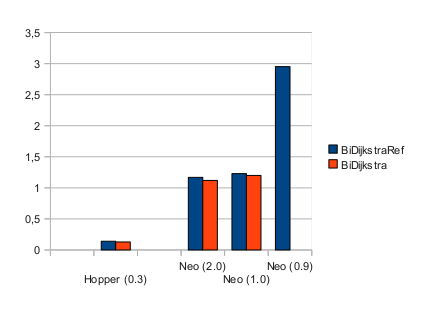
The lower the better – it is the mean time in seconds per run on this road network where two of the algorithms (BiDijkstraRef, BiDijkstra) are used. The number in brackets is the actually used memory in GB for the JVM. The lowest possible memory for GraphHopper was around 160MB, but only for the more memory friendly version (BiDikstra).

For all Neo4J-Bashers: this is not a fair comparison as GraphHopper is highly specialized and will only be usable for 2D networks (roads, public transport) and it is also does not have transaction support etc. as pointed out by Michael:

But we can learn that sometimes it is really worth the effort to create a specialized solution. The right tools for the right job.

Conclusion

Although it is not easy to create memory efficient solutions in Java, with GraphHopper it is possible to import (2.5GB) and use (1.5GB) a road network of the size of Germany on a normal sized machine. This makes it possible to process even large road networks on one machine and e.g. lets you run algorithms on even a single, small Amazon instance. If you reduce memory usage of your (routing) application you are also very likely to avoid garbage collection tuning.

There is still a lot room to optimize memory usage and especially speed, because there is a lot of research about road networks! You’re invited to fork & contribute!
Failed Experiment: Memory Efficient Spatial Hashtable

The Background of my Idea

The idea is to use a hash table for points (aka HashMap in Java) and try to implement neighbor searches. First of all you’ll need to understand what a spatial key is. Here you can read the details, but in short it is a binary Geohash where you avoid the memory inefficient base 32 representation.

Now that we have the spatial key, you can think about an array which is used to map from indices (like spatial keys) to values. This is the simplest representation of a spatial index as we don’t need to store the keys at all. But it is only memory efficient iff we would have no empty entries, which is very unlikely for clustered, real-world GIS-data.

If we would solve this with a normal hash table we encounter two problems:

  • It is very unlikely that points in the same area come into the same hash bucket – making neighborhood searches slow i.e. O(n)
  • It would be necessary to store the entire point – not only the associated value. Otherwise it would be impossible in case of a hash-collision to detect which point belongs to which value.

My idea is to use parts of the spatial key for the hashcode and avoid storing the entire key. It is implemented in Java (open source and available at GitHub).

As you can see we’re still using an array of buckets and a “somehow” converted spatial key to get

The Bucket Index

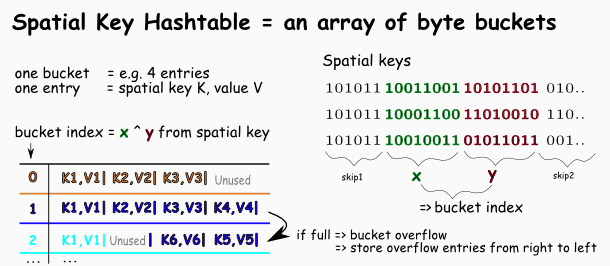
Let me explain the necessary bucket index in more detail (see picture above on the right).

We skip the beginning bits of every spatial key as it is  identical for an area a lot smaller than the world boundaries like Germany.

If we use the first part of the spatial key – in the picture identified as x, then the array is small enough. But with some real world data (also available as osm) this is not sufficient. Too many overflows would happen, some buckets would have several thousands entries! If we move the used part a bit to the right this gets a lot better e.g. for 4 entries per bucket we have a RMS error of about 2.

We now have a form of

A Hashtable & Quadtree Mixture

We can tune if our data structure behaves like a quad tree or a hash table. When moving the bits taken from spatial key to the left we get an quad tree-like characteristics. Taking the bits more from the right we get hash table-like characteristics.

This would be fine if we have massive data. But we need to make this approach practical also e.g. for only 2 mio data points. Because the part of the spatial key is only 19 bits long: if we assume 4 entries per bucket we come to approx. 2 mio (4 * 2^19 = 4 * 524 288). So the bucket index alone is too short. The solution to this problem is to do a bit-operation of the left and the right part of the spatial key:

bucketIndex = x ^ y

Further reduce memory consumption

Besides the fact that we now have some kind of a pointer-less or linear quad tree we can further reduce the memory footprint. We store only the required part (e.g. all bits except y) and not the full spatial key. For this it was necessary that our bit operation (or more generic “hashing scheme”) is reversible. Ie.: we can regain the full spatial key from only the bucket index and the stored part of the key. And in our case the x XOR y it reversible. In fact this memory reduction can be applied to any hashing procedure which fulfills this ‘reversible’ requirement.

Speed of Neighbor Queries is Bad

Neighborhood searches are very slow, slower than I expected. The naiv approach resulted in 60 seconds for a 10km search – 30 times slower as it would take to process all 2 mio entries. When tuning the overflow schema we are now a bit under 2 seconds. Still 10 times slower than a normal quad tree and as slow as processing all entries. The reason for why this storage is only good for get and put operations is that the same bucket needs to be parsed several times: as the same bucket index needs to be the home for several different locations – yeah, exactly as intended.

The good news are:

1. When I was moving the bucket-index-window a lot to the left it gets faster and faster, but took dozens of seconds to create the storage due to the heavy overflow number even for my small data set (2 mio). It could be improved a bit when applying different overflow strategies e.g. not using a linear overflow but skipping every two buckets or others.

2. Even in this state this idea can be used as a memory efficient spatial key-value storage without the neighbor search. E.g. you already have a graph of roads but you need an entrance like a HashMap<Point,NodeId> for it, then our data structure is an efficient hash table. Also doing a simple rectangular neighbor search should be fast: requesting only the 8 surrounding bounding boxes. Then no tree traversal is necessary and every box can be done with just a loop through the bucket array.

3. Another possibility is to use a small quadtree as an entry (mapping spatial keys to ids) for a 2D-graph. Then traversing this graph to find neighbors. This way I’ve finally chosen as I already needed a road-network for Dijkstra. So I only need additional 10MB for the small quadtree inex, see a possible next blog entry.

4. I’m not alone – you can take my idea and try implementing a more efficient neighbor searches yourself 🙂 !

Conclusion

In this post I’ve explained how to create a spatial hash table which is optimized in memory usage. This is achieved combining two ideas: using a hash table-alike data structure still ‘somehow suited’ for neighborhood searches and reducing the amount of memory while storing only parts of the hashkey. This second idea could be applied on every kind of hash table but only if the hashkey creation is reversible.

The ideas are implemented in Java for the GraphHopper project –  see the geohash package. Sadly the perfomance for neighbor searches is really bad. Which created a different solution in my mind (see point 3 of good news).

Outlook

In the literature similar data structures are called linear or pointer-less quad trees. After this experiment I come to the conclusion that the best way to implement a memory efficient spatial storage which is also able to perform fast neighbor queries could be a prefix quad tree. Still using pointers but storing two bits in very branch node and avoid those bits in the leaf nodes. Ongoing work for this is done currently in Spatial4J & Lucene 4.0 – actually without the use of spatial keys.

Tricks to Speed up Neighbor Searches of Quadtrees. #geo #spatial #java

In Java land there are at least two quadtree implementations which are not yet optimal, so I though I’ll post some possibilities to tune them. Some of those possibilities are already implemented in my GraphHopper project.

Quadtree

What is a quadtree? Wikipedia says: “A quadtree is a tree data structure in which each internal node has exactly four children.” And then you need some leaf nodes to actually store some data – e.g. points and associated values.

A quadtree is often used for fast neighbor searches of spatial data like points or lines. And a quadtree with points could work like the following: fill up a leaf node until its full (e.g. 8 entries), then create a branch node with 4 pointers (north-west, north-east, south-west, south-east) and decide where the leaf node entries should go depending of its location, in this process it could be necessary to create new branch nodes if all entries are too much clustered.

Now a simple neighbor search can be implemented recursively. Starting from the root node:

  • If the current node is a leaf node check if the point is in the search area. If that is the case add it to the results
  • If it is branch node check if one of the 4 sub-areas intersects with the search area. If a sub-node intersects then use that as current node and call this method recursively.

Trick 1 – Normalize the Distance

Searches are normally done with a point and a radius. To check if the current area of the quadrant intersects with the search area you need to calculate the distance using the Haversine formula. But you don’t need to calculate it every time in its entire complexity. E.g. you can avoid the following calculation:

R * 2 * Math.asin(Math.sqrt(a));

This is ok, if you have already normalized the radius of the search area via:

double tmp = Math.sin(dist / 2 / R);
return tmp * tmp;

Trick 2 – Use Smart Intersect Methods

The intersect method should fail fast. E.g. when you use again a circle as search area you should calculate only once the bounding box and check intersection of this with the quadrant area before applying the heavy intersect calculation with the Haversine formula:

public boolean intersect(BBox b) {
    // test top intersect
    if (lat > b.maxLat) {
        if (lon < b.minLon)
            return normDist(b.maxLat, b.minLon)  b.maxLon)
            return normDist(b.maxLat, b.maxLon)  0;
    }

    // test bottom intersect
    if (lat < b.minLat) {
        if (lon < b.minLon)
            return normDist(b.minLat, b.minLon)  b.maxLon)
            return normDist(b.minLat, b.maxLon)  0;
    }

    // test middle intersect
    if (lon < b.minLon)         return bbox.maxLon - b.minLon > 0;
    if (lon > b.maxLon)
        return b.maxLon - bbox.minLon > 0;
    return true;
}

Also be very sure you defined your bounding box properly once and for all. I’m using: minLon, maxLon followed by minLat which is south(!) and maxLat. Equally to EX_GeographicBoundingBox in the ISO 19115 standard see this discussion.

Trick 3 – Use Contains() and not only Intersect()

Now a less obvious trick. You could completely avoid intersect calls of quadrant areas which lay entirely in the search area. For this it is necessary to calculate fast if the search area fully contains the quadrant area or not. E.g. the method for a boudning box containing another bounding box would be:

class BBox {
  public boolean contains(BBox b) {
    return maxLat >= b.maxLat && minLat = b.maxLon && minLon   }
  ...
}

Similar for BBox.contains(Circle), Circle.contains(BBox) and Circle.contains(Circle).

Trick 4 – Sort In Time and not just Adding

Normally you want only 10 or less nearest neighbors and not all neighbours in a fixed distance. Especially for search engines like Lucene this should be favoured. For that you should use a priority queue to handle the ordering of the result. But not only of the leaf nodes – also when deciding which branch node should be processed next! See the paper Ranking in spatial databases for more information, where also a method for incremental neighbor search is described. This would make paging through the results very efficient.

Trick 5 – Use Branch Nodes with more than Four Children

Instead of branch nodes with 4 children you could use a less memory efficient but faster arrangement: use branch nodes with 16 child nodes. Or you could even decide on demand which branch node you should use – this can lead to partially big branch arrays where the quadtree is complete – making searching very efficient as then the sub-quadtree is a linear quadtree (see below).

Tricks for linear QuadTrees

Trick 6 – Avoid costly intersect methods

This only applies if you quadtree is a linear one ie. one where you can access the values by spatial keys (aka locational code). You’ll need to compute the spatial key of all four corners of your search area bounding box. Than compute the common bit-prefix of the points and start with that bit key instead from zero to traverse the quadtree. More details are available in the paper Speeding Up Construction of Quadtrees for Spatial Indexing  p.12.

Trick 7 – Bulk processing for linear Quadtrees

If you know that a quadrant is completely contained in a search area you can not only avoid further intersection calls, but also you can completely avoid branching and loop from quadrants bottom-left point to top-right. E.g. your are at key=1011 and you know the current quadrant node is contained in the search area. Then you can loop from the index “1011 000000..” to “1011 111111..”

Trick 8 – Store some Bits from the Point in Branch Nodes

For linear quadtrees you already encoded the point into spatial keys. Now you can use a radix tree to store the data memory efficient: some bits of the spatial key can be stored directly in the branch nodes. I’ve create also a different approach of a memory efficient spatial storage but as it turns out it is not that easy to handle when you need neighbor searches.

Conclusion

As you can see a lot time can go into tuning a quadtree. But at least the first tricks I mentioned should be used as they are easy and fast to apply and will make your quadtree significant faster.

Spatial Keys – Memory Efficient Geohashes

When you are operating on geographical data you can use latitude and longitude to specify a location somewhere on earth. To look up some associated information like we do in GraphHopper for the next street or if you want to do neighborhood searches you could create R-trees, quad-trees or similar spatial data structures to make them efficient. Some people are using Geohashes instead because then the neighborhood searches are relative easy to implement with simple database queries.

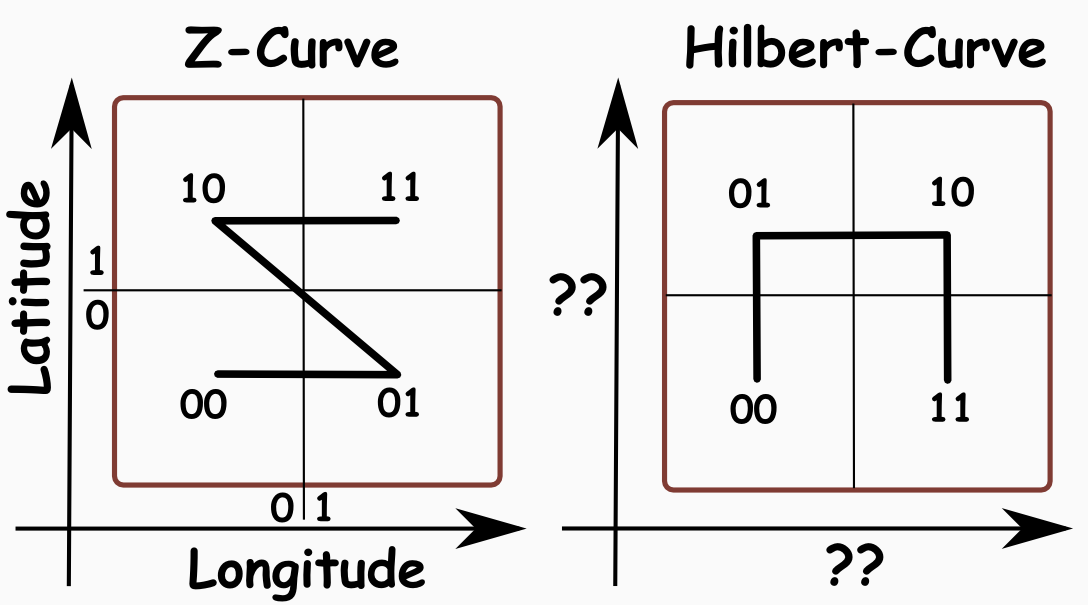
In some cases you’ll find binary representations of Geohashes – I named them spatial keys – in the literature I found a similar representation named locational code (Gargantini 1982) or QuadTiles at OpenStreetMap. A spatial key works like a Geohash but for the implementation a binary representation instead of one with characters is chosen:

At the first level (e.g. assume world boundaries) for the latitude we have to decide whether the point is at the northern (1) or southern (0) hemisphere. Then for the longitude we need to know wether it is in the west (0) or in the east (1) of the prime meridian resulting in 11 for the image below. Then for the next level we “step into” smaller boundaries (lat=0..90°,lon=0..+180°) and we do the same categorization resulting in a spatial key of 4 bits: 11 10

The encoding works in Java as follows:

long hash = 0;
double minLat = minLatI;
double maxLat = maxLatI;
double minLon = minLonI;
double maxLon = maxLonI;
int i = 0;
while (true) {
    if (minLat  midLat) {
            hash |= 1;
            minLat = midLat;
        } else
            maxLat = midLat;
    }

    hash &amp;amp;lt;&amp;amp;lt;= 1;
    if (minLon  midLon) {
            hash |= 1;
            minLon = midLon;
        } else
            maxLon = midLon;
    }

    i++;
    if (i &amp;amp;lt; iterations)
        hash &amp;amp;lt;&amp;amp;lt;= 1;
    else
        break;
}
return hash;

When we have calculated 25 levels (50 bits) we are in the same range of float precision. The float precision is approx. 1m=40000km/2^25 assuming that for a lat,lon-float representation we use 3 digits before the comma and 5 digits after. Then a difference of 0.00001 (lat2-lat1) means 1m which can be easily calculated using the Haversine formula. So, with spatial keys we can either safe around 14 bits per point or we are a bit more precise for the same memory usage than using 2 floats.

I choose the definition Lat, Lon as it is more common for a spatial point, although it is against the mathematic point x,y.

Now that we have defined the spatial key we see that it has the same properties as a Geohash – e.g. reducing the length (“removing some bits on the right”) results in a broader matching region.

Additionally the order of the quadrants could be chosen differently – instead of the Z-curve (also known as Morton Code) you could use the Hilbert Curve:

But as you can see, this would make the implementation a bit more complicated and e.g. the orientation of the “U” order depends on previous levels –  but the neighborhood searches would be more efficient – this is also explained a bit in the paper Speeding Up Construction of Quadtrees for Spatial Indexing  p.8.

I decided to avoid that optimization. Let me know if you have some working code of SpatialKeyAlgo for it 🙂 ! It should be noted that there are other space filling curves like the ones from Peano or Sierpinsky.

One problem

while implementing this was to get the same point out of decode(encode(point)) again. The encoding/decoding schema needs to be “nearly bijective” – i.e. it should avoid rounding problems as good as possible. To illustrate where I got a problem assume that the point P (e.g. see the image above) is encoded to 1110 – so we already lost precision, when our point is now at the bottom left of the quadrant 1110. Now if we decode it back we loose again some precision due to normal double rounding errors. If we would encode that point again it could end up as 1001 – the point moved one quadrant to the right and one to the bottom! To avoid that, you need to define position of the point at the center of the quadrant while decoding. I implemented this simply by adding half of the quadrant width to the latitude and longitude. This makes the encoding/decoding stable even if there are minor rounding issues while decoding.

A nice property of the spatial key

is that one bounding box e.g. for the starting bits at level 6:

110011

goes from the bottom left point

110011 0000..

to the top-right point

110011 1111..

making it easy to request e.g. the surrounding bounding boxes of a point for every level.

Conclusion

As we have seen the spatial key is just a different representation of a Geohash with the same properties but uses a lot less memory. The next time you index Geohashes in your DB use a long value instead of a lengthy string.

In the next post you will learn how we can implement a memory efficient spatial data structure with the help of spatial keys. If you want to look at a normal quadtree implemented with spatial keys you can take a look right now at my GraphHopper project. With this quadtree neighborhood searches are approx. twice times slower than one with values for latitude and longitude due to the necessary encoding/decoding. Have a look into the performance comparison project.

Memory Efficient Java – Mission Impossible?

First, the normal usage in Java leads to massive memory waste as its pointed out in several articles or here in a nice IBM article.

Some examples for the 32 bit JVM:

  1. Using 3 * 4 bytes for an object with no member variables.
  2. Using 4 * 4 bytes for an empty int[] array!
  3. Using 4 * 4 + 7 * 4 = 44 (!) bytes for an empty String object

Of course things are a bit more complicated but in short: the wrapper classes and shorter arrays should be avoided.

Second, doing it a bit more efficient is relative easy – just use the primitive collections from the trove project, where wrapper objects can be avoided. Because the standard collection classes are trimmed to be CPU efficient – not really memory efficient. Also several JVM tuning parameters could be used to reduce RAM usage.

Thrird, doing it more efficient or as efficient as in C++ is very complex and in some cases even impossible.

Let me first explain why it is in some cases impossible to be as efficient as in C++

When you allocate an array of primitives such as int, long or double in Java then the values are stored directly in the array:

int1
int2
int3
...

This is good in terms of memory. Now when you allocate an array of objects then only the references are stored:

ref1  --- > points the object (a position somewhere on the heap)
ref2  --- > points to another object
ref3  --- > etc
...

Imagine that you are using an array of an object Point with only two members latitude and longitude (e.g. both floats). Then you would waste the memory necessary for the reference (4 bytes on  the 32bit JVM) and the object overhead (12 bytes). 16 bytes waste; 8 bytes data. Now assume you need 100 mio points (osm data of Germany) => you would waste 1.6 GB RAM and only if you do it efficient 😉

If you think about this a bit you would probably argue that a clever JVM could inline the objects to avoid the overhead and the additional reference. Well, I think this is impossible.

For the JVM it is nearly impossible to inline objects in arrays

You have two solvable problems when you want that the JVM inlines the objects for you:

  1. You need one bit indicating if the entry is null (0) or not (1) – after initializing then all entries are null. Or one could even call a default constructor per configuration or whatever.
  2. The class needs to be final, as otherwise the lengths of one subclass entry could exceed the reserved maximum length.

… but you have one really hard – unsolvable (?) problem:

     3. You would need to change the move/reference semantics in Java – a no go in my opinion, not only for the language designers.

But why you would need to change the semantics? Well, imagine you have two such inline arrays and you are doing something ‘unimportant’:

// The point p refers to the memory in the array. Okay.
Point p = inlineArr1[100];
p.setX(111f);

// Uh, what to do now? In C++ you could define to copy the point into the array.
// In Java you would copy the reference - not possible for 2 inline arrays ...
inlineArr2[100] = p;
inlineArr2[100].setX(222f);
float result = p.getX();

What result would we get in the last line? With normal Java arrays you get 222f. But with the inline approach and copy semantics you get 111f – which would be against every Java-thinking.

Instead of using Java-unintuitive copy semantics one workaround could be to forbid assignments to such inline arrays. Those read-only inline arrays would be harder to use but still nice to have IMO 🙂 !

Memory efficient Java – via Primitives

Now let us investigate how we could be in Java as memory efficient as with C++.

The memory problem above is solvable in Java when one would use two float arrays. But it makes programming harder. For example how to swap two of those entries? The normal Java way for the Point class is:

Point tmp = arr[2]; arr[2]=arr[3]; arr[3]=tmp;

But the array wrapper would make it necessary to create a separate swap method which then swaps the two entries for every point:

float tmpx = x[2]; x[2]=x[3]; x[3]=tmpx;
float tmpy = y[2]; y[2]=y[3]; y[3]=tmpy;

If you retrieve the raw floats and would swap the entries outside of the wrapper it would be error prone to add more members later to the object (e.g. like a point ID). And you’ll get probably other problems as well.

But we could put an object oriented wrapper class around it which returns Point objects created from the underlying float arrays, which has the disadvantage of being CPU intensive. Now, in the next part we use a similar idea but operate on more low level arrays which then gives us the possibility to use memory mapped features – turning our datastructure in a simple storage. Read on!

Memory efficient Java – via raw Bytes

A second solution in Java is to use an object oriented wrapper around one big byte array or a ByteBuffer which then can be even memory mapped:

RandomAccessFile file = new RandomAccessFile(fileName, "rw");
MappedByteBuffer byteArray = file.getChannel().map(FileChannel.MapMode.READ_WRITE, 0, size);

The disadvantage is that you will have additional CPU for the conversion and a much more complicated procedure to retrieve and store things. E.g. to retrieve a point you’ll need to write:

Point get(int index) {
  int offset = index * bytesPerPoint;
  return new Point(bytesToFloat(byteArray, offset), bytesToFloat(byteArray, offset + 4));
}

or to serialize the object into bytes:

void set(Point p) {
  int offset = index * bytesPerPoint;
  writeFloat(byteArray, offset, p.getX());
  writeFloat(byteArray, offset + 4, p.getY());
}

The big advantage over the method with a normal primitive array is that then “loading” objects on startup takes milliseconds and not seconds or minutes, which is quite cool and very uncommon for java 😉

Conclusion

In my opinion all the memory efficient programming methods for Java are very ugly. This time the simplicity of C++ easily beats Java, because in Java you need to operate on bits and bytes – in C++ you could just cast the bytes to your objects and be memory efficient as well.

But (sadly?) I’m a Java guy – and I still prefer faster development cycles than 100% memory efficiency. Read in some weeks how I’ve implemented a memory efficient Map of Geohashes or a simple graph in Java for my GraphHopper project.

Update – Resources

Free Online Graph Theory Books and Resources

A link compilation of some Hackernews and Stackoverflow posts and a longish personal investigation.

Google books

Chapters:

Visualizations

None-free

Rage Against the Android – Nearly solved! #eclipse #netbeans

After ranting against Android in my previous post I have mainly solved now the untestable situation Android is producing.

Thanks to Robolectric all my tests are finally fast and do not unpredictable hang or similar!

The tests execute nearly as fast as in a normal Maven project – plus additional 2 seconds to bootstrap (dex?). Robolectric was initially made for maven integration on IntelliJ. But it works without Maven and under Eclipse as described here. I didn’t get robolectric working via Maven under Eclipse – and it was overly complex e.g. you’ll need an android maven bridge but when you use a normal Android project and a separate Java projects for the tests then it works surprisingly well for Eclipse.

Things you should keep in mind for Eclipse:

  • Eclipse and Robolectric description here
  • In both projects put local.properties with sdk.dir=/path/to/android-sdk
  • Android dependencies should come last for the test project as well as in the pom.xml for the maven integration (see below)

But now even better: when you are doing your setup via Maven you can use NetBeans! Without any plugin – so even in the latest NetBeans version. But how is the setup done for Maven? Read this! After this you only need to open the project with NetBeans (or IntelliJ).

Things you should keep in mind for Maven and NetBeans:

  • Use Maven >= 3.0.3
  • Again: put the android dependencies last!
  • Specify the sdk path via bashrc, pom.xml or put it into your settings.xml ! Sometimes this was not sufficient in NetBeans – then I used ANDROID_HOME=xy in my actions
  • Make sure “compile on save” is disabled for tests too, as I got sometimes strange exceptions
  • deployment to device can be done to:
    mvn -DskipTests=true clean install      # produce apk in target or use -Dandroid.file=myApp.apk in the next step
    mvn -Dandroid.device=usb android:deploy # use it
    mvn android:run
  • If you don’t have a the Android plugin for NetBeans just use ‘adb logcat | grep something’ for your UI to the logs

Thats it. Back to hacking and Android TDD!

Rage Against the Android #eclipse

Developing Android applications on Linux with Eclipse sometimes can get really ugly. Sadly neither NetBeans which has a really nice Android plugin, but cannot execute a single test nor IDEA can rescue me or make me switching 😦 but probably they wouldn’t rescue me due to problems of Android development kit itself – I’m not sure.

Update: Have a look at my solution

So, I’ve collected some of the most common problems I encountered while developing an Android app and how to ‘solve’ them:

  • Problem: Eclipse says ‘Your project contains error(s), please fix it before running it.’ and you cannot find a problem.
    Solution:
    1. Open the problem tab. fix the described errors.
    2. Make sure that you included all necessary jars in your build path
    3. Sometimes even this can help: rm ~/.android/debug.keystore
  • Problem: you cannot debug your application
    Solution:
    1. check if debuggable = true in application tag of manifest xml
    2. if that does not help or if you are getting “Can’t bind to local 8601 for debugger” in the Console tab then read this and make sure you use only the line
    127.0.0.1       localhost
    in your hosts file. if not, change the file and restart adb (see below)
  • Problem: Error “AdbCommandRejectedException: device not found”
    Solution: restart adb (see below)
  • Problem: you cannot select one test case to execute
    Solution: run the whole (android) juni test or a package and then select via right click to debug one single test

If nothing seems to help then try one or all of the following steps:
1. restart device
2. restart eclipse
3. restart adb: sudo adb kill-server; sudo adb start-server

Please add your problems and solutions in the comments 😉

Assignment Algorithms to improve Perfomance of Automated Timetabling

Update: Was reblogged at dzone.com

Last two days I’ve read the old Java code of a board game. Although the game still compiles and works (it even works on a Zaurus device) the code itself is horrible: no unit tests, thread issues, a lot of static usages and mixed responsibilities. But then I ‘rediscovered’ my old TimeFinder project, which is a lot better – at least it has several unit tests! Then I saw that I even wanted to publish a paper regarding a nice finding I made 3 years ago. But I never published it as the results were too disappointing to me at that time.

Nevertheless I think the idea is still worth to be spread around (you are free to avoid usage ;)).

My Draft of a paper

So here is my “paper” ‘Optimizing Educational Schedules Using Hungarian Algorithm and Iterated Local Search‘ with the following main result:

The algorithm is bad when it comes to softconstraint optimizations (it wasn’t designed for this though) but it really shines to reduce hard constraints of timetabling problems. E.g. it was an order of magnitude faster than the 5th place (Mueller with UniTime) of the International Timetabling Competition 2007. Of course, I didn’t compare the latest version of UniTtime with TimeFinder yet.

Let me know what you think!

Now I would like to talk a bit about how one could in general use assigment algorithms in timetabling.

Using Assignment Algorithms in Timetabling

In this paper a technic is shown how assignment algorithms could be applied in timetabling. Only a few papers are known to us which uses assignment algorithms based on graph theory [Kin05, Bah04, MD77, TM02].
An assignment algorithm can be used as a subprocedure of a heuristic as it is done in the open source timetabling application called TimeFinder [Kar08]. TimeFinder uses an Hungarian algorithm only to assign a location to an event, where the solution itself is improved with a heuristic based on iterated local search [SLM03], we called this heuristic NoCollisionPrinciple.
Another possibility is to use an assignment algorithms as the ’backbone’ of a heuristic as it is done in [Bah04], where the Hungarian Algorithm is modified to act as a timetabling optimization algorithm.A third approach is to use an assignment algorithm as a pre-solver of another algorithm. This is planed for the TimeFinder project: before using the constraint based algorithm of UniTime an assignment algorithm will be used to give a good and fast starting point where all hard constraints are valid.

In all cases the good performance and optimal results of a mathmatically founded technic are the reason they are choosen and promise a good performing algorithm.

The heuristic tries to add and remove events to specific timeslots very often. So, the check if there is a room available for event E1 in a timeslot has to be very fast. But if there are already a lot of rooms and events in this timeslot it is difficult to test with a simple method if a valid room for E1 exists. Here the assignment algorithms came to my rescue. Other algorithms like the auction algorithm could solve the assignment problem, too, but are not discussed here.

An example for one cost matrix, where we want to calculate the minimal weighted matching (“best assignment”) later, could be the following:

Rooms \ Events | E1    E2
------------------------
R1             | 12    10
R2             | 16    3

The entries of the matrix are the difference of the seats to the visitors. E.g. (E2,R2)=3 means there will be 3 free seats which is better than (E2,R1)=10 free seats.

To optimize room-to-event-assignments it is necessary that the assigned room has nearly the same or slightly more seats as event E1 has visitors. The difference shouldn’t be too large, so that no seats will be ‘wasted’ (and an event with more visitors could be assigned later)

Of course, it could be that an entry is not valid (e.g. too many visitors) then the value in the matrix is +infinity.

The best solution (minimal sum) here would be E1,R1 and E2, R2 with a total sum of 15.

Some informations about the words in graph theory: this cost matrix is equivalent to a weighted, undirected, bi-partitioned, complete graph G. Weighted means with numbers instead of booleans; undirected means the same value for (Ex,Ry) and (Ry,Ex); bi-partitioned means the graph can be divided in two sets A and B where “A and B = empty” and “A or B = G”; complete means the cost matrix has the same number of rows and columns, you can always force this with +infinity values.

Assignment Algorithms

The easiest way to solve an assignment problem correctly is a brute force algorithm, which is very slow for big n: O(n!).
(Okay, it is even slow for small n=10: 10!=3628800)
Where n is in my case the number of rooms available in one timeslot. But this algorithm is always correct, because it tries all combinations of assignments and picks the the one with the minimal total sum. I used this algorithm to check the correctness of other assignment algorithms I implemented later.

Now it is great to know that there is another very fast and correct algorithm which is called Kuhn-Munkres [1] or Hungarian algorithm. The running time is O(n³) (10³=1000) and the ideas used in this algorithm are based on graph theory. Another optimization which one could use only in special cases is the incremental assignment algorithm with O(n²) (E.g. for “add one assignment” or “remove one assignment”)

And there are even faster algorithms such as the algorithm from Edmons and Carp [2]. For bi-partite graphs it runs in O(m n log n).

An interesting approach are the approximation assignment algorithms which can be a lot faster: O(n²) with a small constant. But the resulting assignments are not the best in every case.
A well known and easy to implemented algorithm the path growing algorithm from Drake and Hougardy [3] which works as follows:

currentMatching = matching0 = empty
matching1 = empty
while edges are not empty
   choose a node x from all nodes which has at least one neighbor
   while x has a neighbor
       find the heaviest edge e={x,y} incident to x
       add it to the currentMatching
       if(currentMatching == matching1) currentMatching = matching0
       else currentMatching = matching1
       remove x from the graph
       x:=y
   end
end

The good thing of this algorithm is that you can say sth. about the resulting assignment: the total sum is maximal twice times higher then the sum gained with an optimal algorithm. There are even better guarantees e.g. the one of Pettie and Sanders (~ maximal 3/2 times higher):

matching is empty
repeat k times
  choose a node x from all nodes at random
  matching := matching (+) aug(x)
end
return matching

Resources

You can grab the source of TimeFinder (Apache2 licensed) via svn:

svn checkout https://timefinder.svn.sourceforge.net/svnroot/timefinder/trunk timefinder

Then look in the package

timefinder-core/src/main/java/de/timefinder/core/algo/

To build it you have to use maven.

And finally here is the paper where the idea of a maximum network flow was already presented:
John van den Broek, Cor A. J. Hurkens, and Gerhard J. Woeginger. Timetabling problems at the TU Eindhoven. Electronic Notes in Discrete Mathematics, 25:27–28, 2006.

References

[1] Kuhn Munkres, “Algorithms for the Assignment and Transportation Problems”
[2] Edmonds and Karp, Theoretical improvements in algorithmic efficiency for network flow problems“.
[3] Drake and Hougardy, A Simple Approximation Algorithm for the Weighted Matching Problem, 2002
[4] Pettie and Sanders, A Simpler Linear Time 2/3 – epsilon Approximation for Maximum Weight Matching, Inf. Process. Lett. Vol 91, No. 6, 2004

Bird’s Eye View on ElasticSearch its Query DSL

I’ve copied the whole post into a gist so that you can simply clone, copy and paste the important stuff and even could contribute easily.

Several times per month there pop up questions regarding the query structure on the ElasticSearch user group.

Although there are good docs explaining this in depth probably the bird view of the Query DSL is necessary to understand what is written there. There is even already some good external documentation available. And there were attempts to define a schema but nevertheless I’ll add my 2 cents here. I assume you set up your ElasticSearch instance correctly and on the local machine filled with exactly those 3 articles.

Now we can query ElasticSearch as it is done there. Keep in mind to use the keyword analyzer for tags!

curl -X POST “http://localhost:9200/articles/_search?pretty=true&#8221; -d ‘
{“query” : { “query_string” : {“query” : “T*”} },
“facets” : {
“tags” : { “terms” : {“field” : “tags”} }
}}’

But when you now look into the query DSL docs you’ll only find the query part

{“query_string” : {
“default_field” : “content”,
“query” : “this AND that OR thus”
}}

And this query part can be replaced by your favourite query. Be it a filtered, term, a boolean or whatever query.

So what is the main structure of a query? Roughly it is:

curl -X POST “http://localhost:9200/articles/_search?pretty=true&#8221; -d ‘
{“from”: 0,
“size”: 10,
“query” : QUERY_JSON,
FILTER_JSON,
FACET_JSON,
SORT_JSON
}’

Keep in mind that the FILTER_JSON only applies to the query not to the facets. Read on how to do this. And now a short example how this nicely maps to the Java API:

SearchRequestBuilder srb = client.prepareSearch(“your_index”);
srb.setQuery(QueryBuilders.queryString(“title:test”));
srb.addSort(“tags”, SortOrder.ASC);
srb.addFacet(FacetBuilders.termsFacet(“tags”));
// etc -> use your IDE autocompletion function 😉

If you install my hack for ElasticSearch Head you can formulate the above query separation directly in your browser/in javascript. E.g.:

q ={ match_all:{} };
req = { query:q }

A more detailed query structure is as follows – you could easily obtain it via Java API, from the navigational elements from the official docs or directly from the source:

curl -X POST “http://localhost:9200/articles/_search?pretty=true&#8221; -d ‘
{“query” : QUERY_JSON,
“filter” : FILTER_JSON,
“from”: 0,
“size”: 10,
“sort” : SORT_ARRAY,
“highlight” : HIGHLIGHT_JSON,
“fields” : [“tags”, “title”],
“script_fields”: SCRIPT_FIELDS_JSON,
“preference”: “_local”,
“facets” : FACET_JSON,
“search_type”: “query_then_fetch”,
“timeout”: -1,
“version”: true,
“explain”: true,
“min_score”: 0.5,
“partial_fields”: PARTIAL_FIELDS_JSON,
“stats” : [“group1”, “group2”]
}’

Let us dig into a simple query with some filters and facets:
curl -XGET ‘http://localhost:9200/articles/_search?pretty=true&#8217; -d ‘
{“query”: {
“filtered” : {
“query” : { “match_all” : {} },
“filter” : {“term” : { “tags” : “bar” }}
}},
“facets” : {
“tags” : { “terms” : {“field” : “tags”} }
}}’

You should get 2 out of the 3 articles and the filter directly applies on the facets as well. If you don’t want that then put the filter part under the query:

curl -XGET ‘http://localhost:9200/articles/_search?pretty=true&#8217; -d ‘
{“query” : { “match_all” : {} },
“filter” : {“term” : { “tags” : “bar” }},
“facets” : {
“tags” : { “terms” : {“field” : “tags”} }
}}’

And how can I only filter on the facets? You’ll need facet_filter:

curl -XGET ‘http://localhost:9200/articles/_search?pretty=true&#8217; -d ‘
{“query” : { “match_all” : {} },
“facets” : {
“mytags” : {
“terms” : {“field” : “tags”},
“facet_filter” : {“term” : { “tags” : “bar”}}
}
}}’

You’ll get 3 documents with filtered facets.

Hope this posts clarifies a bit and reduces your trouble. I’ll update the post according to your comments/suggestions. Let me know if you want something explained which is Query-DSL specific for all the other questions there is the user group.