Here you can read about the history of Java, starting at 23.5.1995 where the Java technology was launched.
But if you really want to know how it all began you should search for “oak java” or sth. like that.
The first commits have been done to the Spring Desktop project:

Join the discussion on the mailing list about the future of this framework!
But until a first release you could benefit from my other posts about spring and spring rich client here.
Let us do some more basics with the “Spring Rich Client” 1.0.0 (SpringRC). Although it is time to give an overview of the entire architecture I won’t do this here, because I am a newbie with Spring and SpringRC. So we will just look into the steps how we get things running.
Update: See an older post for a good intro or this link collection for more information.
First of all we want to include a license prompt on the very first startup. If it is in pure text format surround the license with <pre>licenseText</pre>, save it to the classpath as /path/license.txt and do the following:
    private final Log logger = LogFactory.getLog(getClass());
    private static final String SHOW_WIZARD_KEY = "setupWizard.show";
    private Settings settings;
    @Override
    public void onPreStartup() {
        boolean showDialog = true;
        if (settings.contains(SHOW_WIZARD_KEY)) {
            showDialog = settings.getBoolean(SHOW_WIZARD_KEY);
        }
        if (showDialog && getApplication().getApplicationContext().containsBean("setupWizard")) {
            SetupWizard setupWizard = (SetupWizard) getApplication().getApplicationContext().getBean(
                    "setupWizard", SetupWizard.class);
            setupWizard.execute();
            settings.setBoolean(SHOW_WIZARD_KEY, false);
            try {
                settings.save();
            } catch (IOException ex) {
                logger.error("Can't save state.", ex);
            }    }    }
    public void setSettings(Settings set) {
        settings = set;
    }
<bean id="setupWizard" class="org.springframework.richclient.application.setup.SetupWizard">
    <property name="licenseTextLocation" value="/path/license.txt" />
</bean>
<bean id="xmlInternalSettings"
      class="org.springframework.richclient.settings.xml.XmlSettingsFactory"
      factory-bean="settingsManager"
      factory-method="getInternalSettings">
</bean>
<bean id="settingsManager" class="org.springframework.richclient.settings.SettingsManager">
        <property name="settingsFactory">
            <bean class="org.springframework.richclient.settings.xml.XmlSettingsFactory"/>
        </property>
</bean>
And insert <property name=”settings” ref=”xmlInternalSettings” /> into the lifecycleAdvisor bean’s property list.
The most of the xml code above is necessary to inject a new instance of Settings which will be created from the SettingsManager.
… Break …
Does anybody of you know, how I can do this in Java, not in ugly xml? Well, I could create the factory directly in the LifecycleAdvisor, but how can I do this dependency injection in Java (with Spring)?
… Okay, let us go further …
This settings object is then accessible within the LifecycleAdvisor because of the setSettings method and is necessary to save, if this wizard should be prompted on the next startup again. The xml-settings will be written to currentPath/settings/internal.settings.xml.
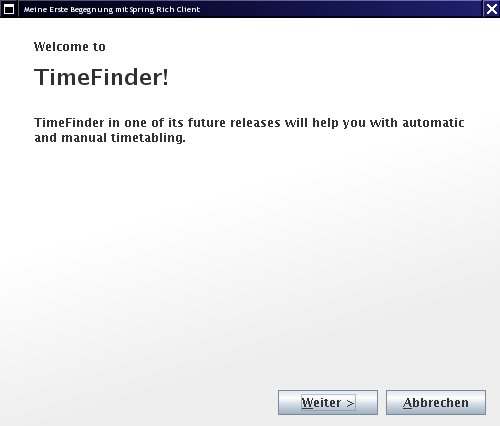
The used SetupWizard extends from AbstractWizard. This abstract class could be used for any other wizards: just add one or more AbstractWizardPages to the wizard and see this documentation. Here is the result:

Another cool feature is to show a progressbar on the splashscreen. This was very easy: add (or replace the existing) bean to the startup-context.xml file:
<bean id="splashScreen" class="org.springframework.richclient.application.splash.ProgressSplashScreen" scope="prototype">
        <property name="imageResourcePath" value="/de/peterk/springr/ui/images/splash-screen.png" />
        <property name="showProgressLabel" value="true" />
</bean>
Now I did an ugly hack. I want to change the colors of the progressbar. But only on the progressbar on startup, so we have to revert the following code:
Color myYellow = new Color(255, 225, 100);
Color myGreen = new Color(120, 208, 60);
UIManager.put("ProgressBar.selectionForeground", myYellow);
UIManager.put("ProgressBar.selectionBackground", myGreen);
UIManager.put("ProgressBar.foreground", myGreen);
UIManager.put("ProgressBar.background", myYellow);
UIManager.put("ProgressBar.border", new LineBorderUIResource(myYellow));
To revert these changes, please look into the method LifecycleAdvisor.onPreWindowOpen (see the resources section, I will not post it here – it is too stupid ;-))
Here is the result:

Hopefully I can create a next blog entry about the docking framework MyDoggy and the integration into SpringRC. Now it works like a charm – try it out! (see resources).
Today I will show what you can apply to all ‘component managers’ that are integrated in SpringRC.
First: there is one application per virtual machine. But there could be one or more ApplicationPages (JFrames) with several views (center, north, south, …). In our case (MyDoggy) there is only one ApplicationPage.
Normally you want to have more than one component per start-up page. To change this add the following xml to the application-context.xml:
<bean id="aLotOfViews" class="org.springframework.richclient.application.support.MultiViewPageDescriptor">
   <property name="viewDescriptors">
     <list>
        <value>view2</value>
        <value>initialView</value>
     </list>
   </property>
</bean>
And change the startingPageId in the lifecycleAdvisor bean to aLotOfViews. With the upcoming MyDoggy 1.5.0 enabled we can get this nice layout, which will be automatically saved(!):

Of course it is possible to use other layout manager like swing dockings:

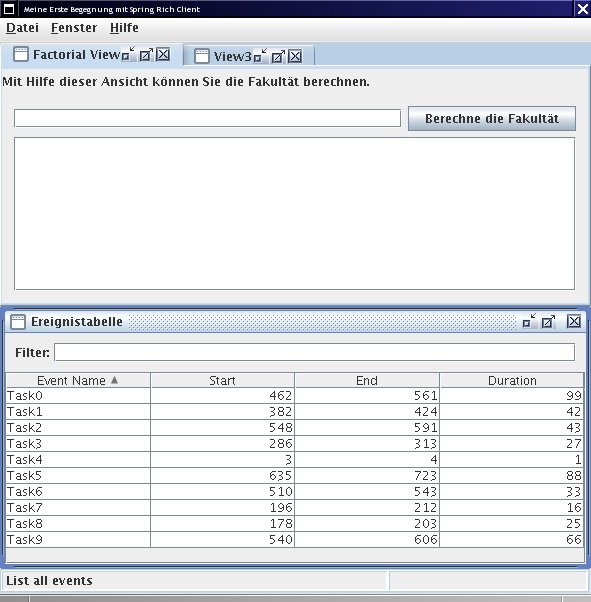
If you want to use custom components: just add them! I created a custom component with the open source Matisse GUI builder integrated in NetBeans. Here is the code how you can put this component into SpringRC:
public class CalculatorView extends AbstractView {
    protected JComponent createControl() {
        JPanel panel = getComponentFactory().createPanel(new BorderLayout());
        panel.add(new CalculatorPanel()/*created with Matisse*/, BorderLayout.CENTER);
        return panel;
    }}
To add this view to the startingPage do (aLofOfViews already references to this bean, so no changes are necessary there):
<bean id="view2" class="de.timefinder.core.ui.mydoggy.MyDoggyViewDescriptor">
        <property name="viewClass" value="de.timefinder.core.ui.CalculatorView" />
</bean>
One thing you have to know is: How to translate keys within this ‘external’ CalculatorView?
In Matisse do:
For all of the following components it is easier: do 1, 2, 3 and insert the key! This could be the new slogan for Matisse 😉
Now some more I18N. For example you want to display: “Result of $number!” you should use the following line in message.properties:
calculatorPanel.title=Result of {0} !
and get the formatted string via
Application.instance().getApplicationContext().getMessage("calculatorPanel.title", new Object[]{result}, null);
Another small point could be the ugly output of the standard java 1.4 Logger. We will now change the two-lined logging output into a one-lined. Actually this is a one-liner if you look for yourself into the resource section for the TFFormatter class:
java.util.logging.Logger.getLogger("de.timefinder").getParent().getHandlers()[0].setFormatter(new TFFormatter());
In Swing you can use the Swing ProgressMonitor, but in SpringRC you should use the integrated ProgressMonitor to indicate the current progress of a task in the bottom right corner of the page:

With the factorial view of my example you can calculate, yes, factorials. I tried “50 000” and the calculation took nearly the same time as adding the number to the JTextArea …
So, use the ProgressMonitor in combination with the SwingWorker (I grabbed it from jdesktop, but you can use SpringRC’s Swingworker as well. Get the concurrent package from here or through maven. )
Now you can use the following code to execute a long running task:
ApplicationWindow aw = Application.instance().getActiveWindow();
final ProgressMonitor pm = aw.getStatusBar().getProgressMonitor();
String str = Application.instance().getApplicationContext().getMessage("calculatorPanel.startTask", null, null);
pm.taskStarted(str, -1);
SwingWorker sw = new SwingWorker() {
        BigInteger resultLong = BigInteger.ONE;
        //protected Object construct() in SpringRC's SwingWorker!
        protected Object doInBackground() {
            // now my long task and the progress indication
            for (int i = 2; i <= fac && !pm.isCanceled(); i++) {
                pm.worked(100 * i / fac);
                resultLong = resultLong.multiply(BigInteger.valueOf(i));
            }
            return resultLong;
        }
        //protected void finished()
        @Override
        protected void done() {
            // all of the following code will be called on the Event Dispatching Thread
            if (pm.isCanceled()) {
                output.setText("Canceled");
            } else {
                output.setText(resultLong.toString());
            }
            pm.done();
        }
    };
    //sw.start();
    //sw.clear(); // reuse would be possible with SpringRC's SwingWorker!
    sw.execute();
SpringRC offers us – as client-side-programmers – a bunch of powerful utilities to build our application fast and scaleable. Some parts are well documented; some parts not. But I think with relaunching the project in October ’08 (hopefully!) as Spring Desktop it will get a lot of support from even more users and maybe from the company SpringSource itself. Hopefully then the documentation will be better…
The most important point for me is that SpringRC is ‘only’ a sweat jar collection and not a layer between me and Swing.
Another point is that SpringRC uses dependency injection and NetBeans RCP uses the service locator approach e.g.
SomeInterfaceImpl impl = Lookup.lookup(SomeInterface.class).
instead of the setter injection in the very first example for SpringRC.
For others this could be one more argument against NetBeans RCP (not for me …)
Normally the reason why I write blogs is to inform other people about interesting things I found or I am thinking about. Today I will ask some questions and wait for your answer 😉
One of my latest posts was about the spring rich client. Because of this project and picocontainer I read a lot about design patterns. The most obvious design pattern in spring is called dependency injection. This design pattern helps the software architect to loosly couple components. It could work like follows (just for the JSE-developers under us):
class ClassA {
MyInterface objectA;
public void setMyInterface(MyInterface objA) {objectA = objA;}
}
where we could have defined the interface like this:
interface MyInterface{ String toString(); }
Now, ClassA defines a dependency on an instance of MyInterface and the framework (for Java e.g. picocontainer, spring, juice or others) will inject an instance of an implementation of MyInterface into ClassA. It is up to the configuration if objA is a newly created instance or if it is a ‘singleton’. (MyInterface could be a class as well.)
For example if you call
ClassA classA = framework.getBean(ClassA.class); //code is similar to picocontainer; not to spring!
You will get back an instance of class ClassA, where objectA is not null! The dependency was defined by the method (setMyInterface) – this is called setter injection. Other kinds of injections are:
Where picocontainer campaigns for constructor and spring for setter injection (but both projects offer at least the mentioned kinds of injection).
It is correct that you can create your own small framework or even set up the objecs by hand to achieve the same: dependency injection. But I guess you are lazy and will choose one of the open source frameworks.
Now, all is explained to understand my 3 questions. Hopefully someone out there will have an answer!
1. How should I design a library?
Let me explain. You want to sell a nice designed, but complex library. The library offers a lot of functionality and you want to split it into loosly coupled components. That means you have to use dependency injection (DI), but you don’t know if the customer has or wants such a DI-framework.
So, if you use e.g. the annotation-based injection it would be nearly impossible for the customer to use your library; with setter or constructor injection it is quite difficult to set up the objects for using your library.
I don’t know what to do: Should I really use dependency injection here? Or should I use a (dynamic) service locator instead; to decouple my components within the library?
Martin Fowler says:
“It (dependency injection) tends to be hard to understand and leads to problems when you are trying to debug. […] This isn’t to say it’s a bad thing, just that I think it needs to justify itself over the more straightforward alternative (service locator).”
“A common reason people give for preferring dependency injection is that it makes testing easier. The point here is that to do testing, you need to easily replace real service implementations with stubs or mocks. However there is really no difference here between dependency injection and service locator: both are very amenable to stubbing. I suspect this observation comes from projects where people don’t make the effort to ensure that their service locator can be easily substituted.“
“So the primary issue is for people who are writing code that expects to be used in applications outside of the control of the writer. In these cases even a minimal assumption about a Service Locator is a problem.”
So: What would you do? Would you use a service locator or dependency injection inside the library?
And this leads me to the next important question:
2. Why is a singleton an antipattern?
I stumbled over this question while I used picocontainer. They say you have to avoid singletons, because it is difficult to test and to replace. My question is: why? Imagine the following singleton:
class LogFactory{
public static Logger getLogger(Class clazz) { … }
}
Now it is really easy to replace the implementation of the Logger interface e.g. if one defines a setImpl method:
LogFactory.setImpl(LoggerForTesting.class);
So what’s soo wrong with a singleton?
3. How can I avoid making all classes public?
I don’t know if it is the case for autowiring in spring. But in picocontainer you have to set-up the configuration for the wiring of the classes by yourself e.g. in a separate class (with Java; no xml! compiler checks references! yeah!) or in a separate file with a scripting language (or xml) and nanocontainer. That means you could specify the implementations of the interface by:
framework.setImpl(MyInterface.class, FirstImpl.class);
But wouldn’t it mean that I have to add the modifier public to the class FirstImpl? (To let picocontainer call the default constructor.) This can’t be good design to allow the user of my library to see the implementations of MyInterface.
Whats wrong with my use case and my conclusion?
“Today” I learned C# and I will post some intersting facts about Java and C#. But please, this is just a draft. Maybe this wikipedia article is a better place for you.
And please correct me, if I posted mistakes or invalid facts about C#. Or if you missed a great feature of C# or an example of the facts, then please let me know.
verbatim strings begin with the special character @. Please see this doc.
string c = "hello \t world";               // hello     world
string d = @"hello \t world";               // hello \t world
string g = "\\\\server\\share\\file.txt";   // \\server\share\file.txt
string h = @"\\server\share\file.txt";      // \\server\share\file.txt
In c# we have real generics, with separate namespace: System.Collections.Generic (instead System.Collections)
For a direct comparison of these two packages, please visit this page of galileo computing and go to the chapter 7.4.8.
But it seems to me the Java collection API has some more Classes, e.g. today I missed a Set. Okay we can simulate it via a SortedList<Key, Value> …
in C#: there is a BitVector which is variable in length and allocated on the heap (BitVector32 has only 32 bits and allocated on the stack, so its faster.)
In Java there is similar class BitSet.
What’s better in Java?
Although I love Java there are really cool things in C#:
Feel free to post your experiences with C#!
English documentation:
http://msdn.microsoft.com/en-us/library/ms228358.aspx
German documentation:
http://www.galileocomputing.de/openbook/csharp
Do you know what real time editing is?
No, then look at this fantastic video to see this feature in Eclipse.
Or browse through this tutorial. It is really great.
I love NetBeans. So is there something similar for NetBeans? Yes! There is a collaboration plugin, but I tried it for myself and, sorry, it is really bad.
Update: You need a private server and then it should work
Here you have my bug list:
So the previous bugs are not bad. But then when I tried it with a developer (of timefinder.de) it is only useable for a normal chat, because:
But please proof me wrong and contact me via
Today I will start a series about the great Swing framework called Spring Rich Client (SRC). The 1.0.0 version was released in March 2008 and it is not inactive as I thought before.
You can get more information about SRC from:
Why I listed the forum as the first point? Because for a beginner like me it was the best source of information (after the samples).
So, let us set up a hello world example.
If you use my Hello World skeleton you should open it in NetBeans, right click on the project node and resolve reference problems. Then go to the place where you have unzipped the SRC and add the first jar file. The other jar files should be added automagically for you.
The project with dependencies would be about 2.7 MB, it is not a small overhead, but okay, I think. As an example for the reader one can compare it to the minimal size of the NetBeans or Eclipse RCP.
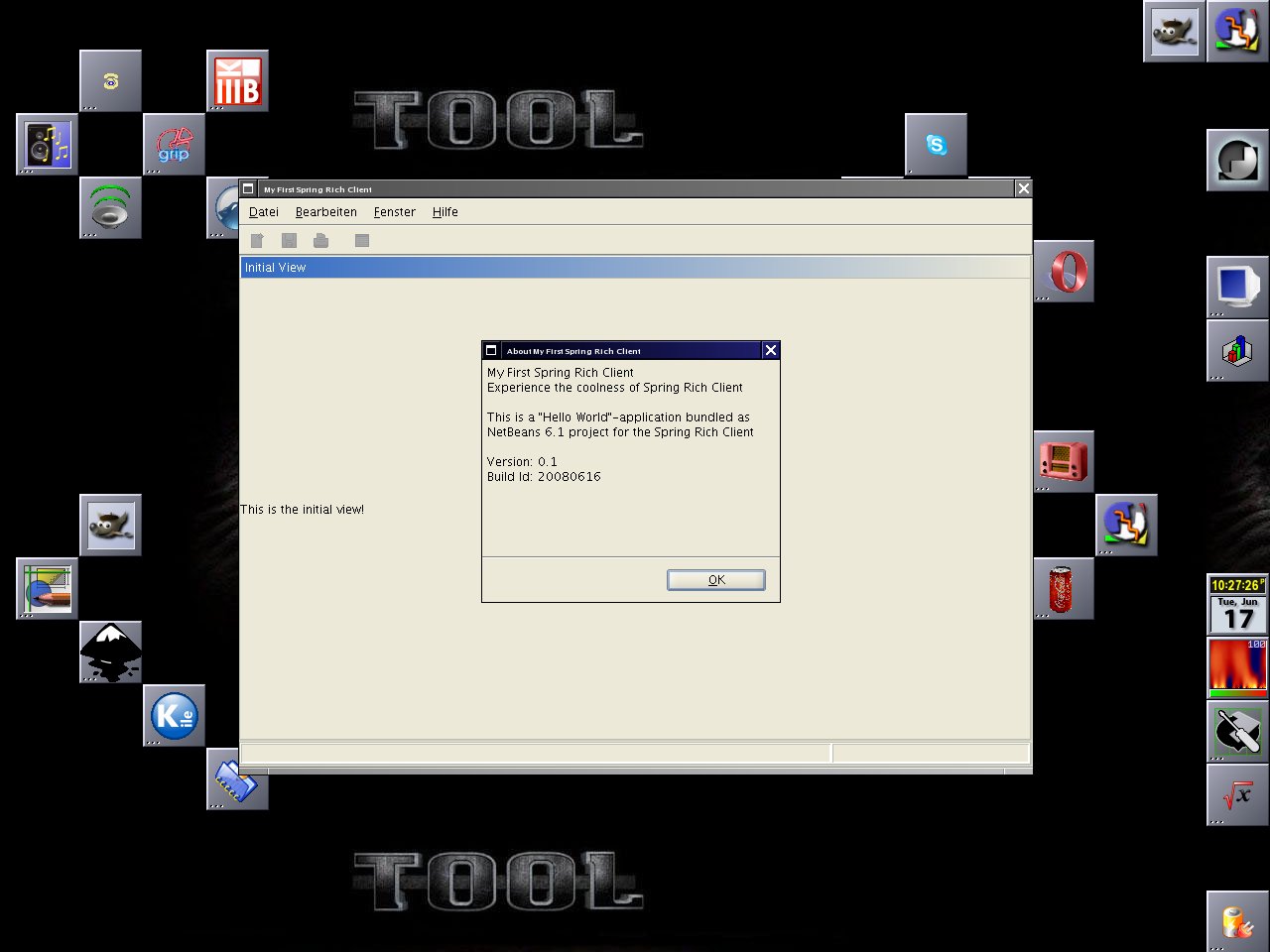
Now it is time to start the project with F6 or Run->’Run Main Project’. You should see the frog-splashscreen and the final view:
Now let me explain several things that one could customize in SRC. Please see the Resources section for the result of customization.
As the first point I wanted to know how easy it is to introduce docking capabilities (vl docking). It was really easy!
Then you can add a new window to see the results of dragging:
Now,
how easy is it to use your own layout? Configuring the look and feel:
Okay, then changing the splash screen is trivial: just overwrite the splash-screen.png or change the path in the richclient-startup-context.xml file.
Now we should adjust the size of the view, this can be done with 2 lines in the method SimpleLifecycleAdvisor.onPreWindowOpen:
Rectangle rect = GraphicsEnvironment.getLocalGraphicsEnvironment().getMaximumWindowBounds();
configurer.setInitialSize(new Dimension(rect.width, rect.height));
And to translate the messages simply copy all property files to e.g. file_de.properties and translate them! In our case it means “cp message.properties message_de.properties”. If you want to add a translateable tool tip of the initalView-label just use:
To set a keyboard shortcuts e.g. to leave the application. You need to add one line to the message.properties file
Another interesting action (in SRC they will be called commands) could be restart. So how can we add the action into the menu? You have to add
The final result is:
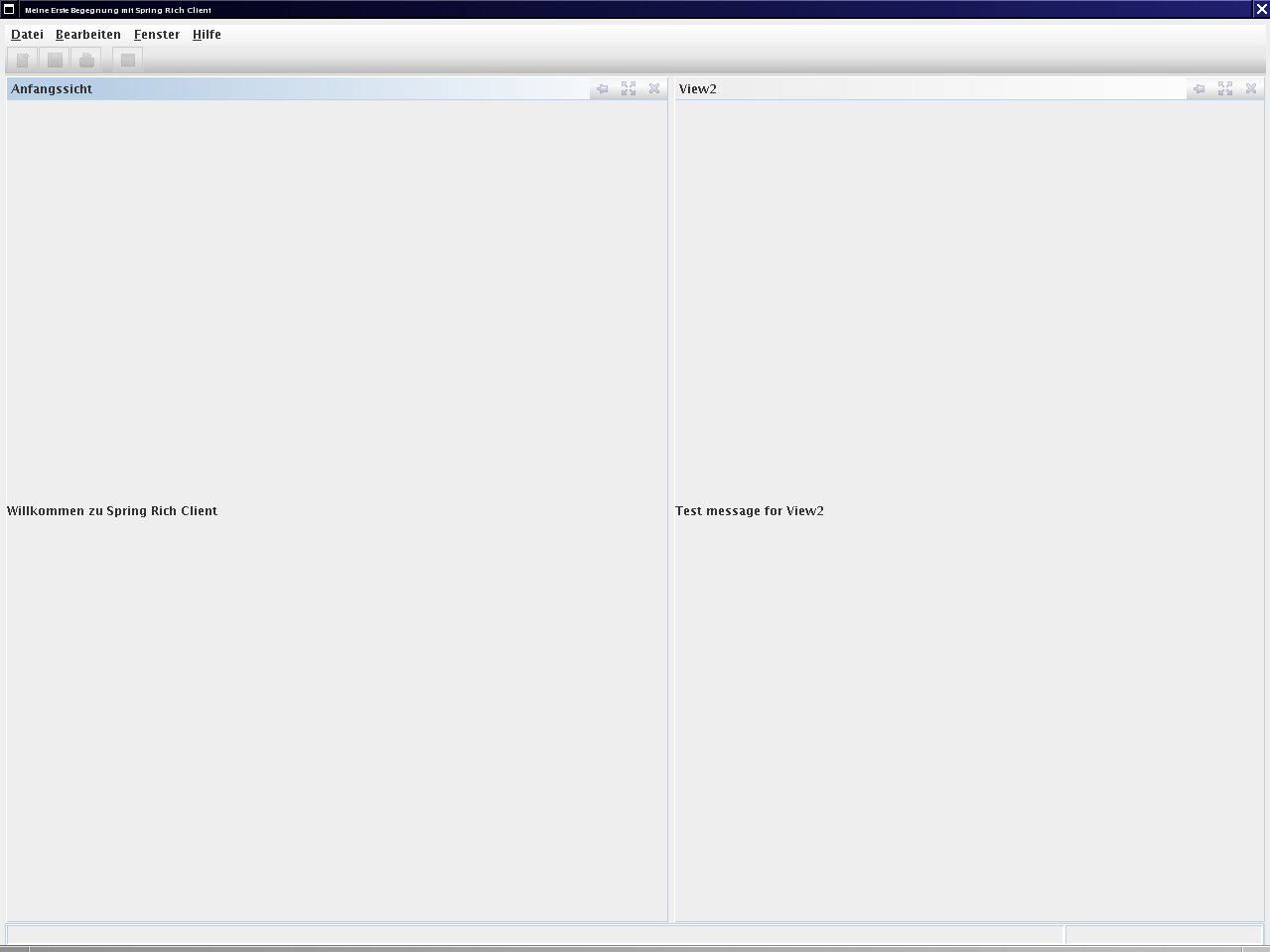
Here you can download the extended “hello more” sample (a NetBeans 6.1 project about 90 KB, without dep). The full project was 2.9 MB.
One can say that Spring Rich Client is a powerful jar collection :-). But I would say SRC is a great way for your next swing application!
It is very intuitive to use: the whole sample (including to write this blog) took me only about 6 hours. I think you could be really productive with it! In the case I published the documents with mistakes: please leave your comment here!
Today I am looking around which library or framework could make my life easier while developing with Swing.
For Swing I need nice components, dialogs, wizards, background threads, etc.
In additation to this I will need ‘easy’ logging, ‘easy’ translation, beans binding and so on. The final requirements are not fixed at the moment so I will take just a survey 😉
So whats the difference between an ordenary ‘libray’ and the hip ‘framework’?
I think the main difference between a framework and a library is, that you have to call the libraries methods directly from code. Swing itself is a framework, so it calls your methods; e.g. your ActionListener’s listen to an action from Swing and will be called from Swing. That means a framework uses the hollywood principle or sometimes called dependency injection.
Let me start with the ‘EierlegendeWollmilchsäue’ (the more bigger frameworks):
There are some smaller, but very nice libraries and frameworks:
Do you know other free libraries or frameworks, which could be useful for Swing development?
A long time I invested to explore the project called Datanucleus where you can use object oriented DBs like db4o, relational DBs like derby or just XML files as datasource!
Thats fantastic and open source :-). You can find more implementations of JDO here.
Other resources:
Derby is a good database, which could pass ACID tests. You could run it in embedded mode, which makes it suiteable for the usage in your standalone swing application.
A pure xml library is XStream. Where you can (de)serialize your objects with one method call. No configuration! Really.
 Navigatone