Relax NG

For my open source timetabling application (gstpl) I want to create a file format. There are some standard timetabling formats, but none of them is easy and general.

I decided to use a schema to validate the created xml file. Checking the well-formedness is easy, but for validation you need to define a grammer, i.e.define what tags (and attributes) should be possible and which combinations.

There are three main schema types: DTD, XML Schema and Relax NG (.dtd, .xsd and .rng/.rnc). The first one is not so powerful, so perhaps it is better to use XML Schema. There are a lot of editors like “NetBeans XML” which can handle the validation of XML Schema and even the schema creation from within the editor. There is a graphical editor available:
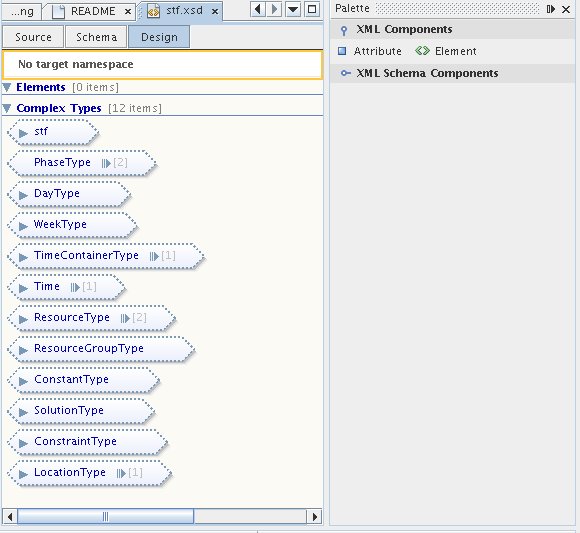
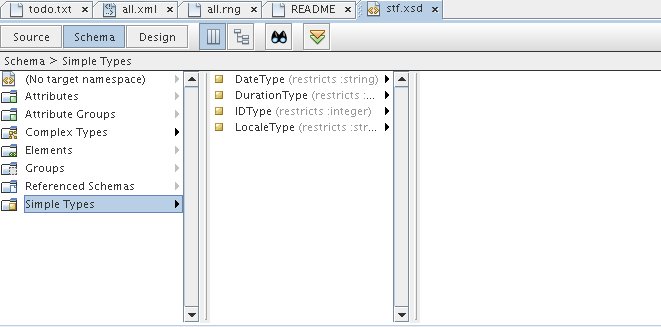
NetBeans XML DesignerNetBeans XML Editor

For Relax NG I didn’t find such a good and free editor easily for linux, although I could write alot faster with Relax NG. E.g. in XML Schema you need:

<xs:element name=”Header”>
<xs:complexType>
<xs:sequence> …

In Relax NG you only need one line:

<element name=”Header”>

And attributes are handled compareable to elements – in this way you can define e.g. that either a tag ‘test’ or an element ‘test’ should exist:

<choice>

<element name=”test”><text/></element>

<attribute name=”test”><data type=”string”/></attribute>

</choice>

I found no way to define it in XML Schema.

Now here are some editors:

  • XML Copy Editor RelaxNG editing and validation (no support for compact style)
  • Etna (only xml editor where you ensure that the created xml is valid against some given schemas)
  • nXML addon for emacs

some (extern) validators:

  • jing compact and xml style
  • rnv only compact style
  • relax ng + XML Schema via Sun Multi-Schema XML Validator (MSV), select msv.20080213.zip
  • relax ng with embedded schematron constraints via MSV, select relames.20060319.zip.

some (extern) conversation tools:

  • via MSV (select rngconv.20060319.zip) you can create a relax ng file from various schemas types.
  • trang (could even create a schema from a given example xml – I didn’t tried it)
  • relaxer is a compiler to generate various artifacts from a schema (download version 1.0), could even create a schema from a given example xml – it works!! A lot more intersting features are provided.

some tools:

  • via MSV (select xmlgen.20060319.zip) you can create xml files from various schemas types. To have some test instances of the created schema.
  • XML Schema Datatypes implementation via MSV (select xsdlib.20060319.zip) to use XML Schema Part 2

So after creating my schema in relax ng (this was really faster then with XML Schema) I can convert it into XML Schema. Then NetBeans offers a JAXB Binding (schema to java code) for XML Schemas:
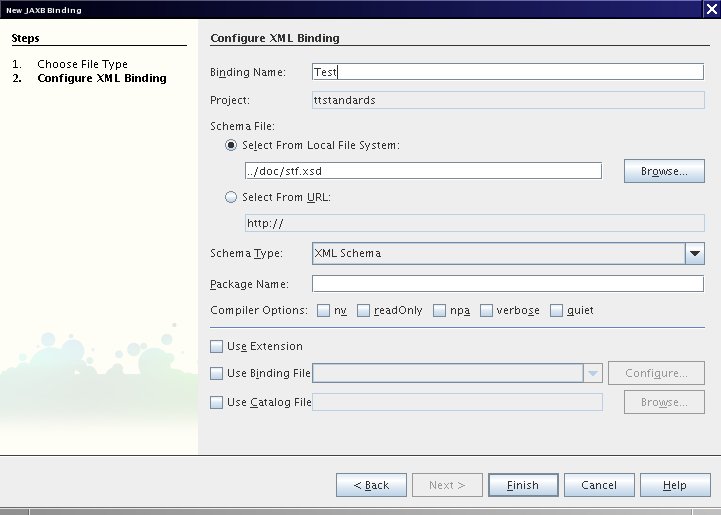
NetBeans JAXB Binding Dialog

(You have to install the whole netbeans – I think the xml + soa stuff??)

Lizenztext und Benutzername | Custom License-text and User-name for NetBeans

Ich habs endlich hinbekommen: jede neue Datei trägt meinen Name als @author und meine eigene Lizenz im Dateikopf.

(For the english version see below)

Eigener Lizenztext

Zuerst müsst ihr den Lizenztext z.B. nach /home/user/quell/license-lgpl.txt kopieren. Der Name dieser Datei ist dabei wichtig.

Als nächstes in der projekt-spezifischen Datei nbproject/project.properties

project.license=lgpl

einfügen. Z.B. innerhalb NetBeans: Einfach euer Projekt in der Dateiansicht ‘File’ öffnen.

Jetzt müssen wir NetBeans noch sagen wo die Datei license-lgpl.txt steckt:

Wähle in Tools->Templates den Knoten ‘Licenses’ aus und

suche mittels ‘Add..’ die vorher kreierte Datei /home/user/quell/license-lgpl.txt.

Diese sollte dann unter Licenses hinzugefügt worden sein.

Nun einfach mittels Rechtsklick auf ein Java Paket ausprobieren:

New->Java Interface auswählen und ‘Constraint’ eingeben.

Veränderter Benutzername

Dies ist ein Trick von Geertjan. Die User.properties öffnen:

in Tools->Templates->User Configuration Properties->User.properties

Dort einfach einfügen

user=Peter Karich, peat_hal ‘at’ users ‘dot’ sourceforge ‘dot’ net

English Translation

I have solved the problem in the latest NetBeans 6.1: every new file has my name as a value for the @author attribute and my own license text as header.

Your own license text

First of all you have to copy your license text e.g. to /home/user/quell/license-lgpl.txt. The name of this file is important.

As a next step go into the project specific file nbproject/project.properties and add

project.license=lgpl

E.g. with the files window within NetBeans.

Now you have to specify that you want to use this file as license text:

Go to Tools->Templates and choose ‘Licenses’ then search via ‘Add..’ the previously created file /home/user/quell/license-lgpl.txt.

To test it right click on a java package and choose:

New->Java Interface auswählen; then type ‘Constraint’ and you should see the license header.

Here is an example of an adapted apache header:

<#if licenseFirst??>
${licenseFirst}
</#if>
${licensePrefix}This file is part of the TimeFinder project.
${licensePrefix}Visit http://www.timefinder.de for more information.
${licensePrefix}Copyright ${date?date?string(“yyyy”)} the original author or authors.
${licensePrefix}
${licensePrefix}Licensed under the Apache License, Version 2.0 (the “License”);
${licensePrefix}you may not use this file except in compliance with the License.
${licensePrefix}You may obtain a copy of the License at
${licensePrefix}
${licensePrefix} http://www.apache.org/licenses/LICENSE-2.0
${licensePrefix}
${licensePrefix}Unless required by applicable law or agreed to in writing, software
${licensePrefix}distributed under the License is distributed on an “AS IS” BASIS,
${licensePrefix}WITHOUT WARRANTIES OR CONDITIONS OF ANY KIND, either express or implied.
${licensePrefix}See the License for the specific language governing permissions and
${licensePrefix}limitations under the License.
<#if licenseLast??>
${licenseLast}
</#if>

Change your user name

This trick is from Geertjan. Open User.properties in Tools->Templates->User Configuration Properties->User.properties

Replace all stuff with

user=Peter Karich, peat_hal ‘at’ users ‘dot’ sourceforge ‘dot’ net

and you are done.