Puh, encoding! Did you ever have trouble with it? No? You must be a lucky guy!
Even none-developers should have problems with it e.g. if they use different operating systems.
What is encoding? And what’s so difficult with the encoding?
First encoding (better: character encoding) defines how characters have to be saved to be displayed correctly in your editor or look at the wikipedia definition to be correct. Update: here is a nice introduction.
For example if your editor only reads ASCII files all is very simple: it will use every 8 bits of the bitstream to get a number. Then it will interpret this number according to the ASCII-table. So, if it finds a 97 (this is 0x61 in hexadecimal) it prints ‘a’.
(BTW: look at this nice ASCII-art.)
But what if the encoding is another one? Or if even the bitstream should be splitted into 16-bits-packages instead of 8-bits-packages?
Then the user won’t see the correct information!
Second: On linux everything is in UTF-8. Windows uses CP 1252. and so on. Not good!
(With everything I means: clipboard, default file encoding, …)
How can you (as an end user) handle this under linux?
There are at least 4 programs that helps you with encoding issues under linux:
- There are command line utilities in linux where you can determine automatically the encoding of a file: enconv and enca or open the file in firefox and go to View -> Encoding and view the detected encoding!
- To change the encoding of file-content the editor kate is really great:
Go to extras -> encoding and try it out.
- Change the encoding of the content of several files which come from windows and you want to have them in linux then use recode:
recode CP1252..UTF-8 *
recode ISO-8859-1..UTF-8 *
do the following to backup the original files:
mkdir test && cp * test/ && cd test
- Another command line utility is iconv (or here)
- Change the encoding of the filenames with convmv (files e.g. from windows).
To preview the change do:
convmv -f cp1252 -t utf8 *
To do the change:
convmv --notest -f cp1252 -t utf8 *
How does Java handle encoding?
Java is platform independent one should think, but it isn’t regarding to the encoding.
For example: if you read a file correctly under linux, this could fail if you don’t specify the encoding explicitly, because it assumes it is utf8 and under windows it will use another default!
To override the default use: ‘java -Dfile,encoding=UTF-8’ or be explicit with the encoding! E.g read characters from a stream with the following lines:
BufferedInputStream iStream = new BufferedInputStream(urlConn.getInputStream());
InputStreamReader reader = new InputStreamReader(iStream, "UTF-8");
Another issue could be Java source files. They can have different encoding. You should use UTF8, because this is the encoding Java uses for its Strings.
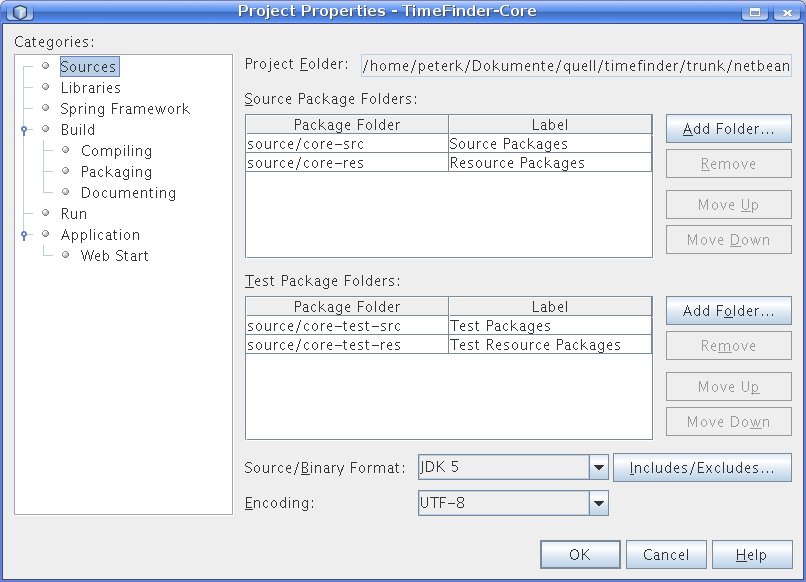
In NetBeans 6.1 change it in the project properties (right-click on the project->properties)->Source->Encoding
In Eclipse 3.4 go to the preferences (menu Window) -> General ->Workspace->text file encoding
But this is only useful for desktop applications like my open source timetabler. But what if you do web development? All fine there? No not really. Then you might get additional problems with url encoding or xml parsing. For the latter one the fix is simple:
- XML: <?xml version=”1.0″ encoding=”UTF-8″?>
But for url encoding the following does not really work:
- JSP: <%@page contentType=”text/html; charset=UTF-8″ language=”java”%>
Apropos JSP – I had an encoding issue with the request. Try the following:
<% out.print(“RESPONSE character encoding=” + response.getCharacterEncoding() + ” “);
out.print(“REQUEST character encoding=” + request.getCharacterEncoding() + ” “);
out.print(“JVM encoding ” + System.getProperty(“file.encoding”) + ” “);
//EVEN here we get request parameter in wrong encoding
bean.setRequest(request);
%>
You will see that the request is null if I am not wrong. And then Java will use utf8? NO!
It will use ISO-8859-1! Why? It is written in the standard!
A simple request.setCharacterEncoding(“UTF-8”); would help if all browsers would send its request according to the header of the jsp. But this isn’t actually working for my use case. So I grabbed the strings from the request via this helper method:
private String toUTF8(String str) {
        try {
            return new String(str.getBytes("8859_1"), "UTF8");
        } catch (UnsupportedEncodingException ex) {
            return str;
        }
}
Update 1: Read this or this to get a better workaround with a javax.servlet.Filter, webserver parameters and jsp configs.
Update 2: The following snippets could be useful if you are using maven and want to make the application UTF-8 aware:
<plugin>
<artifactId>maven-compiler-plugin</artifactId>
<configuration>
<source>1.6</source>
<target>1.6</target>
<encoding>UTF-8</encoding>
</configuration>
</plugin>
<plugin>
<groupId>org.apache.maven.plugins</groupId>
<artifactId>maven-resources-plugin</artifactId>
<configuration>
<encoding>UTF-8</encoding>
</configuration>
</plugin>
Update 3:
A good side with a lookup table for Unicode characters
http://unicode.coeurlumiere.com/
Summary

I invite you to post all your experiences with encoding problems in java.
E.g. how to force jboss or jetty to use utf8?

 Navigatone
