How different is a quickstart project from production?
Today we released jetwick. With jetwick I wanted to realize a service to find similar users at twitter based on their tweeted content. Not based on the following-list like it is possible on other platforms:
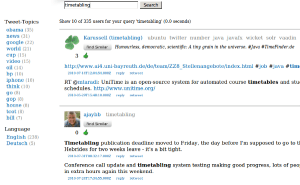
Not only the find similar feature is nice, also the topics (on the right side of the user name; gray) give a good impression about which topic a user tweets about. The first usable prototype was ready within one week! I used lucene, vaadin and db4o. But I needed facets so I switched from lucene to solr. The tranformation took only ~2 hours. Really! Test based programming rocks 😉 !
Now users told me that jetwick is slow on ‘old’ machines. It took me some time to understand that vaadin uses javascript a lot and inappropriate usage of layout could affect performance negativly in some browsers. So i had the choice to stay with vaadin and improve the performance (with different layouts) or switch to another web UI. I switched to wicket (twitter noise). It is amazingly fast. This transformation took some more time: 2 days. After this I was convinced with the performance of the UI. The programming model is quite similar (‘swing like’) although vaadin is easier and so, faster to implement. While working on this I could improve the tweet collector which searches twitter for information and stores the results in jetwick.
After this something went wrong with the db. It was very slow for >1 mio users. I tweaked to improve the performance of db4o at least one week (file >1GB). It improves, but it wouldn’t be sufficient for production. Then I switched to hibernate (yesql!). This switch took me again two weeks and several frustrating nights. Db4o is so great! Ok, now that I know hibernate better I can say: hibernate is great too and I think the most important feature (== disadvantage!) of hibernate is that you can tweak it nearly everwhere: e.g. you can say that you only want to count the results, that you want to fetch some relationship eager and some lazy and so on. Db4o wasn’t that flexible. But hibernate has another draw back: you will need to upgrade the db schema for yourself or you do it like me: use liquibase, which works perfectly in my case after some tweeking!
Now that we had the search, it turned out that this user-search was quite useful for me, as I wanted to have some users that I can follow. But alpha tester didn’t get the point of it. And then, the shock at the end of July: twitter released a find-similar feature for users! Damn! Why couldn’t they wait two months? It is so important to have a motivation … 😦 And some users seems to really like those user suggestions. ok, some users feel disgustedly when they recognized this new feature. But I like it!
BTW: I’m relative sure that the user-suggestions are based on the same ‘more like this’ feature (from Lucene) that I was using, because for my account I got nearly the same users suggested and somewhere in a comment I read that twitter uses solr for the user search. Others seems to get a shock too 😉
Then after the first shock I decided to switch again: from user-search to a regular tweet search where you can get more information out of those tweets. You can see with one look about which topics a user tweets or search for your original url. Jetwick tries to store expanded URLs where possible. It is also possible to apply topic, date and language filters. One nice consequence of a tweet-based index is, that it is possible to search through all my tweets for something I forgot:
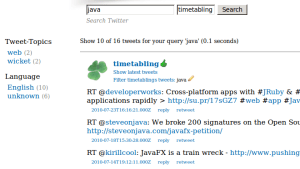
Or you could look about all those funny google* accounts.
So, finally. What have I learned?
From a quick-start project to production many if not all things can change: Tools, layout and even the main features … and we’ll see what comes next.


 Navigatone