Feeding Solr with its own Logs

I always looked for a simple way to visualize our log data e.g. from solr. At that time I had in mind a combination of gnuplot and some shellscripts but this session from the lucene revolution changed my idea. (Look here for all videos from lucene revolution.)

I thought: “hey thats it! Just put the logs into solr!” So I coded something which simply reads the log files and named it Sogger. Without sharding, without message queues, … but it should work on real systems without any changes to your system (but probably to sogger).

I hope Sogger doesn’t suck, but it does not come with any warranty, so use it with care! And: It is only a proof of concept – nothing comparable to the guys from loggly.com

To get your logs sogged:

  • Download the ‘Sogger’ code via:
    hg clone http://timefinder.hg.sourceforge.net/hgroot/timefinder/sogger sogger-code
    
  • Download the Solr from trunk.
    svn co -r  1023329 https://svn.apache.org/repos/asf/lucene/dev/trunk solr-code
    

    Sogger doesn’t necessarily need the trunk version but I didn’t tested it for others yet

  • compile solr and Sogger with ant
  • cd solr-code/solr/example/
  • copy solrconfig.xml, schema.xml from Sogger into solr/conf
  • copy the *.vm files from Sogger into the files at solr/conf/velocity/
  • start solr
    java -jar start.jar
  • start feeding your logs
    cd sogger-code/
    java -jar dist/Sogger.jar url=http://localhost:8983/solr logFile=data/solr.2010-10-25.log.gz
    
  • to search your logs do:
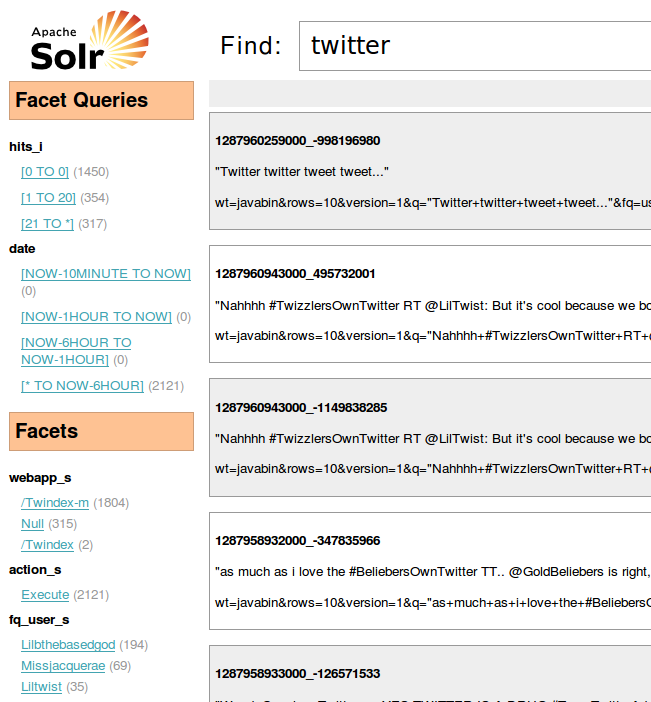
    http://localhost:8983/solr/browse?q=twitter

Now you should see something like this

Sogger has several advantages over simple “grep-ing” or scripting with your solr logs:

  • full text search. near real time: ~1min 😉
  • performance. I hope commiting every minute does not make solr a lot slower
  • filtering by log level: Quickly find warnings and exceptions
  • filtering by webapp: If you have multiple apps or solr cores which are logging into the same file filtering is really easy with solr (with grep too, but you’ll have to re-grep the whole log …)
  • open source: you can change the feeding method I used and take care of your special needs. Tell me if you need assistance!
  • new log lines will be detected and commited ala tail -f
  • besides text files sogger accepts and detects compressed (zip, gzip/gz) files ala zgrep. So you don’t need to change your log handlers or preprocess the files.

to do’s:

  • make the log format customizable within a property file:
    line1=regular expression pattern1
    line2=regular expression pattern2
  • read and monitor multiple log files
  • make it a solr plugin via special UpdateHandler?
  • a xy plot (or barchart) in velocity for some facets or facet queries would be nice. Something like I had done before with wicket.
  • I don’t like velocity … althought it is sufficient for this … but should we use wicket!?

Fun and some important Dev-Tweets of the last week, 11th October

Let us start with the fun tweets. Ok, this week a lot Java bashing tweets, but I like them!

  • maven 3 is out. It now lets you download the internet even faster than before.

  • The world needs to stop hyping “html5” as though it’s markup alone that builds rich web apps. It makes JavaScript angry.

  • “JavaScript is the only language that people feel they dont need to learn before they start using it.” – Crockford

  • Little known fact: JavaScript also has an isNaaN() function for when you aren’t sure if you’re working with Indian food

  • I have seen an app with SQL code in the *views*, looked like a java coder was given a php book and told to make a rails app.

  • Matz on #ruby speed: Build your website in Ruby until you have more traffic than Twitter, then use your riches to hire Java programmers.

  • OH: “Java is just a DSL for turning XML into core dumps.”

  • judging Clojure/Lisp by its parens is like judging Java by its classpath


And last but not least some intersting infos:


Of course this list isn’t complete! So, watch out for more fun and infos at twitter and contact me or comment if you want to add it here or for the next week.

Barchart with Wicket and pure HTML

I needed to display the tweets per day for my date filter @ jetwick.com

I tried the jfreechart approach but I didn’t like to have a generated image with an imagemap although it worked and looks nicely.

So here you have the html, css and java snippet necessary to do the same in pure html. Please comment if something is wrong (I had to edit the working code to remove the unnecessary solrJ stuff that I had within that component).

Html

<!DOCTYPE html PUBLIC "-//W3C//DTD XHTML 1.0 Strict//EN"
    "http://www.w3.org/TR/xhtml1/DTD/xhtml1-strict.dtd">
<html xmlns="http://www.w3.org/1999/xhtml" xml:lang="en" lang="en"
      xmlns:wicket="http://wicket.apache.org/dtds.data/wicket-xhtml1.4-strict.dtd">
    <head>
        <title>[Panel Test]</title>
    </head>
    <body>
        <wicket:panel>
               <div class="main-bar-chart">
               <div class="bar-chart">
                    <div wicket:id="items">
                        <a wicket:id="itemLink">
                            <span wicket:id="itemLabel">[Text]</span>
                            <div wicket:id="itemSpan"/>
                        </a>
                    </div>
              </div>
              </div>
        </wicket:panel>
    </body>
</html>

Css

.date-filter .main-bar-chart {
    background: #f2f2f2 url('../img/bottom-line.png') bottom left repeat-x;
    padding: 10px;
    width: 610px;
    height: 100px;
}
.date-filter-label {
    padding-bottom: 10px;
}
.date-filter .bar-chart, .main-bar-chart .gray  { color: gray; }

.date-filter .bar-chart .item {
    padding-left: 10px;
    float: left;
}

.date-filter .bar-chart .item span  {
    font-size: 12px;
}

.date-filter .bar-chart .item .item-span {
    background-repeat: repeat-y;
background-image: url('../img/bar-min.png');
}

Java

     private List<Object[]> entryList = new ArrayList<Object[]>();
    private long max = 1;

    public JSDateFilter(String id) {
        super(id);

        ListView items = new ListView("items", entryList) {

            @Override
            public void populateItem(final ListItem item) {
                float zoomer = MAX_HEIGHT_IN_PX / max;
                final Object[] entry = (Object[]) item.getModelObject();
                String strValue = (String) entry[0];
                Integer count = (Integer) entry[1];
                Label bar = new Label("itemSpan");

                AttributeAppender app = new AttributeAppender("title", new Model(count + " entries"), " ");
                bar.add(app).add(new AttributeAppender("style", new Model("height:" + (int) (zoomer * count) + "px"), " "));
                AjaxFallbackLink link = new AjaxFallbackLink("itemLink") {

                    @Override
                    public void onClick(AjaxRequestTarget target) {
                        //TODO
                    }
                };
                link.add(app);
                Label label = new Label("itemLabel", strValue);
                link.add(bar).add(label);
                if (count == 0) {
                    link.setEnabled(false);
                    link.add(new AttributeAppender("class", new Model("gray"), " "));
                }

//                if (selected)
//                    link.add(new AttributeAppender("class", new Model("filter-rm"), " "));
//                else
//                    link.add(new AttributeAppender("class", new Model("filter-add"), " "));

                item.add(link);
            }
        };

        add(items);
    }

    public void update(Map<String, Integer> map) {
        entryList.clear();
        max = 1;
        for (Entry<String, Integer> e : map.entrySet()) {
            entryList.add(new Object[]{e.getKey(), e.getValue()});
            if (e.getValue() > max)
                max = e.getValue();
        }
    }

You can use this code in your wicket page via the following snippet in the html:

<div wicket:id="dateFilter">[dateFilter]</div>

and add(new DateFilter(“dateFilter”)) in the Java part. The bar image is available here.

Important Java Tweets of the last week, 20th September

My last summary cries for another week: here you have the latest news and fun tweets.

Fun

News

Important Java Tweets of the last Week

First, a funny news from twitter.com/geekgay: Feliz Dia Do Programador! http://pt.wikipedia.org/wiki/Dia_do_Programador. Look at this wikipedia link to understand the tweet.

News

Fun

  • twitter.com/rhauch
    @al3x Maybe the JDK 7 release date keeps changing because java.util.Date is mutable?
  • twitter.com/al3x
    Maybe it’s hard to predict when JDK 7 will ship because they’re using java.util.Date in their automated prediction system?
  • twitter.com/jamesiry
    To sum up Java 7’s plan: it won’t have lambdas unless it will in which case it might not.
  • twitter.com/gilad_bracha
    If you need to use Java, you should be using Scala. If you don’t need to use Java – then you have options.

Now some funny tweets from today:

  • twitter.com/kumpera
    I chatted with a friend about Java other day. Oracle charged me $10 for that.
  • twitter.com/psnively
    Struts2 + Velocity = the type safety of Rails + the verbosity of Java.
  • twitter.com/angie_design
    va de nuevo para los programadores:¿Quien fue el primer programador de la historia? Pedro Picapiedra por que dominaba el Java Daba Duu

Subjective selected via ‘many retweets‘ at jetwick/?q=java. There is also an option to find the origin of any query, which I tried really hard for every tweet. So now I hope I always found the original author of the tweet!

Twitter Search Jetwick – powered by Wicket and Solr

How different is a quickstart project from production?

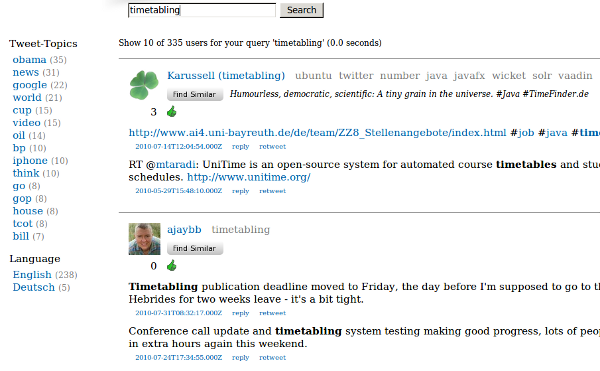
Today we released jetwick. With jetwick I wanted to realize a service to find similar users at twitter based on their tweeted content. Not based on the following-list like it is possible on other platforms:
Not only the find similar feature is nice, also the topics (on the right side of the user name; gray) give a good impression about which topic a user tweets about. The first usable prototype was ready within one week! I used lucene, vaadin and db4o. But I needed facets so I switched from lucene to solr.  The tranformation took only ~2 hours. Really! Test based programming rocks 😉 !

Now users told me that jetwick is slow on ‘old’ machines. It took me some time to understand that vaadin uses javascript a lot and inappropriate usage of layout could affect performance negativly in some browsers. So i had the choice to stay with vaadin and improve the performance (with different layouts) or switch to another web UI. I switched to wicket (twitter noise). It is amazingly fast. This transformation took some more time: 2 days. After this I was convinced with the performance of the UI. The programming model is quite similar (‘swing like’) although vaadin is easier and so, faster to implement. While working on this I could improve the tweet collector which searches twitter for information and stores the results in jetwick.

After this something went wrong with the db. It was very slow for >1 mio users. I tweaked to improve the performance of db4o at least one week (file >1GB). It improves, but it wouldn’t be sufficient for production. Then I switched to hibernate (yesql!). This switch took me again two weeks and several frustrating nights. Db4o is so great! Ok, now that I know hibernate better I can say: hibernate is great too and I think the most important feature (== disadvantage!) of hibernate is that you can tweak it nearly everwhere: e.g. you can say that you only want to count the results, that you want to fetch some relationship eager and some lazy and so on. Db4o wasn’t that flexible. But hibernate has another draw back: you will need to upgrade the db schema for yourself or you do it like me: use liquibase, which works perfectly in my case after some tweeking!

Now that we had the search, it turned out that this user-search was quite useful for me, as I wanted to have some users that I can follow. But alpha tester didn’t get the point of it. And then, the shock at the end of July: twitter released a find-similar feature for users! Damn! Why couldn’t they wait two months? It is so important to have a motivation … 😦 And some users seems to really like those user suggestions. ok, some users feel disgustedly when they recognized this new feature. But I like it!

BTW: I’m relative sure that the user-suggestions are based on the same ‘more like this’ feature (from Lucene) that I was using, because for my account I got nearly the same users suggested and somewhere in a comment I read that twitter uses solr for the user search. Others seems to get a shock too 😉

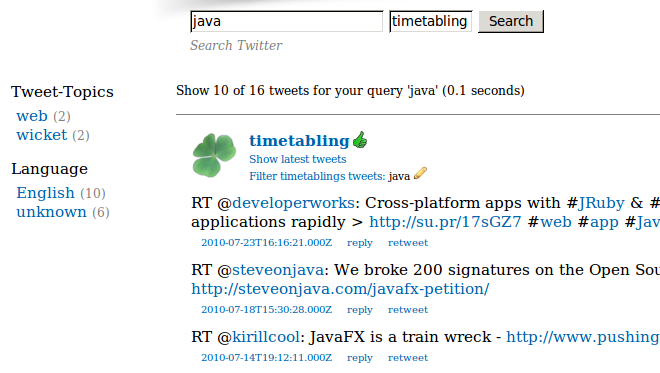
Then after the first shock I decided to switch again: from user-search to a regular tweet search where you can get more information out of those tweets. You can see with one look about which topics a user tweets or search for your original url. Jetwick tries to store expanded URLs where possible. It is also possible to apply topic, date and language filters. One nice consequence of a tweet-based index is, that it is possible to search through all my tweets for something I forgot:
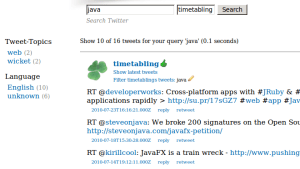
Or you could look about all those funny google* accounts.

So, finally. What have I learned?

From a quick-start project to production many if not all things can change: Tools, layout and even the main features … and we’ll see what comes next.

Not A Java Web Frameworks Survey: Just use Wicket!

‘Java Web Frameworks Survey’ was my first blog posted which was reposted at dzone. Sadly there never was a follow up of it. Although I planned one with:

jZeno, SpringMVC, Seam, Vaadin (at that time: IT-Mill Toolkit), MyFaces, Stripes, Struts, ItsNat, IWebMvc

Now, today just a short, subjective mini-follow-up, maybe someone is interested after all those months … over the months I have additionally investigated JSF, Rails, Vaadin and one more:

  • No comments to JSF :-/
  • Rails is great! Especially the db migrations and other goodies. Partials are a crap: I prefer component based UI frameworks. If you don’t like ruby take a look at grails with autobase.
  • Additionally I highly recommend everyone to take a look at vaadin (‘server-side GWT’) if you need a stateful webapplication. Loading time was a problem for me. Other client-side performance problems can be solved if you use CssLayout, I think.

But for jetwick.com I chose wicket! There were/are 10 reasons:

The most important thing is: if you use ‘mvn jetty:run’ and NetBeans in combination then the development cycle feels like Rails: modify html, css or even Java code. Save and hit F5 in the browser. Nothing more.

The only problem is the database migration (wicket solves only the UI problems). For that I would use liquibase. Or simply run db4o, a nosql solution ‘or’ solr.

Liquibase + Hibernate (annotations): Easy and solid Database Migration

As I pointed out earlier liquibase is a stable and nice migration tool for SQL databases in the Java land. The problem I had is that I couldn’t get it working with hibernate while using annotations.

Now just for my personal memory here are the steps to get it working. Download liquibase 1.9.5 (couldn’t get it working with 2.0.0 :-() and put the following libs in the liquibase/lib folder:

dom4j-1.6.1.jar
h2-1.2.137.jar #or your prefered jdbc database driver
hibernate-annotations-3.5.1-Final.jar
hibernate-commons-annotations-3.2.0.Final.jar
hibernate-core-3.5.1-Final.jar
hibernate-jpa-2.0-api-1.0.0.Final.jar
slf4j-api-1.6.0.jar

You will need to put the 4 hibernate jars into the classpath parameter, too. To do a diff and update the changelog file via the command line do the following:

liquibase --logLevel=FINE \
 --driver=org.h2.Driver \
 --classpath=$CP \
 --url=jdbc:h2:~/.myapp/h2db \
 --username=sa \
 --password=tmp \
 --changeLogFile=src/main/resources/dbchangelog.xml \
 diffChangeLog \
 --baseUrl=hibernate:src/main/resources/hibernate.cfg.xml

This means you compare the ‘old’ database with the new hibernate config. If you have problems while set-up you can look directly into the source file.

BTW: here is the pom snippet for the hibernate deps:

<dependency>
   <groupId>org.hibernate</groupId>
   <artifactId>hibernate-core</artifactId>
   <version>3.5.1-Final</version>
 </dependency>
 <dependency>
   <groupId>org.hibernate</groupId>
   <artifactId>hibernate-annotations</artifactId>
   <version>3.5.1-Final</version>
 </dependency>

Google Adwords API (sandbox): The specified client email does not exist.

If you encounter the following for the sandbox:

The specified client email does not exist. Your client accounts may not exist because either this is your first time using the sandbox or the sandbox database has been cleaned. Please remove the clientEmail from the request header and call the getClientAccounts method from AccountService to ensure that your client accounts are created and do exist.

Do what they mean 😉 !!

1. Run your application once with an empty clientId/clientMail (so use “” in the Java API) … then you will get an error, which is okay

2. Run your app a second time. But then specify the correct clientId (sth. like “client_1+youraccount@gmail.com”) and all should work fine.

How to Test Apache Solr(J)?


public class SolrSearchTest extends AbstractSolrTestCase {

 private SolrServer server;

 @Override
 public String getSchemaFile() {
    return "solr/conf/schema.xml";
 }

 @Override
 public String getSolrConfigFile() {
    return "solr/conf/solrconfig.xml";
 }

 @Before
 @Override
 public void setUp() throws Exception {
    super.setUp();
    server = new EmbeddedSolrServer(h.getCoreContainer(), h.getCore().getName());
 }

 public testFirstTry() {
    // e.g. add some docs via solrJ
    server.add(createDoc(entity1));
    server.add(createDoc(entity2));
    server.add(createDoc(entity3));
    server.add(createDoc(entity4));
    server.add(createDoc(entity5));

    // now query
    ArrayList myEntities = new ArrayList();
    SolrQuery query = new SolrQuery("text:peter").setQueryType("standard");
    QueryResponse rsp = server.query(query);
    SolrDocumentList docs = rsp.getResults();
    for (SolrDocument sd : docs) {
       myEntities.add(readDoc(sd));
    }

    assertEquals("peter", myEntities.get(0).getText());
    assertEquals(5, rsp.getResults().getNumFound());
 }
}

Another approach is documented here.