Get Started with ElasticSearch and Wicket

GraphHopper – A Java routing engine

karussell ads

This article will show you the most basic steps required to make ElasticSearch working for the simplest scenario with the help of the Java API – it shows installing, indexing and querying.

1. Installation

Either get the sources from github and compile it or grab the zip file of the latest release and start a node in foreground via:

bin/elasticsearch -f

To make things easy for you I have prepared a small example with sources derived from jetwick where you can start ElasticSearch directly from your IDE – e.g. just click ‘open projects’ in NetBeans run then start from the ElasticNode class. The example should show you how to do indexing via bulk API, querying, faceting, filtering, sorting and probably some more:

To get started on your own see the sources of the example where I’m actually using ElasticSearch or take a look at the shortest ES example (with Java API) in the last section of this post.

Info: If you want that ES starts automatically when your debian starts then read this documentation.

2. Indexing and Querying

First of all you should define all fields of your document which shouldn’t get the default analyzer (e.g. strings gets analyzed, etc) and specify that in the tweet.json under the folder es/config/mappings/_default

For example in the elasticsearch example the userName shouldn’t be analyzed:

{ "tweet" : {
   "properties" : {
     "userName": { "type" : "string", "index" : "not_analyzed" }
}}}

Then start the node:

import static org.elasticsearch.node.NodeBuilder.*;
...
Builder settings = ImmutableSettings.settingsBuilder();
// here you can set the node and index settings via API
settings.build();
NodeBuilder nBuilder = nodeBuilder().settings(settings);
if (testing)
 nBuilder.local(true);

// start it!
node = nBuilder.build().start();

You can get the client directly from the node:

Client client = node.client();

or if you need the client in another JVM you can use the TransportClient:

Settings s = ImmutableSettings.settingsBuilder().put("cluster.name", cluster).build();
TransportClient tmp = new TransportClient(s);
tmp.addTransportAddress(new InetSocketTransportAddress("127.0.0.1", 9200));
client = tmp;

Now create your index:

try {
  client.admin().indices().create(new CreateIndexRequest(indexName)).actionGet();
} catch(Exception ex) {
   logger.warn("already exists", ex);
}

When indexing your documents you’ll need to know where to store (indexName) and what to store (indexType and id):

IndexRequestBuilder irb = client.prepareIndex(getIndexName(), getIndexType(), id).
setSource(b);
irb.execute().actionGet();

where the source b is the jsonBuilder created from your domain object:

import static org.elasticsearch.common.xcontent.XContentFactory.*;
...
XContentBuilder b = jsonBuilder().startObject();
b.field("tweetText", u.getText());
b.field("fromUserId", u.getFromUserId());
if (u.getCreatedAt() != null) // the 'if' is not neccessary in >= 0.15
  b.field("createdAt", u.getCreatedAt());
b.field("userName", u.getUserName());
b.endObject();

To get a document via its id you do:

GetResponse rsp = client.prepareGet(getIndexName(), getIndexType(), "" + id).
execute().actionGet();
MyTweet tweet = readDoc(rsp.getSource(), rsp.getId());

Getting multiple documents at once is currently not supported via ‘prepareGet’, but you can create a terms query with the indirect field ‘_id’ to achieve this bulk-retrieving. When updating a lots of documents there is already a bulk API.

In test cases after indexing you’ll have to make sure that the documents are actually ‘commited’ before searching (don’t do this in production):

RefreshResponse rsp = client.admin().indices().refresh(new RefreshRequest(indices)).actionGet();

To write tests which uses ES you can take a look into the source code how I’m doing this (starting ES on beforeClass etc).

Now let use search:

SearchRequestBuilder builder = client.prepareSearch(getIndexName());
XContentQueryBuilder qb = QueryBuilders.queryString(queryString).defaultOperator(Operator.AND).
   field("tweetText").field("userName", 0).
   allowLeadingWildcard(false).useDisMax(true);
builder.addSort("createdAt", SortOrder.DESC);
builder.setFrom(page * hitsPerPage).setSize(hitsPerPage);
builder.setQuery(qb);

SearchResponse rsp = builder.execute().actionGet();
SearchHit[] docs = rsp.getHits().getHits();
for (SearchHit sd : docs) {
  //to get explanation you'll need to enable this when querying:
  //System.out.println(sd.getExplanation().toString());

  // if we use in mapping: "_source" : {"enabled" : false}
  // we need to include all necessary fields in query and then to use doc.getFields()
  // instead of doc.getSource()
  MyTweet tw = readDoc(sd.getSource(), sd.getId());
  tweets.add(tw);
}

The helper method readDoc is simple:

public MyTweet readDoc(Map source, String idAsStr) {
  String name = (String) source.get("userName");
  long id = -1;
  try {
     id = Long.parseLong(idAsStr);
  } catch (Exception ex) {
     logger.error("Couldn't parse id:" + idAsStr);
  }

  MyTweet tweet = new MyTweet(id, name);
  tweet.setText((String) source.get("tweetText"));
  tweet.setCreatedAt(Helper.toDateNoNPE((String) source.get("createdAt")));
  tweet.setFromUserId((Integer) source.get("fromUserId"));
  return tweet;
}

When you want that the facets will be return in parallel to the search results you’ll have to ‘enable’ it when querying:

facetName = "userName";
facetField = "userName";
builder.addFacet(FacetBuilders.termsFacet(facetName)
   .field(facetField));

Then you can retrieve all term facet via:

SearchResponse rsp = ...
if (rsp != null) {
 Facets facets = rsp.facets();
 if (facets != null)
   for (Facet facet : facets.facets()) {
     if (facet instanceof TermsFacet) {
         TermsFacet ff = (TermsFacet) facet;
         // => ff.getEntries() => count per unique value
...

This is done in the FacetPanel.

I hope you now have a basic understanding of ElasticSearch. Please let me know if you found a bug in the example or if something is not clearly explained!

In my (too?) small Solr vs. ElasticSearch comparison I listed also some useful tools for ES. Also have a look at this!

3. Some hints

  • Use ‘none’ gateway for tests. Gateway is used for long term persistence.
  • The Java API is not well documented at the moment, but now there are several Java API usages in Jetwick code
  • Use scripting for boosting, use JavaScript as language – most performant as of Dec 2010!
  • Restart the node to try a new scripting language
  • Use snowball stemmer in 0.15 use language:English (otherwise ClassNotFoundException)
  • See how your terms get analyzed:
    http://localhost:9200/twindexreal/_analyze?analyzer=index_analyzer “this is a #java test => #java + test”
  • Or include the analyzer as a plugin: put the jar under lib/ E.g. see the icu plugin. Be sure you are using the right guice annotation
  • You set port 9200 (-9300) for http communication and 9300 (-9400) for transport client.
  • if you have problems with ports: make sure at least a simple put + get is working via curl
  • Scaling-ElasticSearch
    This solution is my preferred solution for handling long term persistency of of a cluster since it means
    that node storage is completely temporal. This in turn means that you can store the index in memory for example,
    get the performance benefits that comes with it, without scarifying long term persistency.
  • Too many open files: edit /etc/security/limits.conf
    user soft nofile 15000
    user hard nofile 15000
    ! then login + logout !

4. Simplest Java Example

import static org.elasticsearch.node.NodeBuilder.*;
import static org.elasticsearch.common.xcontent.XContentFactory.*;
...
Node node = nodeBuilder().local(true).
settings(ImmutableSettings.settingsBuilder().
put("index.number_of_shards", 4).
put("index.number_of_replicas", 1).
build()).build().start();

String indexName = "tweetindex";
String indexType = "tweet";
String fileAsString = "{"
+ "\"tweet\" : {"
+ "    \"properties\" : {"
+ "         \"longval\" : { \"type\" : \"long\", \"null_value\" : -1}"
+ "}}}";

Client client = node.client();
// create index
client.admin().indices().
create(new CreateIndexRequest(indexName).mapping(indexType, fileAsString)).
actionGet();

client.admin().cluster().health(new ClusterHealthRequest(indexName).waitForYellowStatus()).actionGet();

XContentBuilder docBuilder = XContentFactory.jsonBuilder().startObject();
docBuilder.field("longval", 124L);
docBuilder.endObject();

// feed previously created doc
IndexRequestBuilder irb = client.prepareIndex(indexName, indexType, "1").
setConsistencyLevel(WriteConsistencyLevel.DEFAULT).
setSource(docBuilder);
irb.execute().actionGet();

// there is also a bulk API if you have many documents
// make doc available for sure – you shouldn't need this in production, because
// the documents gets available automatically in (near) real time
client.admin().indices().refresh(new RefreshRequest(indexName)).actionGet();

// create a query to get this document
XContentQueryBuilder qb = QueryBuilders.matchAllQuery();
TermFilterBuilder fb = FilterBuilders.termFilter("longval", 124L);
SearchRequestBuilder srb = client.prepareSearch(indexName).
setQuery(QueryBuilders.filteredQuery(qb, fb));

SearchResponse response = srb.execute().actionGet();

System.out.println("failed shards:" + response.getFailedShards());
Object num = response.getHits().hits()[0].getSource().get("longval");
System.out.println("longval:" + num);
Get more Friends on Twitter with Jetwick

Obviously you won’t need a tool to get more friends aka ‘following’ on twitter but you’ll add more friends when you tried our new feature called ‘friend search’. But let me start from the beginning of our recent, major technology shift for jetwick – our open source twitter search.

We have now moved the search server forward to ElasticSearch (from Solr) – more on that in a later post. This move will hopefully solve some data actuality problems but also make more tweets available in jetwick. All features should work as before.

To make it even more pleasant for you my fellow user I additionally implemented the friend search with all the jetwicked features: sort it against retweets, filter against language, filter away spam and duplicates …

Update: you’ll need to install jetwick

Try it on your own

  1. First login to jetwick. You need to ~2 minutes until all your friends will be detected …
  2. Then type your query or leave it empty to get all tweets
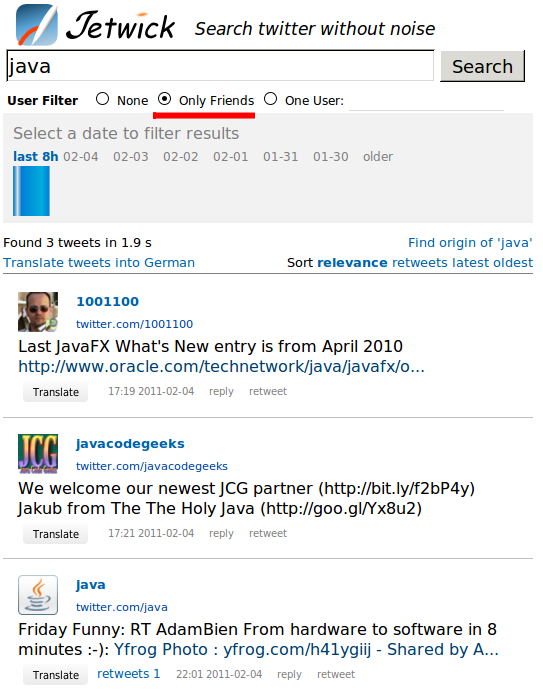
  3. Finally select ‘Only Friends’ as the user filter.
  4. Now you are able to search all the tweets of the people you follow.
  5. Be sure you clicked on without duplicates (on the left) etc. as appropriated

Here  the friend search results when querying ‘java’:

And now the normal search where the users rubenlirio and tech_it_jobs are not from my ‘friends’:

You don’t need to stay on-line all the time – jetwick automagically grab the tweets of your friends for you. And if you use the relaxed saved searches, then you’ll also be notified for all changes in you homeline – even after days!

That was the missing puzzle piece for me to be able to stay away from twitter and PC – no need to check every hour for the latest tweets in my homeline or my “twitter – saved searches”.

Jetwick is free so you’ll only need to login and try it! As a side effect of being logged in: your own tweets will be archived and you can search them though the established user search. With that user search you can use twitter as a bookmark application as I’m already doing it … BTW: you’ll notice the orange tweet which is a free ad: just create a tweet containing #jetwick and it’ll be shown on top of matching searches.

Another improvement is (hopefully) the user interface for jetwick, the search form should be more clear:

before it was:

and the blue logo should now look a bit better, before it was:

What do you think?

Detect Stolen and Duplicate Tweets with Solr

A new feature “duplication detection” is implemented for jetwick and seems to work pretty good thanks to the great performance of Solr.

To try it, go to this tweet and click on the ‘Find Similar’/’Guttenberg’ button below the tweet to investigate existing duplicates. With that feature it is possible for jetwick to skip spam, identify different accounts of the same user, skip tweets with wrong retweet or attribution.

but also to see stolen tweets i.e. when users tweeting without attribution or not knowing the original tweet. Or if all tweeters had a common different source, e.g. news paper. Thanks to pannous for pointing this out.

Examples for ‘stolen’ or duplicated tweets:

So this is an example for a user using two twitter accounts, because the tweet has the same twitter client and they were posted on identical times.

The following German example looks more like ‘stolen’ tweets:

http://twitter.com/#!/Newsteam_Berlin/status/17881387294003200

and a lot more: ste_pos, Kleines79, …

the oldest tweet and therefor the original is:

As you can see it is not necessary for the successful detection that the tweets have exactly the same string.

Detecting duplicated tweets could be interesting for all people wanting to give the ‘correct’ guy its attribution. Because it is often the case that not the original tweet but the ‘stolen’ tweet is more popular (has more retweets). Especially for heavy follower accounts.

But it is also useful for “tweet readers” like jetwick to avoid twitter noise and reading the same content twice.

Update: This seems to be the first tweet about santa and wikileaks:

suliz has only 67 followers .. now take that tweet from ihackinjosh with over 6000 followers. This tweet has over 600 retweets, although suliz has tweeted nearly one day earlier. That is life!

Bahn zensiert trending Topics bei Twitter

Bahn zensiert trending Topics bei Twitter oder warum erscheint “Bahn rät von Bahnreisen ab” dort nicht? 😉

Lustige, handmade Tweets findet ihr heute (und wahrscheinlich auch die nächste Woche) hier.

Zum Abschluss noch “Tweets über die Bahn enthalten meistens auch:”

PS: ‘meter’ kommt wahrscheinlich durch bahnometer zustande und nicht durch Beschreibungen von Warteschlangen vor den Zügen.


Hootsuite gets a Challenger

We are pleased to announce that starting from today you can save searches.

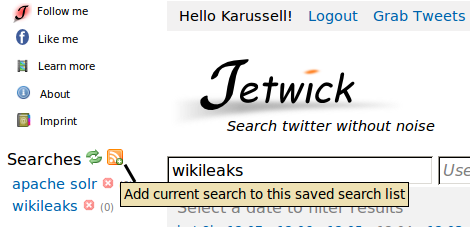
Go to jetwick.com. Login. Do a search. Save it with the rss icon:

BTW: we’ve redefined RSS to “relaxed saved searches” 😉

Hmmh, ok. Nothing new, you might think. Twitter allows you to do the same: saving searches. And e.g. Hootsuite is really good to store several searches too. I must admit that jetwick isn’t a big challenger, because it isn’t as proven and well tested, doesn’t have a solid user base etc

But: neither twitter nor hootsuite allows you to sort the tweets by number of retweets or language, right?

With jetwick you now can save your favourite searches and come back after days. Read only tweets that are important.

One example

if I would have to follow the twitter search for ‘java’ I would get hundreds of tweets per hours. So, logically I cannot read them all and to be honest: I never read them. It gets even worse when I do not visit twitter for days (yeah thats really possible). But I also do not want to miss the most important tweets. And thats where jetwick comes into the game which allows you to do exactly that: define a search important to you, sort or filter against retweets or language, and then stay informed after days. The saved search will display in the gray brackets the number of new tweets, calculated from the last search. It will update this count in a regular interval if you left the browser window open.

Jetwick even allows you to search an account and filter this for a keyword. This is especially usefull for an account with a lots of tweets like heiseonline:

And whats best about this all: jetwick is free software. Get the Java sources or join the team to make jetwick even more exciting and useful!

Use cases of faceted search for Apache Solr

GraphHopper – A Java routing engine

karussell ads

In this post I write about some use cases of facets for Apache Solr. Please submit your own ideas in the comments.
This post is splitted into the following parts:

  • What are facets?
  • How do you enable and use simple facets?
  • What are other use cases?
    1. Category navigation
    2. Autocompletion
    3. Trending keywords or links
    4. Rss feeds
  • Conclusion

What are facets?

In Apache Solr elements for navigational purposes are named facets. Keep in mind that Solr provides filter queries (specified via http parameter fq) which filters out documents from the search result. In contrast facet queries only provide information (count of documents) and do not change the result documents. I.e. they provide ‘filter queries for future queries’. So define a facet query and see how much documents I can expect if I would apply the related filter query.

But a picuture – from this great facet-introduction – is worth a thousand words:

What do you see?

  • You see different facets like Manufacturer, Resolution, …
  • Every facet has some constraints, where the user can filter its search results easily
  • The breadcrumb shows all selected contraints and allows removing them

All these values can be extracted from Solrs’ search results and can be defined at query time, which looks surprising if you come from FAST ESP. Nevertheless the fields on which you do faceting needs to be indexed and untokenized. E.g. string or integer. But the type of fields where you want to do faceting mustn’t be the default ‘text’ type, which is tokenized.

In Solr you have

The normal facets can be useful if your documents have a manufacturer string field e.g. a document can be within the ‘Sony’ or ‘Nikon’ bucket. In contrast you will need facet queries for integers like pricing. For example if you specify a facet query from 0 to 10 EUR Solr will calculate on the fly all documents which fall into that bucket. But the facet queries becomes relative unhandy if you have several identical ranges like 0-10, 10-20, 20-30, … EUR. Then you can use range queries.

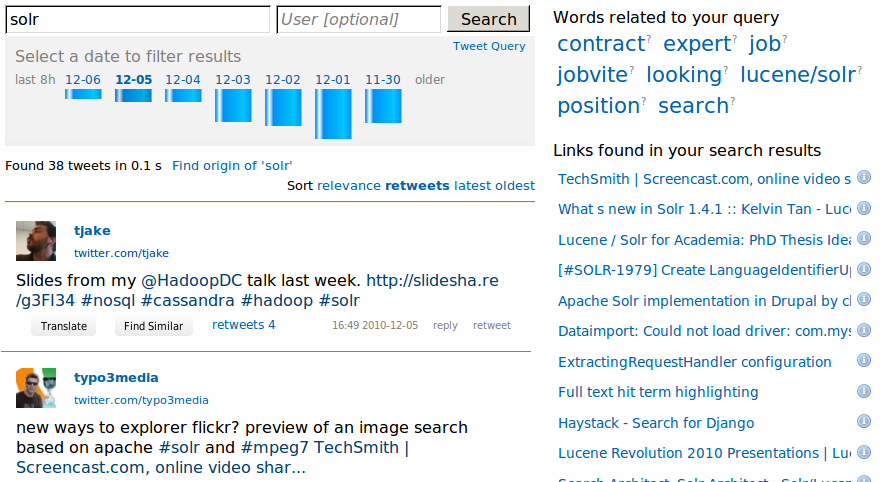
Date facets are special range queries. As an example look into this screenshot from jetwick:

where here the interval (which is called gap) for every bucket is one day.

For a nice introduction into facets have a look into this publication or use the solr wiki here.

How do you enable and use simple facets?

As stated before they can be enabled at query time. For the http API you add “&facet=true&facet.field=manu” to your normal query “http://localhost:8983/solr/select?q=*:*”. For SolrJ you do:

new SolrQuery("*:*").setFacet(true).addFacetField("manu");

In the Xml returned from the Solr server you will get something like this – again from this post:

<lst name="facet_fields">
            <lst name="manu">
               <int name="Canon USA">17</int>
               <int name="Olympus">12</int>
               <int name="Sony">12</int>
               <int name="Panasonic">9</int>
               <int name="Nikon">4</int>
            </lst>
</lst>

To retrieve this with SolrJ you don’t need to touch any Xml, of course. Just get the facet objects:

List<FacetField> facetFields = queryResponse.getFacetFields();

To append facet queries specify them with addFacetQuery:

solrQuery.addFacetQuery("quality:[* TO 10]").addFacetQuery("quality:[11 TO 100]");

And how you would query for documents which does not have a value for that field? This is easy: q=-field_name:[* TO *]

Now I’ll show you like I implemented date facets in jetwick:

q.setFacet(true).set(“facet.date”, “{!ex=dt}dt”).
set(“facet.date.start”, “NOW/DAY-6DAYS”).
set(“facet.date.end”, “NOW/DAY+1DAY”).
set(“facet.date.gap”, “+1DAY”);

With that query you get 7 day buckets which is visualized via:

It is important to note that you will have to use local parameters like {!ex=dt} to make sure that if a user applies a facet (uses the facet query as filter query) then the other facet queries won’t get a count of 0. In the picture the filter query was fq={!tag=dt}dt:[2010-12-04T00:00:00.000Z+TO+2010-12-05T00:00:00.000Z]. Again: filter query needs to start with {!tag=dt} to make that working. Take a look into the DateFilter source code or this for more information.

Be aware that you will have to tune the filterCache in order to keep performance green. It is also important to use warming queries to avoid time outs and pre-fill caches with old ‘heavy’ used data.

What are other use cases?

1. Category navigation

The problem: you have a tree of categories and your products are categorized in multiple of those categories.

There are two relative similar solutions for this problem. I will describe one of them:

  • Create a multivalued string field called ‘category’. Use the category id (or name if you want to avoid DB queries).
  • You have a category tree. Make sure a document gets not only the leaf category, but all categories until the root node.
  • Now facet over the category field with ‘-1’ as limit
  • But what if you want to display only the categories of one level? E.g. if you don’t want other level at a time or if they are too much.
    Then index the category field ala <level>_category. For that you will need the complete category tree in RAM while indexing. Then use facet.prefix=<level>_ to filter the category list for the level
  • Clicking on a category entry should result in a filter query ala fq=category:”<levle>_categoryId”
  • The little tricky part is now that your UI or middle tier has to parse the level e.g. 2 and the append 2+1=3 to the query: facet.prefix=3_
  • If you filter the level then one question remains:
    Q: how can you display the path from the selected category until the root category?
    A: Either get the category parents via DB, which is easy if you store the category ids in Solr – not the category names.
    Or get the parents from the parameter list which is a bit more complicated but doable. In this case you’ll need to store the category names in Solr.

Please let me know if this explanation makes sense to you or if you want to see that in action – I don’t want to make advertisments for our customers here 🙂

BTW: The second approach I have in mind is: instead of using facet.prefix you can use dynamic fields ala category_<level>_s

Special Hint: If it are too many facets you can even page through them!

2. Autocompletion

The problem: you want to show suggestions as the user types.

You’ll need a multivalued ‘tag’ field. For jetwick I’m using a heavy noise word filter to get only terms ‘with information’ into the tag field, from the very noisy tweet text. If you are using a shingle filter you can even create phrase suggestions. But I will describe the “one more word” suggestion here, which will only suggest the next word (not a complete different phrase).

To do this create a the following query when the user types in some characters (see getQueryChoices method of SolrTweetSearch):

  • Use the old query with all filter queries etc to provide a context dependent autocomplete (ie. only give suggestions which will lead to results)
  • split the query into “completed” terms and one “to do” term. E.g. if you enter “michael jack”
    Then michael is complete (ends with space) and jack should be completed
  • set the query term of the old query to michael and add the facet.prefix=jack
  • set facet limit to 10
  • read the 10 suggestions from facet field but exclude already completed terms.

The implementation for jetwick which uses Apache Wicket is available in the SearchBox source file which uses MyAutoCompleteTextField and the getQueryChoices method of SolrTweetSearch. But before you implement autocomplete with facets take a look into this documentation. And if you don’t want to use wicket then there is a jquery autocomplete library especially for solr – no UI layer required.

3. Trending keywords or links

Similar to autocomplete you will need a tag or link field in your index. Then use the facet counts as an indicator how important a term is. If you now do a query e.g. solr you will get the trending keywords and links depending on the filters. E.g. you can select different days to see the changes:

The keyword panel is implemented in the TagCloudPanel and the link list is available as UrlTrendPanel.

Of course it would be nice if we would get the accumulated score of every link instead of a simple ‘count’ to prevent spammers from reaching this list. For that, look into this JIRA issue and into the StatsComponent. Like I explained in the JIRA issue this nice feature could be simulated by the results grouping feature.

4. Rss feeds

If you log into at jetwick.com you’ll see this idea implemented. Every user can have different saved searches. For example I have one search for ‘apache solr’ and one for ‘wikileaks’. Every search could contain additional filters like only German language or sort against retweets. Now the task is to transform that query into a facet query:

  • insert AND’s between the query and all the filter query
  • remove all date filters
  • add one date filter with the date of the last processed search (‘last date’)

Then you will see how many new tweets are available for every saved searches:

Update: no need to click refresh to see the counts. The count-update is done in background via JavaScript.

Conclusion

There are a lot of applications for faceted search. It is very convinient to use them. Okay, the ‘local parameter hack’ is a bit daunting, but hey: it works 🙂

It is nice that I can specify different facets for every query in Solr, with that feature you can generate personalized facets like it was explained under “rss feeds”.

One improvement for the facets implemented in Solr could be a feature which does not calculate the count. Instead it sums up a fieldA for documents with the same value in fieldB or even returns the score for a facet or a facet query. To improve the use case “Trending keywords or links”.

Poor Man’s Monitoring for Solr

For jetwick I’m the developer, PR agent and sadly also the admin ;-). All in one, at once. Here is a minor snippet to get an alert email if your solr index is either not available or countains too few entries. And get a resolved mail if all is fine again.


cd /path/
FILE=bla.log
EMAILS="your@email.here"
SUBJECT="OK: jetwick"
STATUS=OK

CNT=`wget --http-user=user --http-password=password  -T 10 -q "http://your-host.com/solr/select?q=&rows=1&wt=json" -O - | tr ',' '\n' |grep numFound|tr ':' ' '|awk '{print $3}'`
if [ "x$CNT" == x ] || [ "$CNT" -lt 500000 ]; then
  SUBJECT="CRITICAL: check http://your-host.com/solr"
  STATUS=CRITICAL
fi

PREV_STAT=`cat .status`

if [ "$STATUS" == "CRITICAL" ]; then
if [ "$PREV_STAT" == "OK" ]; then
cat $FILE | mail $EMAILS -a $FILE -s "$SUBJECT. doc count was only $CNT"
fi
echo CRITICAL > .status
else
if [ "$PREV_STAT" == "CRITICAL" ]; then
cat $FILE | mail $EMAILS -a $FILE -s "SOLVED: http://your-host.com/solr"
fi
echo OK > .status
fi

echo $STATUS > .status

add via this via crontab -e

*/2 * * * * /path/check-health.sh

If you look at the code there is one mini hack which is necessary if the solr index is down and the CNT is empty:

"x$CNT" == x

Jetwick Twitter Search is now free software! Wicket and Solr pearls for Developers.

Today we released Jetwick under the Apache 2 license.

Why we made Jetwick free software

I would like to start with an image I made some years ago for TimeFinder:

This is one reason and we are very interested in your contributions as patches or bug reports.

But there are some more interesting opportunities when releasing jetwick as open source:

  • Open architecture: several jetwick-hosters could provide parts of the twitter index and maybe at some day we can have a way to freely explore all tweets at twitter in the jetwicked way
  • Personalized jetwick: every user has different interests. If you only feed tweets from searches of terms that your are interested in and also only your timeline, then you will be able to search this personalized twitter, sort against retweets, see personal URL-trends, etc.
    This way you’ll be informed faster, wider and more personalized than with an ordinary rss feed or the ordinary twitter timeline. Without reading a lot of unrelated content. If jetwick would stay closed then this task would be too resource intensive or even impossible to convince every user.

In our further development we will concentrate on the second point, because then jetwick will have at least one user

Explore Jetwick

Why you should install Jetwick and try it out?

First you can look at the features and see if something interesting – for you as a user – is shown.

For developers there could be the following things (and more) worth to be investigated:

Jetwick can be used as a simple showcase how to use wicket and solr:

  1. show the use of facets and facet queries
  2. show date facets as explained in here
  3. make autocompletion working
  4. instant results when you select a suggestion from autocompletion as explained in this video

If you are programming some twitter stuff you should keep an eye on the following points:

  • spam detection as explained in this post
  • how you can use oAuthentication with twitter4j and wicket
  • transform tweets with clickable users, links and hashtags
  • translate tweets with google translate

If you are new to wicket

  • Jetwick is configured that if you run ‘mvn jetty:run’ you can update html and code and you can hit refresh on the browser 1-2 seconds later to see the updated results. For css it will be updated immediately
  • query wikipedia and show the results in a lazyload panel

Some solr gems:

  • simple near realtime set up with solr. And that although we make heavy usage of facets where a lot autowarming is required.
  • if you re-enable the user search you can use twitters person suggestions on your own data. I’m relative sure that twitter uses the ‘more like this’ feature of lucene that jetwick had implemented with solr.

fluid database and the PermGenSpace checker

  • fluid update of your database from hibernate changes (via liquibase). Hint: at the moment we only use the db for the ytags
  • a simple helper method ‘getPermGenSpace’ to check if reload is possible

The following interesting issues are still open:

  • using a storage for tweets (mysql or redis or …). This will increase the index time dramatically, because we had to switch to a pure solr solution (we had problems with h2 and hibernate for over 4mio tweets)
  • a mature queue like 0mq and protobuf or something else
  • a ‘real’ realtime solution for solr, if we use solr from trunk

Search any Twitter Account

There are a lot of services offering the same, even offering archiving but they often need registration.

Now with jetwick it is easy to search any account you like . E.g. try my account. To do the same for your account go to Jetwick, click ‘login’, allow jetwick access to your account (you can revoke it at any time and we won’t misuse it or even post tweets etc) and then click “grab tweets”.Then you will see something like

After this procedure you can search the whole history of the tweets easily.

Why do you want to grab tweets from other users? With that you can easily see about which topic a user tweets, on the right side. Again see “Words related to your query” of my account:

PS: Jetwick is now free software … you can host your own and play around!

What is your plan B after software carrier?

This minor stunt is nothing comparable to Danny but hey, its great fun! If you want to see the king of trial click here. If you have something special to you which makes fun or is difficult (etc) please comment or add a video reply.

Sadly Sony don’t want me to promote ‘Electric Feel’ from MGMT on youtube. In my opinion this is a fair usage (only a 42 second snippet) of the song in my video … Watch the video via blip tv.