2 Scripts to Make JavaFX + NetBeans Available on Linux

All the code comes from here and here. It worked for me, although I had to ignore 2 exceptions after this.

Update: JavaFX 1.0 only! See the first comment!

So first run:

mkdir javafxnbms
cd javafxnbms
wget http://updates.netbeans.org/netbeans/updates/6.5/uc/final/stable/modules/javafx/org-netbeans-modules-api-debugger-javafx.nbm
wget http://updates.netbeans.org/netbeans/updates/6.5/uc/final/stable/modules/javafx/org-netbeans-modules-debugger-javafx-ant.nbm
wget http://updates.netbeans.org/netbeans/updates/6.5/uc/final/stable/modules/javafx/org-netbeans-modules-debugger-javafx-projects.nbm
wget http://updates.netbeans.org/netbeans/updates/6.5/uc/final/stable/modules/javafx/org-netbeans-modules-debugger-javafx-ui.nbm
wget http://updates.netbeans.org/netbeans/updates/6.5/uc/final/stable/modules/javafx/org-netbeans-modules-debugger-javafx.nbm
wget http://updates.netbeans.org/netbeans/updates/6.5/uc/final/stable/modules/javafx/org-netbeans-modules-javafx-bestpractices.nbm
wget http://updates.netbeans.org/netbeans/updates/6.5/uc/final/stable/modules/javafx/org-netbeans-modules-javafx-editor.nbm
wget http://updates.netbeans.org/netbeans/updates/6.5/uc/final/stable/modules/javafx/org-netbeans-modules-javafx-fxd.nbm
wget http://updates.netbeans.org/netbeans/updates/6.5/uc/final/stable/modules/javafx/org-netbeans-modules-javafx-lexer.nbm
wget http://updates.netbeans.org/netbeans/updates/6.5/uc/final/stable/modules/javafx/org-netbeans-modules-javafx-lib.nbm
wget http://updates.netbeans.org/netbeans/updates/6.5/uc/final/stable/modules/javafx/org-netbeans-modules-javafx-navigation.nbm
wget http://updates.netbeans.org/netbeans/updates/6.5/uc/final/stable/modules/javafx/org-netbeans-modules-javafx-palette.nbm
wget http://updates.netbeans.org/netbeans/updates/6.5/uc/final/stable/modules/javafx/org-netbeans-modules-javafx-platform.nbm
wget http://updates.netbeans.org/netbeans/updates/6.5/uc/final/stable/modules/javafx/org-netbeans-modules-javafx-profiler.nbm
wget http://updates.netbeans.org/netbeans/updates/6.5/uc/final/stable/modules/javafx/org-netbeans-modules-javafx-project.nbm
wget http://updates.netbeans.org/netbeans/updates/6.5/uc/final/stable/modules/javafx/org-netbeans-modules-javafx-sdk-mac.nbm
wget http://updates.netbeans.org/netbeans/updates/6.5/uc/final/stable/modules/javafx/org-netbeans-modules-javafx-sdksamples.nbm
wget http://updates.netbeans.org/netbeans/updates/6.5/uc/final/stable/modules/javafx/org-netbeans-modules-javafx-source.nbm
wget http://updates.netbeans.org/netbeans/updates/6.5/uc/final/stable/modules/javafx/org-netbeans-modules-javafx-userlib.nbm

Then install the nbms via NetBeans: Tools -> Plugins -> Downloaded -> Add Plugins … and shutdown NetBeans (ignore the exception).

As last step run the following within the javafxnbnms folder:

mkdir unzipsdk
cd unzipsdk
unzip ../org-netbeans-modules-javafx-sdk-mac.nbm
cp -r netbeans/* ~/Programme/netbeans-6.5/javafx2/
chmod 755 ~/Programme/netbeans-6.5/javafx2/javafx-sdk1.0/bin/*

Restart NetBeans (ignore exception, disable the module -> it even works then!) and you should be able to create a JavaFX sample, run it, view it and change it.

Now you are able to help on timefinder 😉
No Warranty for that procedure!!

Good Java(FX) Programmer Known?

I am looking for Java and JavaFX developers for my open source timefinder project – a program for automatically optimizing the timetable for students e.g. at the high school.

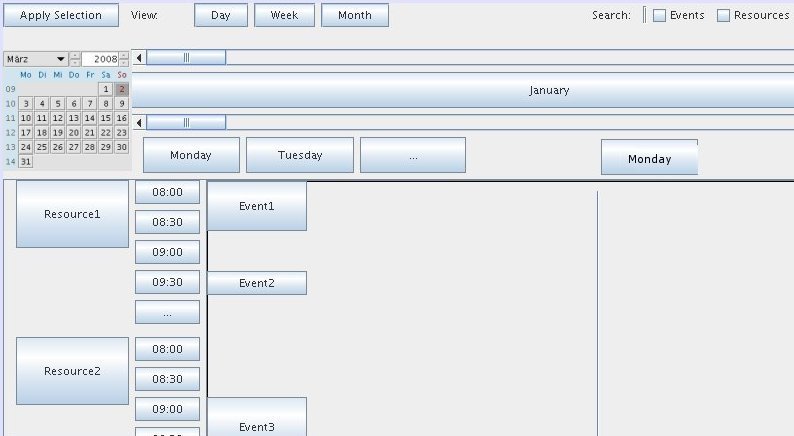
The intend for this post is an idea of a component where I can see the timetable of several persons or even rooms. This component should be nice – so I tried out the NetBeans graph library and I tried JavaFX (choose what you like for that task). Here is a stub created with Matisse:

resource-view-detailed

In Java there are some calendar implementations:

 <dependency>
            <groupId>net.sf.nachocalendar</groupId>
            <artifactId>nachocalendar</artifactId>
            <version>0.23</version>
  </dependency>
  <dependency>
            <groupId>com.toedter</groupId>
            <artifactId>jcalendar</artifactId>
            <version>1.3.2</version>
  </dependency>

For JavaFX I found this here. And for drag and drop support one can use sth. like this here.

The developer who like to help will get no salary, but a lot of new knowledge and support from myself. The resource component should display the current timetable and the calculated one. So that the human timetabler could choose the right. See e.g. Outlook/Lightning for a client side timetable ‘managers’.

Now a list of some ideas for the resource component follows:

  • fish eye view, that means: items near the mouse are bigger! (or introduce another magnifier like this here)
  • Implement a ‘grid’ for the timeslots (day horizontal, time vertical or horizontal) The resources will be on y axis and the days will be on x axis. The hours of a day can be either on x axis OR on y axis. The switch shouldbe easy. (Button or sth. else)
  • The planner should be a separate library, so that it can be used from any other program as a library. The only dependency should be on the de.timefinder.core.data.* classes.
  • It should be easy to go to the next/previous day, week or year. (Button or sth. else)
  • Different modes should be possible:
    • view
    • edit
    • print (shrink size to a minimum, only important stuff!)
    • export to pdf
    • export to html.
  • Events with small duration should be handled (they will be very small!).
  • Drag and drop to change starttime and duration in edit mode.
  • Selection of one event will color all events in the group grey
  • Handle overlapping events. So it is possible to circulate with Page Up/Down over the overlapping to see all events under the selected one, i.e. put the next available event on the top. Introduce a z axis for every event?
  • The resource list on the x axis should be filterable (or sortable) against the resource type: person, room etc.Searchable planner against event names and properties
  • see ganttproject, openproj, lightning, outlook, zimbra, …

DZone Refcards – FREE Cheat Sheets for Developers

This blog entry might look like a stupid advertisement for dzone. But I am not involved in any financial transaction (although they send me a t-shirt to express their thankfulness for some of my blog entries 😉

So no advertisement – facts.

I really like the most refcards, which are abailable at dzone. Great for beginners or if you want/think about to start in a certain field of programming.

But do not click on any entry above an article! Sometimes you get not refcards! You will get advertisment! And I thought they were refcards, because they were named like refcards: ‘Automating excel reports’ or ‘Choosing a development tool’ – really annoying…

So avoid that – go directly here to get your refcards!

Migrate to Liquibase

As shown in my last blog entry liquibase is very helpful to migrate even ‘living’-databases.

But how to migrate to liquibase? I propose the following steps:

  1. Backup all you data! Really do it! E.g. with xstream. First try the following steps on a test db, of course!
  2. Generate your initial changelog with liquibase:
    liquibase --defaultsFile=src/main/resources/liquibase.properties generateChangeLog

    Check the xml file and if you need additional data into liquibase you could read how to do this here. Or if you like you can do this via:

    <changeSet author="pk" id="1">
            <customChange class="de.InitBean"/>
    </changeSet>

    Then implement CustomSqlChange. Only the generateStatements method is important, where you add your sql statements. (Although it would be cool to use hibernate to create database independent statements. Anyone who did this?)

  3. Now drop all tables with squirell sql (right click all tables -> edit -> tables -> remove) and then execute in sql tab:
    drop sequence HIBERNATE_SEQUENCE;
  4. Now you should be able to update with liquibase. First look at the generated sql statements:
    liquibase --defaultsFile=src/main/resources/liquibase.properties updateSQL

    Then execute:

    liquibase --defaultsFile=src/main/resources/liquibase.properties update

    liquibase should say sth. like: Migration successful

  5. Try executing your program or run tests. And make sure the tests do not overwrite or clear the db schema!
  6. After these steps migrating via liquibase should be possible.

Liquibase – A Smart Database-Migration Tool

I just want to make some publicity for liquibase, which is a tool (the only one?) for database migrations in Java and licensed under LGPL.So you can deploy it to your server if you want very hot database changes.

Liquibase is sth. like the rails db migrations but for Java ;-).

One note: if you want to use liquibase from maven – use the following configuration so that you can call

mvn liquibase:updateSQL
<build>
 <plugins>
   <plugin>
      <groupId>org.liquibase</groupId>
      <artifactId>liquibase-plugin</artifactId>
      <version>1.9.0.0</version>
      <configuration>
        <propertyFile>src/main/resources/liquibase.properties</propertyFile>
        <verbose>true</verbose>
      </configuration> 
   </plugin>
   ...
 </plugins>
 ...
<build>

Then you don’t bind the sql-update process to a build step like proposed in the docs.

Other useful infos are:

  • liquibase-plugin is 1.9.0.0, but core is only 1.9.0
  • use the hibernate config file to generate the diff. (Is this even possible if I use annotations?)
  • keep in mind that you have to specify the rollback tags if you call ‘mvn liquibase:rollback -Dliquibase.rollbackCount=1’:
      <changeSet id="1" author="pk">
            <createTable tableName="test">
                <column name="id" type="int">
                    <constraints primaryKey="true" nullable="false"/>
                </column>           
            </createTable>
            <rollback>
                <dropTable tableName="test"/>
            </rollback>
        </changeSet>
  • docs, video docs
  • the project blog

10 steps to the Romaframework – Yet another Java Webframework?

Now the Romaframework in my little series of Meta-Frameworks!

It is a clean Java Web Framework which can use Echo2, but has modules to support other view technologies (I didn’t try). With Echo2 it is not a standard form based web application – it is an Ajax-Rich-Client application. The core is Apache 2.0 licensed.

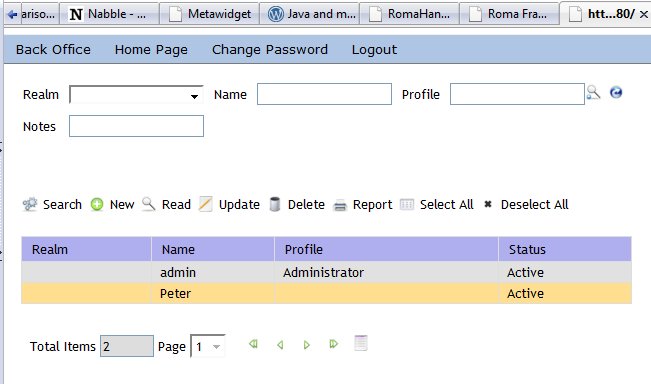
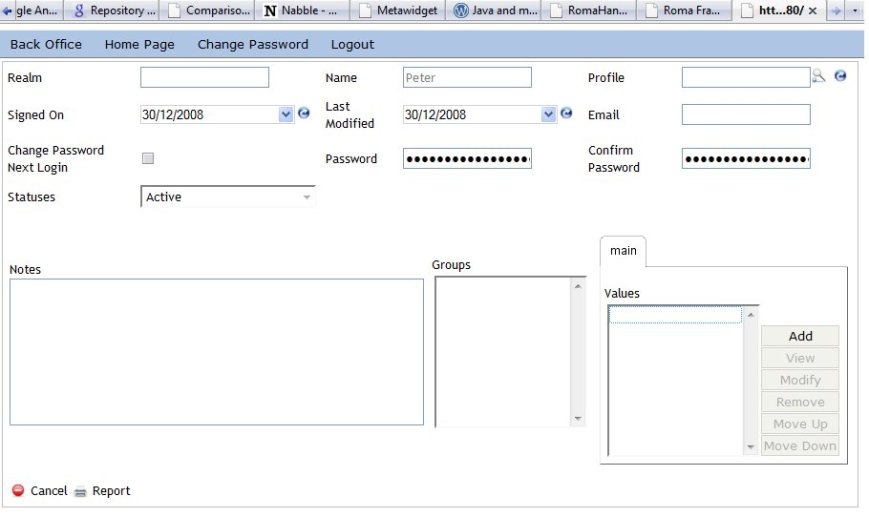
What to say. Hmmh I will show you my impressions:

user-table

read-user

It was easy and fast to get started and to get it working. So try it out for yourself. For the lazy people I prepared 10 steps to the running application:

  1. Download the Web Wizard distribution
  2. On Windows go to system properties (right click on computer) -> extended -> edit environment variables -> add the ROMA_HOME and specify the download location.
  3. Or if you are riding linux it is faster:
    > export ROMA_HOME=`pwd`
  4. Add ROMA_HOME to the PATH variable.
  5. Then update roma
    > roma check
  6. Create the project skeleton with absolute path name (relative path names lead to an exception [1])
    > roma create webready mytestapp de.uni_bayreuth c:\romatest
  7. The reporting module is missing in the BackOfficeMenu source file. So, either remove the method or install reporting via (before importing into NetBeans):
    > roma install new reporting-jr
    Now add this to the project (WARNING: no automatic undo possible)
    > roma add reporting-jr
  8. I could import this eclipse project into NetBeans (be sure your standard JDK is 1.5 or higher)
    I have to ignore one Warning : “There are inter-project dependencies which could not be resolved. Importing the whole workspace could prevent this problem. (‘org.eclipse.jst.j2ee.internal.web.container’)”
  9. Now press F6 or run this project und you are done! Nothing more is necessary! Wow! Faster than with Ruby on Rails. (I know that all the new technologies are better if you only touch them on the surface, but we will see …)
  10. login = admin and password = admin

[1]
load-project-info:
[echo] Loading project info from ..\romatest/mytestapp/roma-project.xml
ava.io.FileNotFoundException: C:\Users\btn417\Downloads\roma-framework-webwizar
at java.io.FileInputStream.open(Native Method)
at java.io.FileInputStream.<init>(FileInputStream.java:106)
at java.io.FileInputStream.<init>(FileInputStream.java:66)
at com.oopsconsultancy.xmltask.ant.XmlTask.documentFromFile(XmlTask.java
at com.oopsconsultancy.xmltask.ant.XmlTask.access$000(XmlTask.java:27)
at com.oopsconsultancy.xmltask.ant.XmlTask$InputFile.getDocument(XmlTask
at com.oopsconsultancy.xmltask.ant.XmlTask.execute(XmlTask.java:651)
at org.apache.tools.ant.UnknownElement.execute(UnknownElement.java:288)
at sun.reflect.NativeMethodAccessorImpl.invoke0(Native Method)
at sun.reflect.NativeMethodAccessorImpl.invoke(NativeMethodAccessorImpl.
at sun.reflect.DelegatingMethodAccessorImpl.invoke(DelegatingMethodAcces
at java.lang.reflect.Method.invoke(Method.java:597)
at org.apache.tools.ant.dispatch.DispatchUtils.execute(DispatchUtils.jav
at org.apache.tools.ant.Task.perform(Task.java:348)
at org.apache.tools.ant.Target.execute(Target.java:357)
at org.apache.tools.ant.Target.performTasks(Target.java:385)
at org.apache.tools.ant.Project.executeSortedTargets(Project.java:1329)
at org.apache.tools.ant.Project.executeTarget(Project.java:1298)
at org.romaframework.wizard.command.project.impl.ProjectAddModuleWizard.
at org.romaframework.wizard.command.project.impl.ProjectCreateWizard.add
at org.romaframework.wizard.command.project.impl.ProjectCreateWizard.exe
at org.romaframework.wizard.MainWizard.main(Unknown Source)
xception in thread “main” C:\Users\btn417\Downloads\roma-framework-webwizard-1.
den angegebenen Pfad nicht finden)
at com.oopsconsultancy.xmltask.ant.XmlTask.execute(XmlTask.java:659)
at org.apache.tools.ant.UnknownElement.execute(UnknownElement.java:288)
at sun.reflect.NativeMethodAccessorImpl.invoke0(Native Method)
at sun.reflect.NativeMethodAccessorImpl.invoke(NativeMethodAccessorImpl.
at sun.reflect.DelegatingMethodAccessorImpl.invoke(DelegatingMethodAcces
at java.lang.reflect.Method.invoke(Method.java:597)
at org.apache.tools.ant.dispatch.DispatchUtils.execute(DispatchUtils.jav
at org.apache.tools.ant.Task.perform(Task.java:348)
at org.apache.tools.ant.Target.execute(Target.java:357)
at org.apache.tools.ant.Target.performTasks(Target.java:385)
at org.apache.tools.ant.Project.executeSortedTargets(Project.java:1329)
at org.apache.tools.ant.Project.executeTarget(Project.java:1298)
at org.romaframework.wizard.command.project.impl.ProjectAddModuleWizard.
at org.romaframework.wizard.command.project.impl.ProjectCreateWizard.add
at org.romaframework.wizard.command.project.impl.ProjectCreateWizard.exe
at org.romaframework.wizard.MainWizard.main(Unknown Source)

Use Wicket RAD for an Existent Web-Application

Wicket RAD (Rapid Web Application Development) is a framework which creates a UI on the fly from existing domain classes. It is based on wicket and speeds up development 2-4 times compared to JSF, I guess (but maybe wicket itself is the important speed up factor ;-)).

Here you can find more information about Wicket RAD. I use version 0.6.

  1. Add the following to your pom.xml (maven config file):
       <repositories>
            <repository>
                <id>wicketrad</id>
                <url>http://wicket-rad.sourceforge.net/repo</url>
                <releases>
                    <enabled>true</enabled>
                </releases>
                <snapshots>
                    <enabled>false</enabled>
                </snapshots>
            </repository>
        </repositories>
    
        <dependencies>
            <dependency>
                <groupId>org.wicketrad.jpa</groupId>
                <artifactId>wicket-rad-jpa</artifactId>
                <version>0.6</version>
            </dependency>
            <dependency>
                <groupId>org.wicketrad</groupId>
                <artifactId>wicket-rad-core</artifactId>
                <version>0.6</version>
            </dependency>
        </dependencies>
  2. extends DataWebApplication instead extends WebApplication
  3. There overwrite the method
    public String getDefaultPersistenceUnitName() {return "WicketPersistence";    }
  4. no default name for the class, so use @Table for every entity you want to use with WicketRAD
  5. no default name for the properties, so use @Column for every property
  6. add @TextField or another editor to all the strings you want to edit …
  7. or add @WysiwygEditor to get TinyMCE for free. Version 0.6 needs a missing dependency in pom.xml:
            <dependency>
                <groupId>commons-collections</groupId>
                <artifactId>commons-collections</artifactId>
                <version>3.2.1</version>
            </dependency>
  8. add @LabelProperty to see the property in a table

If you don’t like the default css style for the table. Use the appended code. You have to grab the source and compile it via maven.
.wradTableHeader, .wradFirstRowCell, .wradSecondRowCell, .wradPager{
font-family: Arial,Helvetica,sans-serif;
/* smaller */
font-size: 0.8em;
}
.wradSecondRowCell, .wradFirstRowCell, .wradTableHeader{
padding: .4em 2em 0.4em 2em;
margin: 0px 0px 0px 0px
}

.wradSecondRowCell, .wradFirstRowCell {
border-bottom:1px solid #aaaaaa;
border-left:1px solid #aaaaaa;
}

.wradTableHeader {
border-bottom:2px solid #aaaaaa;
border-left:2px solid #aaaaaa;
background-color: #ff9f0a;
font-weight: bold;
}

.wradSecondRowCell {
background-color: #ffd093;
}

Metaframeworks to create UI from model easily or automatically

For my project at the University Bayreuth (AI4) I need a Java framework which makes it easy to create the UI from the domain classes. So that we can easily add new ‘things’ and have not to worry about the changes to the UI. At the moment we use JSF (myfaces) and hibernate.

There are several projects out there, which could replace our technology. I found the following:

Here are some more project. Please let me know if you know other candidates.

Simplistic Texteditor for Your Next Ruby On Rails Webapplication

Introduction

Do you want to come to the metaparty? Okay it is not a party tool it is a political site in German where the party member itself create the party platform. The vision is: if you vote for metapartei you will get representative candidates which supports the oppinion of the nation – not of a specific lobby. As a member of Metapartei you can create concepts (ideas) and vote for them. At some day the set of all voted concepts will be our party platform.

Metapartei.de was written entirely with rails and with the help NetBeans as IDE (I could displace aptana ;-)). It is and it was really fun. Especially the database migrations in rails are fantastic for production! Okay sometimes ruby wasn’t that much fun. For example the following passes (very strange!):

assert_equal 2, "ÄÄa__".mb_chars.index("a", 4)

In the meanwhile we have to decide how the user can input some more than only text. If you would allow pure html then you would introduce a big security hole! For example someone could then insert any javascript function he likes with e.g. the <script> tag. So we need a rich text editor. But which one? There are a lot of editors out to allow the user to mark up the text. See the appendix for some we had evaluated. But we finally choose

Control.TextArea

from Ryan Johnson, because it is very small and highly customizable. See here for a life example. The small trade-off we had to pay was that we had to implement the conversation from wiki text to html. But this was relative easy. See The ruby code (under public domain) for the WikiText class, which implements the following behaviour:

  • ”bold” to bold
  • ”’italic”’ to italic
  • line breaks to <br />
  • and links like [http://www.metapartei.de Metapartei – a great idea] to Metapartei – a great idea

You can simply add other things (just let me know if you implement lists ;-)). But how you can embed the javascript with ruby? Here is the answer:

TextArea within Rails

Get the textarea.js from the TextArea bundle and put it under public/javascripts. Then create a file textarea_init.js from the code in the The javascript code section. Then insert

<%= javascript_include_tag 'textarea' %>

into app/views/layouts/application.html.erb (<head>HERE</head>). Then directly before the closing </body> tag write

<%= javascript_include_tag 'textarea_init' %>

Additionally you have to add a mark_down specific css file get it from the TextArea project too.

Now you can use it where you like. E.g. in the new template of the comments controller. Within new.html.erb add the following line as the very last:

<div id="markdown_formatted"></div>

But be sure that you specify at least one id for the text content (e.g. like we did: comment_content). See the javascript code section.

That’s it. Hope you enjoy it!

The ruby code

class WikiText
  def initialize(str)
    # process umlaute correctly
    @text = str.mb_chars
  end

  def to_html
    str, ii = process_sub_tag(nil, 0)
    str
  end  

  # returns the resulting string and the processed characters
  def process_sub_tag(until_tag_name, from_index)
    ii = from_index
    if(until_tag_name != nil)
      found_tag_index = @text.index(until_tag_name, from_index)
      if(found_tag_index != nil)
        until_index = found_tag_index + until_tag_name.length
      else
        return "", 0
      end
    end
    until_index = @text.length if until_index == nil

    result = ""
    while(ii < until_index)
      # F... ruby: '\n' != "\n"
      if (@text.at(ii) == "\n")
        result << "\n<br />"
        ii += 1

      elsif check_chars(ii, "'''")
        ii += 3
        if(until_tag_name == "'''")
          break
        end
        str, p_chars = process_sub_tag("'''", ii)
        result << "<b>" + str + "</b>"
        ii += p_chars

      elsif check_chars(ii, "''")
        ii += 2
        # closing tag
        if(until_tag_name == "''")
          break
        end
        last_index = @text.index("''", ii)
        if(last_index != nil)
          str, p_chars = process_sub_tag("''", ii)
          result << "<i>" + str + "</i>"
          ii += p_chars
        end

      elsif check_chars(ii, "]")
        ii += 1
        break;

      elsif check_chars(ii, "[")
        ii += 1
        last_index = @text.index("]", ii)
        if(last_index != nil)
          res = @text[ii, last_index-1].split(' ')
          if(res.length > 1 && !res[1].blank?)
            ii += res[0].length+1
            str, p_chars = process_sub_tag("]", ii)
            result << '<a target="_blank" href="'+ res[0]+'">'+str+"</a>"
            ii += p_chars
          end
        end
      else
        result << @text.at(ii)
        ii += 1
      end
    end
    return result, ii - from_index
  end

  # returns true if the specified chars match directly from the current position
  def check_chars(index, chars)
    len = chars.length
    #if (index > 0 && @text[index-1, 1] == chars.at(0) ||
    #      index + len < @text.length && @text[index+len, 1] == chars.at(0))
    #  return false
    #end
    @text[index, len] == chars
  end
end
# WARNING: with unicode it will not work 100%. See the strange assertion at the beginning of the blog post

The JavaScript code

/**
 * @author Ryan Johnson <http://saucytiger.com/>
 * @copyright 2008 PersonalGrid Corporation <http://personalgrid.com/>
 * @package LivePipe UI
 * @license MIT
 * @url http://livepipe.net/control/textarea
 * @require prototype.js, livepipe.js, textarea.js
 */

if(typeof(Control.TextArea) == "undefined")
    throw "Initialization requires Control.TextArea to be loaded.";

var idOfComponent = 'comment_content';
if($(idOfComponent) == null) {
    idOfComponent = 'concept_content';
}

if($(idOfComponent) != null) {
    var textarea = new Control.TextArea(idOfComponent);

    var toolbar = new Control.TextArea.ToolBar(textarea);

    //for css styles
    toolbar.container.id = 'markdown_toolbar';

    //buttons
    toolbar.addButton('Italics',function(){
        this.wrapSelection("''","''");
    },{
        id: 'markdown_italics_button'
    });

    toolbar.addButton('Bold',function(){
        this.wrapSelection("'''","'''");
    },{
        id: 'markdown_bold_button'
    });

    toolbar.addButton('Link',function(){
        var selection = this.getSelection();
        var response = prompt('Enter Link URL','');
        if(response == null)
            return;
        this.replaceSelection('[' + (response == '' ? 'http://link_url/' : response).
            replace(/^(?!(f|ht)tps?:\/\/)/,'http://') + ' ' + (selection == '' ? 'Link Text' : selection) + ']');
    },{
        id: 'markdown_link_button'
    });

    toolbar.addButton('Help',function(){
        window.open('/documents/wiki_text');
    },{
        id: 'markdown_help_button'
    });
}

Appendix

For more editors look here.