Java6 update10 on Ubuntu 8.04

For ubuntu 8.04 there is no Java6 update10 supported
But you can download the .deb file here (- no WARRANTY for the files and not for this tip …)

Then install them via -I used the lasted 13:

 sudo dpkg -i sun-java6-bin_6-13-1_i386.deb sun-java6-jre_6-13-1_all.deb
 sun-java6-plugin_6-13-1_i386.deb sun-java6-jdk_6-13-1_i386.deb

Verify your installation via:
java -version
javac -version
javaws -version
=> 1.6.0_13

You can switch java versions (e.g. between openjdk and sun) via:
sudo update-alternatives –config java
or
sudo update-alternatives –config javac

You should now be able to download the latest alpha version of timefinder, where I used pack200 without a special server set-up! See more details in the next post.

Maven and WebStart (jnlp)

If you plan to deploy your maven application via webstart you are a lucky man, because this is easy if you know how to do it 😉

I tried it without success, but then Geoffrey with his networktools came to my rescue. Now TimeFinder is jnlp-enabled. The following steps were necessary:

  1. create a new folder ‘jnlp’ under src/ (where main and test live)
  2. put the file template.vm there with:
    <?xml version="1.0" encoding="utf-8"?>
    <jnlp spec="1.0+" codebase="http://timefinder.sourceforge.net/jnlp2" href="$outputFile">
     <information>
        <title>TimeFinder</title>
        <vendor>TimeFinder Team</vendor>
        <homepage href="http://timefinder.sourceforge.net/"/>
        <description kind="one-line">TimeFinder</description>
        <description kind="short">TimeFinder - the automatic timetabling generator for universities and schools</description>
        <description kind="tooltip">TimeFinder - the automatic timetabling generator for universities and schools</description>
        <icon href="http://timefinder.sourceforge.net/jnlp/shamrockwhite.jpg" kind="default"/>
        <shortcut online="false"><desktop/><menu submenu="TimeFiner"/></shortcut>
     </information>
     <security>
     <all-permissions/>
     </security>
     <resources>
        <j2se version="1.6+" initial-heap-size="32m" max-heap-size="128m" />
        <property name="jnlp.versionEnabled" value="true"/>
        $dependencies
     </resources>
     <application-desc main-class="$mainClass">
     </application-desc>
    </jnlp>
  3. create a keystore:
    keytool -genkey -alias timefinder -keystore timefinder.jks
    be sure that you use keytool from the same JDK-PATH as you use for maven!
  4. add the following to your pom.xml:
    <build>
      <plugins>
        <plugin>
           <groupId>org.codehaus.mojo</groupId>
           <artifactId>webstart-maven-plugin</artifactId>
           <version>1.0-alpha-1</version>
       </plugin>
     </plugins>
     <pluginManagement>
        <plugins>
           <plugin>
              <groupId>org.codehaus.mojo</groupId>
              <artifactId>webstart-maven-plugin</artifactId>
             <!-- do not bind to install phase
              <executions>
               <execution>
                 <goals>
                   <goal>report</goal>
                 </goals>
               </execution>
              </executions>
              -->
            <configuration>
               <jnlp>
                <mainClass>de.timefinder.core.Startup</mainClass>
               </jnlp>
              <sign>
               <keystore>/home/peterk/Dokumente/quell/timefinder/trunk/timefinder-core/timefinder.jks</keystore>
               <keypass>unsecpwd</keypass>
               <storepass>unsecpwd</storepass>
               <storetype>jks</storetype>
               <alias>timefinder</alias>
               <verify>true</verify>
             </sign>
            <verbose>true</verbose>
          </configuration>
         </plugin>
       </plugins>
      </pluginManagement>
     </build>
    </project>
  5. Now you should be able to execute:
    mvn install webstart:jnlp
    which will create a zip file with all the signed jars
  6. See my next post for versioning and pack200!

JavaOne Schedule is out – create your own with TimeFinder

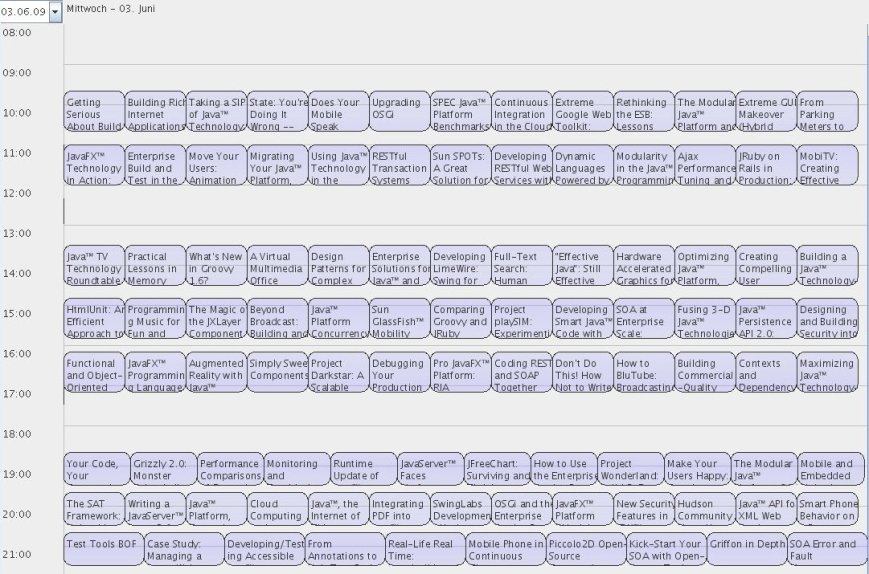
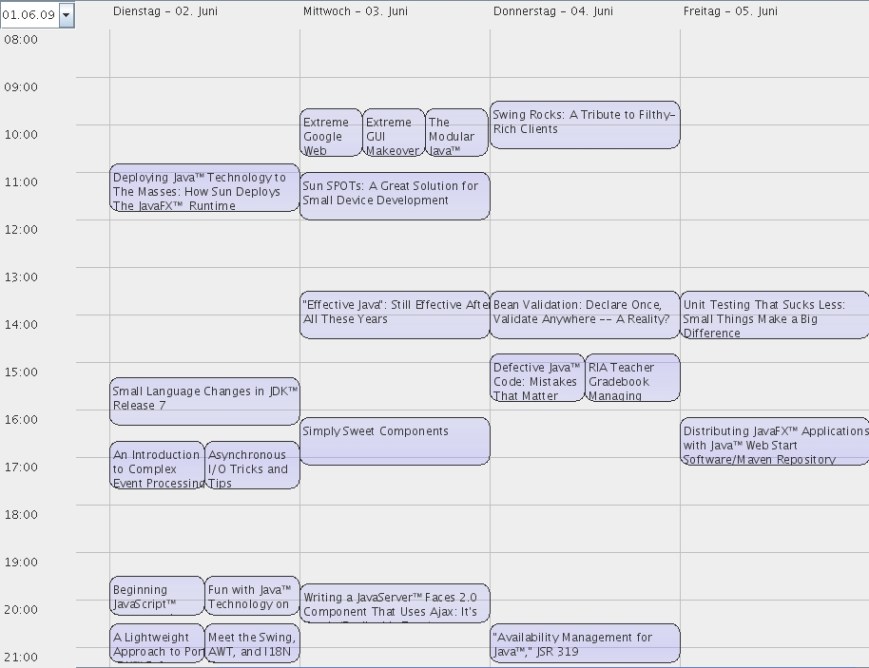
Today I realized that the schedule for the JavaOne 2009 is out (4 days starting from June 2nd). So I grabbed the data from this table and created a new menu entry in my TimeFinder application to import all the talks and get a feeling of how the overall timetable would look. If you build the latest version from source you can create your own schedule for JavaOne – contact me if you need assistance.

Update: Start TimeFinder here. This an alpha version where the JavaOne Import is included.

Update: Click here for a flash video.

If I would be the host I would let the people pre-enrol them before the conference starts. So that the schedule could be optimized with TimeFinder. Then a lot more people could attend what they like.

I do not attend the conference (although I would like) but this could be my schedule (a lot of conflicts, uhm):

peters-timetable1

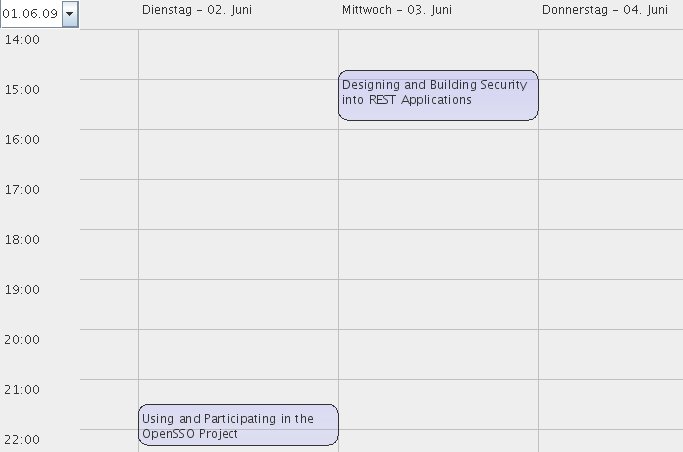
Another cool thing about TimeFinder is that you can see easily the timetable of a lot persons or rooms. E.g. in the JavaOne example you can see which other talks one speaker has – e.g. Sean Brydon from Sun Microsystems, Inc. has the following timetable:

sean-brydons-timetable

Update: I really forgot to publish the javaOne ‘overview’ ;-):

tuesday-overview

wednesday-overview1

thursday-overview

friday-overview

Hessian Web Service Protocol – Hello World Example

Introduction

Yesterday I took a quit look to the binary communication protocol: Hessian.

With Hessian your admins will not have any troubles with port-activation for your (‘desktop’) application, if they have to access remote services (DB etc.).

The Java implemenation from Caucho is released under the Apache License 2.0. Hessian is well integrated into Spring and seems to perform well for version 3.2 (one year old!). An ORM tool which supports Hessian out of the box is Cayenne.

Example

Now to our hello world example. It is a maven project and you can get it from here (public domain of course …).

If you don’t want to use maven you should get the following jars:
hessian-libs

But maybe you have the same problems with downloading a none-corrupted hessian.jar from Caucho (Why that?) – then you will be forced to install maven or NetBeans.

The usage is simple: In NetBeans you can directly open maven projects with the maven plugin. Then start the jetty-server: go into the MyServlet class and press SHIFT+F6. You should see in the output window:
… INFO:  Logging to STDERR via org.mortbay.log.StdErrLog
… INFO:  jetty-6.1.16
… INFO:  Started SocketConnector@0.0.0.0:8080

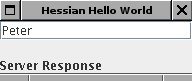
Then go to the Client class and press SHIFT+F6. You should see a new window coming up:

hessian-client

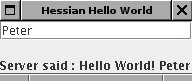
Change the text and press ENTER will push the text to the server and get the response text at the bottom of the window updated:
hessian-client-result

Now let us understand what is necessary:

  1. An interface which has to be available on the server and on the client side:
    public interface CommunicationService {
        String communicate(String str);
    }
  2. An implementation of this interface on the server side:
    public class MyServlet extends HessianServlet implements CommunicationService {
        public String communicate(String str) {
            return "Hello World! " + str;
        }
        ...
    }

    (Here only the ‘implements CommunicationService’ is important)

  3. Now the server code:
    public static void main(String[] args) throws Exception {
            Server server = new Server(8080);
            Context context = new Context(server, "/", Context.SESSIONS);
            context.addServlet(MyServlet.class, "/communication-service");
            server.start();
    }
  4. And the client code:
    String url = "http://localhost:8080/communication-service";
    HessianProxyFactory factory = new HessianProxyFactory();
    final CommunicationService basic = (CommunicationService) factory.create(CommunicationService.class, url);
    ...
    resultLabel.setText("Server said : " + basic.communicate(field.getText()));
  5. Thats it!

Looks really like RPC of Java but it is language independent – there are implementations for ruby, phyton … and it seems to be more performant than language independent solutions like XML-RPC. Are there other advantages or disadvantages?

    TimeFinder released – An open source timetabler

    This week I released the first public version (2009-v1) of my open source project called TimeFinder.

    Although it is an alpha quality software it could be useful for schools (and universities). There are limitations! But today I will list the features only 😉

    All interested users can try it out, comment the functionality and provide feedback what they don’t understand or if they want a new feature (e.g. import/export from a special dataformat). Please contact me under peathal at yahoo . de

    Documentation

    More detailed documentation can be found here.

    Manual Timetabling

    With TimeFinder you can create your timetable from scratch:

    1. Manually manage persons, events and locations
    2. Assign persons to events and a room to an event
    3. Required features for events can be defined. E.g. chemistry should only be scheduled in rooms with the feature ‘lab-suppport’.

    Automatic Timetabling

    Probably the most important feature of TimeFinder is its automatic timetabling engine. With that engine started (one single click after defining the data) you can optimize even difficult timetables within a few minutes or seconds. The algorithm was developed for the International Timetabling Competition 2007/08; it solved (no hard constraint conflicts) all problem sets in the given time.
    The application is not limited to school or university timetable: for example it can be used for a JavaOne timetable, because it is nearly the same task: no person can attend more than one event at a time. And timefinder simply minimizes the conflicts for all attendees.

    Visual Planner

    Special thanks goes to Vijay Nathani for his work on the visual planner component, where he combines Java with JavaFX. The component is read-only at the moment and shows a list of all resources (e.g. persons) with its assigned events. Later on we will implement drag and drop functionality to change e.g. the start time of events visually.

    Download & More Details

    You can start TimeFinder as webstart application from here (21MB) or get the zip bundle (17MB). Java1.6 is required. The software stands under the Apache License, Version 2.0 – this is a very commercial friendly license – so, you can use the TimeFinder’s UI and the engine in nearly all (good!) applications.

    The data storage of TimeFinder is currently file-based (xml) – a database storage will follow some day.

    With MyDoggy the application supports drag and drop of the windows – so you can align and manage them as you like.

    Further Thanks

    This application wouldn’t be the same without the following nice open source projects:
    Google Native Client!?

    Today I need your help!

    What are the differences between the new technology called native client from google compared to existing technologies like Java from Sun and .Net from microsoft?

    The only benefit I figured out is performance. But wouldn’t it burst another security hole into the browser?

    Didn’t we already had such a ‘native client’ with ActiveX? And this will be plattform dependend, right?

    Or is this only a marketing gag?

    Spring Rich Client Links

    Once again a link collection – this time about the great Spring Rich Client Project. Which is a nearly complete platform to develop your next feature-rich Java client application.

    Calling JavaFX from Java

    For my open source timetabler I had to searched for a solution to embed JavaFX components into Swing. But I didn’t see a version which is officially supported.

    But as always there are workarounds like the one from Josh Marinacci. So far I can’t get it working it gives me:

    java.lang.NoSuchMethodException: MyScene.javafx$run$(com.sun.javafx.runtime.sequence.Sequence)

    The simple workaround is now the following (Java Side)

    JXScene scene = new JXScene();
    scene.setScene(new de.timefinder.planner.widgets.SwingHook());
    // ... or create the class indirectly
    // Class clazz = Class.forName("de.timefinder.planner.widgets.SwingHook");
    // scene.setScene(clazz.newInstance());
    
    // now copy parts of the code from Josh's article
    class JXScene extends JComponent {
        public void setScene(Object scene) {
            String helperName = "com.sun.javafx.scene.JSGPanelSceneImpl";
            FXClassType type = FXContext.getInstance().findClass(helperName);
            FXObjectValue panelSceneImpl = type.allocate();
            panelSceneImpl.initVar("scene", FXLocal.getContext().mirrorOf(scene));
            panelSceneImpl.initialize();
    
            FXValue jsgPanelV = type.getVariable("jsgPanel").getValue(panelSceneImpl);
            JComponent jsgPanel = (JComponent) ((FXLocal.ObjectValue) jsgPanelV).asObject();
            add(jsgPanel, BorderLayout.CENTER);
        }
    
        public JXScene() {
            setLayout(new BorderLayout());
        }
    }

    And use the same JavaFX side snippet:

    public class SwingHook extends Scene {
        init {
            content = MainWindowContents{}.getContents()
        }
    }

    Important Update: Pedro commented on Amy Fowler’s Blog that you have to have a run method in the Scene class:

    public function run(args: String[]) {
     AnimationScene = AnimationScene { }  // just an example
     }

    Then my fix to Josh’s workaroung shouldn’t be necessary (I didn’t tried it so far, because this fix would not work for javafx1.2)

    NetBeans = Best Maven IDE?

    Today I want show what is possible with Maven 2.0.9 in NetBeans 6.5 and what makes me nervous.

    First of all you have to download NetBeans and then the Maven plugin: Click Tools->Plugins->Available Plugins.

    I recommend to install the command line of maven and then set the ‘connection’ to the local repository in NetBeans: Tools->Options->Miscellaneous->Maven->Local Repository should be sth. like /home/user/.m2/repository

    • Add a new jar to the project via right click or directly in the pom.xml: there you will have code completion! I.e. you can always choose the latest version of a library or easily switch versions.
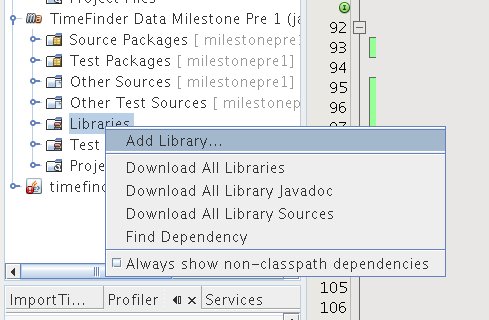
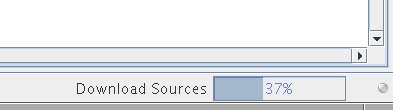
    • Add javadoc or sources (download all source)

      add-sources-and-javadoc

      download-sources

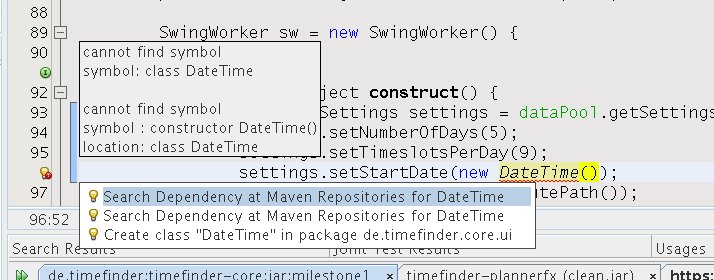
    • You can search unknown class in repository

      search-unknown-symbol

      search-in-repositories

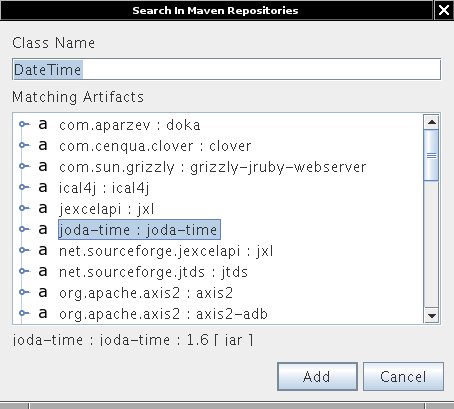
      after adding the JodaTime library with this dialog and adding the sources with the first dialog – all is fine:

      auto-added-lib

    • Set different goal to F6: right click the project->properties->actions->run project and then clear all the fields and set the ‘execute goal’ e.g. to
      mvn jetty:run
    • In the same dialog you can set skip test to true if this is necessary or if you want to speed up compilation
    • Profiling and debugging of a maven project works now, although I had some problems under vista with profiling, but under linux were no issues

    So I am nearly happen with maven under NetBeans, but what really sucks is maven while compiling. A small native NetBeans project takes under 2 seconds to clean and compile. And with maven? Nearly 10 seconds!
    How could one change this? I only found a workaround to use the same project as native NetBeans project, but nothing more. Any ideas how to make ‘maven install’ or ‘mvn compile’ faster??

    (BTW: Today wordpress does not want that I make clickable images … if you want to see the images in better quality you have to right click them->view->remove the stuff after ‘?’. Example: https://navigatone.com/wp-content/uploads/2009/02/add-sources-and-javadoc.jpg)

    Maven2. Phases vs. Goals

    What is the difference between phases and goals in maven?

    I would like to explain the difference with an example:

    Imagine you need an ant task (like copying files) and you want to do this task on every call of

    mvn install

    For this it is necessary to bind the goal ‘run’ from the maven-ant plugin to the phase ‘install’ of the maven lifecycle:

    <build>
       <plugins>
         <plugin>
            <artifactId>maven-antrun-plugin</artifactId>
            <executions>
              <execution>
                 <phase>install</phase>
                 <configuration>
                    <tasks>
                        <copy file="fromfile" todir="todirectory" />
                    </tasks>
                 </configuration>
                 <goals>
                     <goal>run</goal>
                 </goals>
              </execution>
            </executions>
        </plugin>
       </plugins>
    </build>