Today I read the news that now it is possible to use JavaFX1.2 in Java without an additional library like JFXtras.
For more information read it here.
Today I read the news that now it is possible to use JavaFX1.2 in Java without an additional library like JFXtras.
For more information read it here.
Since today the final version of NetBeans 6.7 can be downloaded here. And do not forget to look here for a feature overview.
If you tried the release candidates of 6.7 you will welcome all the new features! Great work! Where can we donate?
The first impressions of this release for me as a NetBeans user are:
Unit tests

Maven dependencies
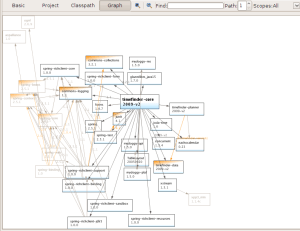
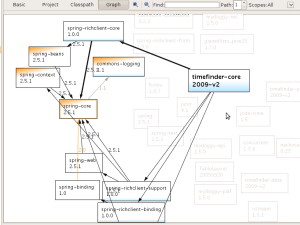
But the cool thing here is that clicking e.g. on spring core shows you all the possible paths to it and grays out all the unimportant
It took me some time to collect the hibernate.cfg.xml data which is necessary for derby, oracle and h2. So here are the default settings for those databases:
<property name=”hibernate.connection.driver_class”>org.apache.derby.jdbc.ClientDriver</property>
<property name=”hibernate.connection.url”>jdbc:derby://localhost:1527/databaseName;create=true</property>
<property name=”hibernate.connection.username”>admin</property>
<property name=”hibernate.connection.password”>admin</property>
<!– no schema necessary –>
<property name=”hibernate.dialect”>org.hibernate.dialect.DerbyDialect</property>
To make it complete here are the maven settings for the databases:
I highly recommend to read this article:
http://daniel.gredler.net/2009/02/18/how-to-start-a-successful-open-source-project/
Have Fun!
After this you surely will be a sceptical about open source projects being the number one 😉
The web site of shine is still available, but nearly all other things were removed from sourceforge.
Thanks for your attention and comments the last months! Hope you will enjoy the next months …
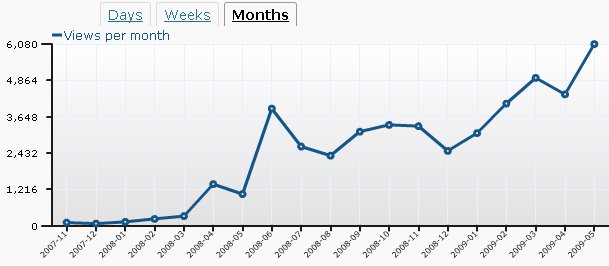
I started my blog in November 2007. Now, May 2009 was the first month with more than 5 000 users (and even over 6000 -> 6080).
The monthly statistics looks a bit like the physical phenomena called ‘Maker-fringes’:
Stats:
Maker-fringes:
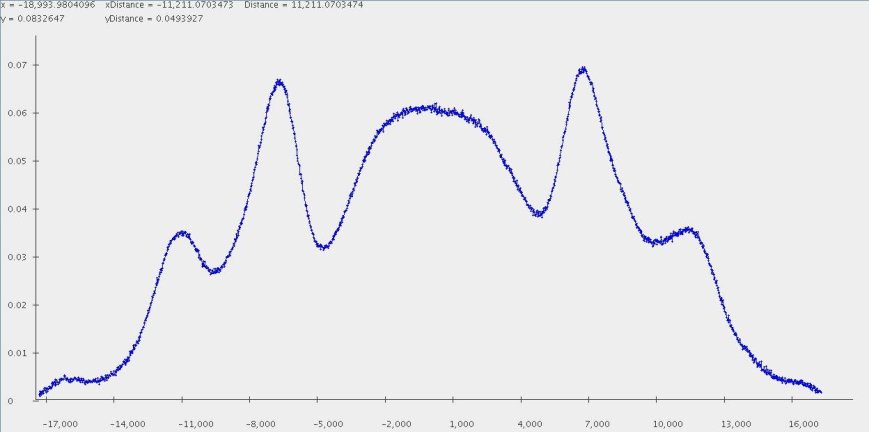
In my diploma thesis 2 years ago I studied this phenomena in detail.
BTW: this fancy 😉 picture I got with my performant Java genvlin plotter.
There are several tools to measure the code quality of my free timetabling software TimeFinder. Here are the tools I tried with success:
mvn findbugs:findbugs
which will use version 1.3.8 out of the box
mvn pmd:pmd
after you specified the following in the pom.xml under<reporting> <plugins> :
<plugin>
  <groupId>org.apache.maven.plugins</groupId>
  <artifactId>maven-pmd-plugin</artifactId>
  <version>2.3</version>
  <configuration>
    <targetJdk>1.5</targetJdk>
  </configuration>
 </plugin>
Other tools could be
but I didn’t tried them so far.
For Findbugs and pmd there is a NetBeans plugin (SQE … software quality environment) which looks promising, but fails with a NullPointerException after I installed it via the update center and tried it on my project. Maybe I should use one of the snapshots. (BTW: I successfully used the pmd-plugin and findbugs in the standalone version).
Sonar is another interesting approach to use several code quality tools at a time. With Sonar it is possible to see the violations or possible bugs over das or weeks – so, you are looking at the improvements and you will not get lost in the mass of bugs at the beginning. Another “multi-tooling” project is XRadar.
A little bit offtopic, but a great tool is proguard, which shrinks, optimizes, obfuscates and preverifies Java class files. There is even a maven plugin for that.
Today I created a video documentation of how to create an individual schedule for JavaOne 2009 with TimeFinder.
Start the flash video it here. (3.5 MB)
Have a look at this presentation where this post is presented as pitfall #3 !
Lesson learned. See comments 🙂
There are a lot microbenchmark tips out in the www. The intent of them differs from author to author.
Today I want to show how you could compare e.g. different algorithms. You could simply do:
int COUNT = 1000000;
long firstMillis = System.currentTimeMillis();
for(int i = 0; i < COUNT; i++) {
  runAlgorithm();
}
System.out.println("Mean runtime of algorithm in seconds:"+(System.currentTimeMillis()-firstMillis) / 1000.0 / COUNT);
There are several problems with this approach, which results in very unpredictable results:
long firstNanos = mx.getCurrentThreadCpuTime();
ThreadMXBean mx = ManagementFactory.getThreadMXBean();
instead of
long firstMillis = System.currentTimeMillis();
After this I got relative stable results: The difference of maximal and minimal value for the result is less then 4% after 10 runs.
If you want no server side setup for webstart all your clients must have a java version greater than java6 update 10 (the naming convention gets too complicated now, mr. sun! …)
For ubuntu 8.04 see my last blog entry how to install this java version.
All you need to do in our maven set-up of this post is to add the following 2 lines to our pom.xml:
…
</sign>
<pack200>true</pack200>
<gzip>true</gzip>
<verbose>true</verbose>
…
Then do:
mvn clean install webstart:jnlp
again and add one line
<j2se version=”1.6+” initial-heap-size=”32m” max-heap-size=”128m”/>
<property name=”jnlp.packEnabled” value=”true”/>
to our jnlp template.
And as it is described here you could even use the versioning feature
<property name=”jnlp.versionEnabled” value=”true”/>
with a specific naming convention, too:
foo__V1.0.jar
But all only if the clients have java > java6 update 10 …
Start TimeFinder here to try a servlet-free-packed200 application out. With jars it was approx 9 MB. Now all pack.gz files in sum are 3.3 MB! And the download time was approx 160 seconds, where now I downloaded und unpacked it within 40 seconds with the same internet connection. You can try it for yourself via switching the java version e.g. from java6_10 to 6_7 or to java5 (in ubuntu this is relative easy with ‘sudo update-alternatives –config javaws’) But before you have to remove the application from cache: start javaws -viewer, search TimeFinder’s shamrock and remove it. Otherwise TimeFinder would start nearly instantaneous.
 Navigatone