Help To Stabilize NetBeans 6.8

From the website:

“Is it easy for you to play with a software and find a defect? If you are an experienced NetBeans user and if you find few hours per week from September through November you can join other community volunteers in NetCAT 6.8 program. Get your favorite NetBeans bug fixed and find new friends.”

Java collections – Are there alternatives?

The built-in collections for Java have good performance and are nice to use – especially with the new for-loop pattern.

But are there alternatives? And if so, why should I use them? (Please use the comment functionality ;-))

The following collection implementations I found on the web:

There are also some older projects, where the development seems to be abandoned:

If you need real big data in memory you should consider a lightweight database (or a real one??) like neodatis, derby or something really interesting: HBase from the hadoop project (Apache/Yahoo!).

Xml Serializers For Java

At the moment I know only some xml serializers with different capabilities to write an object to an xml file and retrieve it back from it:

  1. JDK classes (XmlEncoder and XmlDecoder)
  2. XStream (BSD license)
  3. The Simple project (Apache License 2.0) it even handles cycles.
  4. Apache Digester (Apache license) can only read xml. To write xml use Betwixt.
  5. X2JB (LGPL)
  6. XmlFormat from javolution.org (BSD license)
  7. cedarsoft serialization (GPL with classpath exception)
  8. Xerces XmlSerializer (Apache license) is this used as the implementation for the first one? I discovered the class com.sun.org.apache.xml.internal.serialize.XMLSerializer in the jdk …
  9. Burlap from Caucho (Apache license) used as serialization format over http.
  10. JAXB (Apache license)
  11. Smooks (LGPL)
  12. Moose (LGPL)
  13. Datanucleus (Apache license) JDO persistence into relational db, oo-db, xml, excel, …
  14. vtd-xml (GPL)
  15. WAX (LGPL) xml writer
  16. … more libraries (and an old benchmark)
  17. … or web services tools

Although xstream is very easy to use (like XmlEncoder) it is not that convenient to use if you want that you xml fits to a special schema (if you have cyclic references). For the latter case you can use JiBX, JAXB, Castor or whatever …

Please write a comment of your choice and include some information about the library and why you chose it.

Update:

BTW: If you want to unit test reading and writing xml then xmlunit will help you!

Swing Talks (video and slides available)

Maybe you already know that at parleys they put some nice presentations.

Especially the talk Spring is Swinging from Jo Wyns was impressive to me, where he talks about the Spring Rich Client project.

The presentation seems to be an old one (where is the date??), but it is even today a hot theme: rich desktop applications with database access (or internet connection). He concludes his talk with a tip, when to stop or when is is a bit too far. I think with too far he means projects like the metaframeworks I talked about earlier. And maybe this is true: in commercial applications nearly always you will need to customize views etc. then the simple “annotated domain object”-approach will only work for the first rapid prototype.

Have fun with this talk and with the related talks (here or here).

LiquiBase Extension Contest 2009

To reduce myself to the important I will simply repeat the important phrases from the liquibase homepage:

“LiquiBase is an open source (LGPL), database-independent library for tracking, managing and applying database changes.

Learn more about liquibase with a video or with the quickstart guide. There exist ant- and maven-plugins to apply liquid changes to your database.

“Now is your chance to extend the capabilities of LiquiBase and possibly win a great prize!

The LiquiBase Extension Contest 2009 ends on September 30, 2009.”

Read more about the contest here!

Convert Zaurus Addressbook xml to csv (e.g. for Thunderbird)

Some years ago my father gave me a Zaurus – a PDA-like-device. But in the mean time the battery losts its energy and the only usecase for me was the addressbook. Although the Zaurus was a nice PDA, where you can programm Java GUI’s (via awt, e.g. here or here) and other nice things.

I used the csv file to import my address-data into Thunderbird: in the menu bar under Extras->Import you can choose the csv format for the addressbook and verify every entry in the csv. It will not overwrite anything, because it will create an entirely fresh addressbook named like the csv file, so feel free to try it out and develop it to your needs. If you have another usecase for this source please let me know in the comments.

But today here is the Java source code, so that you can convert the addressbook.xml to an csv and be independent from Zaurus (and its battery life):

package zaurus2thunderbird;

import java.util.Collection;
import java.util.HashSet;
import java.util.LinkedHashMap;
import java.util.Map;
import java.util.Map.Entry;
import java.util.Set;
import javax.xml.parsers.DocumentBuilder;
import javax.xml.parsers.DocumentBuilderFactory;
import org.w3c.dom.Document;
import org.w3c.dom.NamedNodeMap;
import org.w3c.dom.Node;
import org.w3c.dom.NodeList;

/**
 * @author Peter Karich, peat_hal 'at' users 'dot' sourceforge 'dot' net
 */
public class Main {

    public static void main(String[] args) throws Exception {
        new Main().start();
    }

    public void start() throws Exception {
        // Create a factory
        DocumentBuilderFactory factory = DocumentBuilderFactory.newInstance();
        // Use the factory to create a builder
        DocumentBuilder builder = factory.newDocumentBuilder();
        Document doc = builder.parse("addressbook.xml");

        // Get a list of all contacts in the document
        NodeList list = doc.getElementsByTagName("Contact");

        // maps oldKeys to newKeys, but store order of how elements are added
        Map<String, String> map = new LinkedHashMap<String, String>() {

            {
                put("FirstName", "Vorname");
                put("LastName", "Nachname");
                put("MiddleName", "Spitzname");

                put("BusinessStreet", "Dienstlich: Adresse");
                put("BusinessState", "Dienstlich: Adresse 2");
                put("BusinessCity", "Dienstlich: Stadt");
                put("BusinessPhone", "Tel. dienstlich");
                put("BusinessFax", "Fax-Nummer");
                put("BusinessMobile", "Mobil-Tel.-Nr.");

                put("HomeStreet", "Privat: Adresse");
                put("HomeState", "Privat: Adresse 2");
                put("HomeCity", "Privat: Stadt");
                put("HomePhone", "Tel. privat");
                put("HomeFax", "Fax-Nummer");
                put("HomeMobile", "Mobil-Tel.-Nr.");

                put("JobTitle", "Arbeitstitel");
                put("Company", "Organisation");
                put("Department", "Abteilung");

                put("Anniversary", "Geburtstag");
                put("Birthday", "Geburtstag");

                put("DefaultEmail", "Primäre E-Mail");
                put("Emails", "Sekundäre E-Mail");

                put("Categories", "Notizen");

                put("FileAs", "");
                put("rid", "");
                put("Gender", "");
                put("Uid", "");
                put("rinfo", "");
            }
        };

        // maps newKeys to values
        LinkedHashMap<String, String> oneLine = new LinkedHashMap<String, String>();
        for (String newKey : map.values()) {
            oneLine.put(newKey, "");
        }

        // print csv header
        printLine(map.values());

        Set<String> missing = new HashSet<String>();
        for (int i = 0; i < list.getLength(); i++) {
            Map<String, String> cloneForNewLine = (Map<String, String>) oneLine.clone();
            NamedNodeMap attr = list.item(i).getAttributes();
            for (Entry<String, String> entry : map.entrySet()) {
                Node newAttr = attr.getNamedItem(entry.getKey());
                if (newAttr != null)
                    cloneForNewLine.put(entry.getValue(), newAttr.getTextContent());
            }

            // print csv values
            printLine(cloneForNewLine.values());

            // add items if an old attribute does not exist in map
            for (int j = 0; j < attr.getLength(); j++) {
                String newAttr = map.get(attr.item(j).getNodeName());
                if (newAttr == null)
                    missing.add(attr.item(j).getNodeName());
            }
        }

        System.out.println("\nMissing new mappings for old attributes:");
        printLine(missing);
    }

    public void printLine(Collection<String> items) {

        for (String m : items) {
            System.out.print(m + ",");
        }
        System.out.println();
    }
}
A Pagination-enabled List in Swing with Hessian

In an ealier post I documented how to set up a maven project to use port 80 for client-server-communication in a Java Swing project.

Today I want to show how you could implement a list which shows ‘all’ objects of one entity. It is common that there exists thousand or more objects for one entity in a database, so pagination is required. I know that JList and JTable could handle very large result sets easily, but the bandwith would be the limitating factor and loading all the objects into memory is often not required (and not good …).

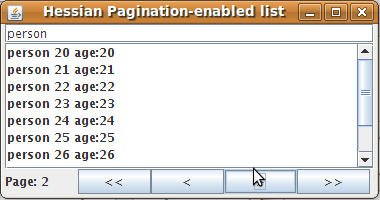
I will use the simplest Swing solution with some pagination buttons, although it would be a lot nicer to have the pagination with a custom vertical JScrollBar-implementation which loads the objects while scrolling (‘on demand’). But this will be either a task for my readers or for myself at a later time. First we can take a look at the resulting (primitive) GUI:

paginationlist

The interface for the data access object was quickly created:

public interface RemoteDao<T> {
   List<T> getAll(int index, int items, String query);
   int count(String query);
}

… the implementation, too (but for this see the source in the provided project). You can simply replace the existing fake-implementation with a RemoteHibernateDao or sth. like this, if you like.

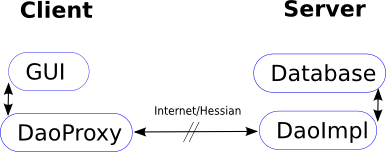
The communication follows this picture:

dao-hessian

To try this maven project: start PaginationServlet under the paginationlist package and then the PaginationClient. The Swing gui should pop up and you could hit enter after a search string like ‘person’ or ’18’ in the textfield at the top. Now try to paginate through the results with the provided buttons at the bottom.

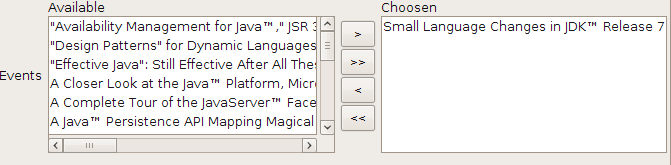
The final goal for me (at a later time) will be to replace the left ‘Available’-JList in a ShuttleList (from Spring rich client project) with my PaginationList. For you information: with a normal ShuttleList one could drop one or more items from ‘available’ list to ‘choosen’ with the buttons in the middle (they have nothing to do with pagination!). Here a normal shuttle list is shown:

shuttlelist-orig

So, now have fun with my small Swing example and feel free to provide feedback or ask questions if you need help while maven or sth. else!

News on an old Java Wisdom

I am fully aware of the brace initialisation of anonymous classes, but I didn’t know that this can help to improve readability of Java programs until I read this nice post:

Map<Integer, String> map = new HashMap<Integer, String>() {{
 put(1, "one");
 put(2, "two");
 put(3, "three");
 put(4, "four");
 put(5, "five");
}};

The author said that this could help in GUI programming:

JFrame frame = new JFrame() {{
   setDefaultCloseOperation(EXIT_ON_CLOSE);  
   add(new JLabel("Hello, World!"));
   pack();
}};

Nice !

Profile J2SE Maven Projects With Yourkit Profiler Under NetBeans 6.7

For my open source timetabler TimeFinder I got a free license of the Java profiler from yourkit.

TimeFinder is a maven project so it starts not out of the box with the latest yk-NetBeans plugin.

But the solution is simple:

  1. Right click the project->Set Configuration->Customize->Add… then enter a name (profile-algo) for the new configuration
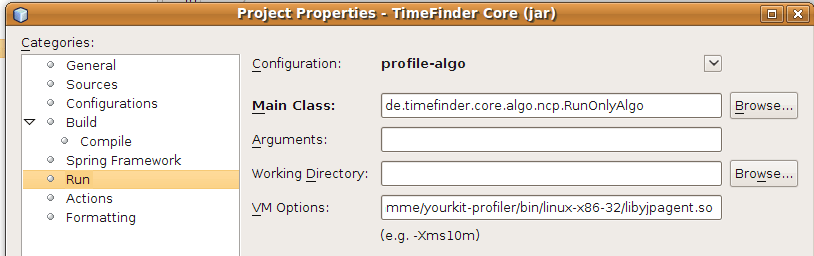
  2. Go to the Run entry in this Project Properties dialog and select the Main Class where your mavenized J2SE application should start with
    nb-config-run
  3. Under VM Options I entered (for linux)
    -agentpath:/home/user/Programme/yourkit-profiler/bin/linux-x86-32/libyjpagent.so
    for another OS please look here.
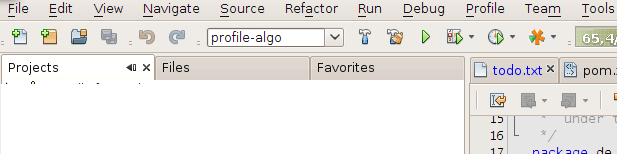
  4. Then select the previously created configuration (profile-algo) in the tool bar under the menu bar and hit F6 to start the mavenized J2SE application
    nb-config
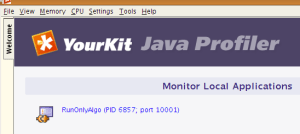
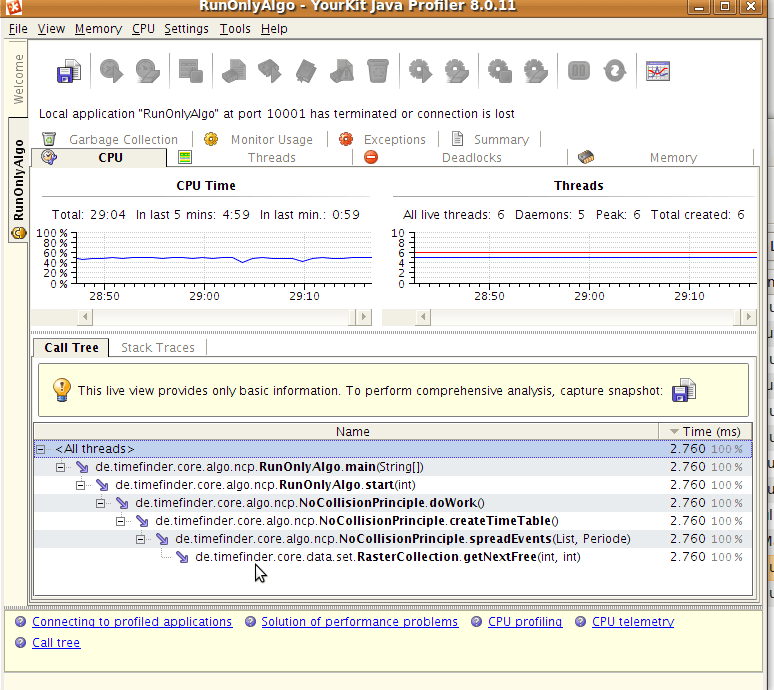
  5. At any time start the yk-profiler (before the J2SE application starts). Now a new entry under Monitor Local Applications should be listed. Click on that and you will be able to “look into” (aka “profile”) a mavenized J2SE application.
    yourkit-overview
    yk-profiler-at-runtime
  6. If you installed the NetBeans 6.7 plugin before you are even able to click on a source file in yk-profiler and this file will be opened automagically in NetBeans