I read an interesting blog entry at Google, where they talk about Thread Weaver (Apache license), which can be used to test against synchronization issues.
Category Archives: Java
VL Docking and other window docking managers for Java
Maybe you already know it;
there are several docking managers and since April 2009 (3.0) you can include VL Docking for free even in commercial applications, because its LGPL!
The good thing about VL Docking is (and of MyDoggy by the way …) that it is well integrated into the Spring RC project.
More information about VL Docking
All Java docking managers
- Raven Docking Apache 2; 0.2 MB
- MyDoggy LGPL; only jar’s: 0.5 MB
- VL Docking LGPL; 0,4 MB
- NetBeans CDDL/GPL; 4.6 MB (platform.zip)
- Eclipse CPL or EPL ? only swt (?)
- InfoNode GPL or Commercial
- Sanaware GPL or Commercial full zip 0.3MB
- Docking Frames LGPL; 0.7 MB
- Jide commercial; <3MB
Inactive projects
- SwingDocking seems to me fully functional and fast; Apache license 2
- XUI will be further developed here?; MPL; 1.6 MB (XUI-jdk15.zip)
- JDocking CDDL; 1.3 MB (v0.8.zip) the docking part of netbeans
- FlexDock MIT; only jar’s: 0.5 MB
- JRichClient GPL; derivation of flexdock
Please let me know if you know other libraries which support ‘window docking’.
Java Application Frameworks (not only client side …)
In an old post I listed all Java libraries,where only two application frameworks were listed.
Today it is time to list some client side Java application frameworks, because I discovered some new ones while reading the W-JAX announcement. Some of the listed frameworks will make developing application with DB easier. And some of them are real 3 tier architectured frameworks. Some of them even allow you to develop RIA’s and web frameworks at the same time.
Here is now the list of open source Java application frameworks especially for the desktop. Feel free to add some more (via comment):
- NetBeans RC Platform, my IDE is build on this 😉
- Eclipse RC Platform, has an interesting ‘subproject’ called Riena
- Spring RC, at the moment my favourite used in TimeFinder
- AppFramework which won’t be in JDK 7, but has a lot of derivatives
- JVx, looks very nice! Makes fast development of Swing applications possible (with db support)
- OpenXDev a framework which could be used as a base for your next Swing project
- Genuine is a client framework for Java Swing applications for which it provides basic infrastructure
- Genesis with Swing and SWT binding; Easy, transparent remoting; etc
- GWT (although only intented for javascript widgets it could theoretically being used as a rich client running in the jvm)
- OpenSwing Framework is an open-source suite of advanced graphics components based on Swing toolkit
- Leonardi Framework
- Jspresso is a framework for building rich internet applications
- Viewa framework
- XUI is a Java and XML RIA platform
- Swing + XUL = SwiXAT looks interesting but dead, the same for the next:
- Swing + XML = SwiXml a small GUI generating engine.
- buoy built on top of Swing. Xml serialization of UI possible
- But why xml if you have groovy: Griffon 😉
Now, a nice approach would be to send/receive groovy code and build the clients’ GUI on fly… this would be like replacing the browser+html+javascript system with rock solid JVM+Groovy 😉
Another Comment from Andres: An addtional tidbit about Griffon, it can be seen as a polyglot programming desktop/RIA framework as it supports 5 JVM languages at the moment: Java, Groovy, Scala, Clojure and JavaFX. It also lets you embed JavaFX components on Swing containers. - JMatter is a software framework for constructing workgroup business applications based on the Naked Objects Architectural Pattern.
- Metawidget is a ‘User Interface widget’ that populates itself, at runtime, with UI components to match the properties of your business objects.
- Pivot a platform for building rich internet applications in Java
Especially JVx with a webstart demo looks very promising! It even feels better and faster than an ordinary flash application!
Commercial:
I listed only frameworks which help developers to easier build client side desktop application and only if they run in the JVM. So frameworks where the client is browser-based (aka web frameworks) are not listed here.
For a good list of J2EE frameworks go to java-source.net or to wikipedia. (Or here, or there, or even here)
Update: For additional comments look at dzone
Import/Export Code Formatting Settings from NetBeans
In short: To share settings (e.g. code formatting) from NetBeans with Eclipse a little bit work has to be done.
For NetBeans you have the following possibilities
- Either directly use the file
'home'/.netbeans/6.0/config/Preferences/org/netbeans/modules/java/source/CodeStyle/default.properties
- Use the eclipse importer. Now you can use the project within NetBeans and sync etc.
- Or you could load the settings (e.g. the settings from previously imported eclipse project) via “right-clicking the project”->Properties->Formatting->Use project specific options->Load from other project
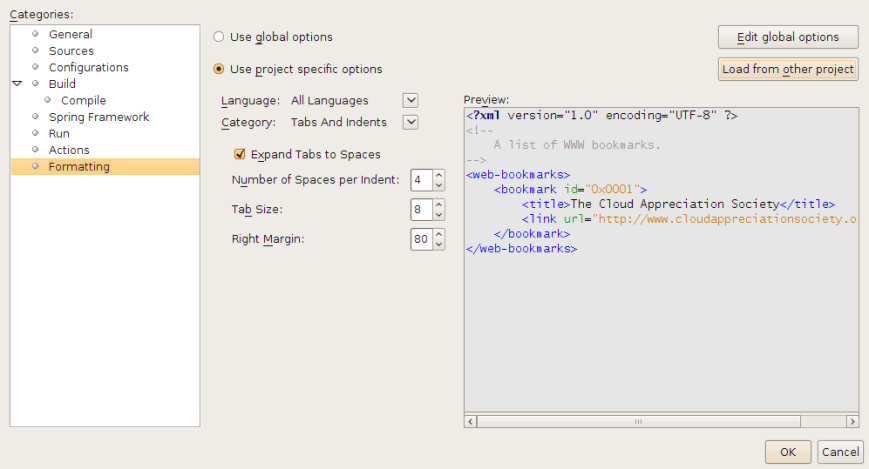
- Other possibilities? Let me know!
Evolution of Build Systems
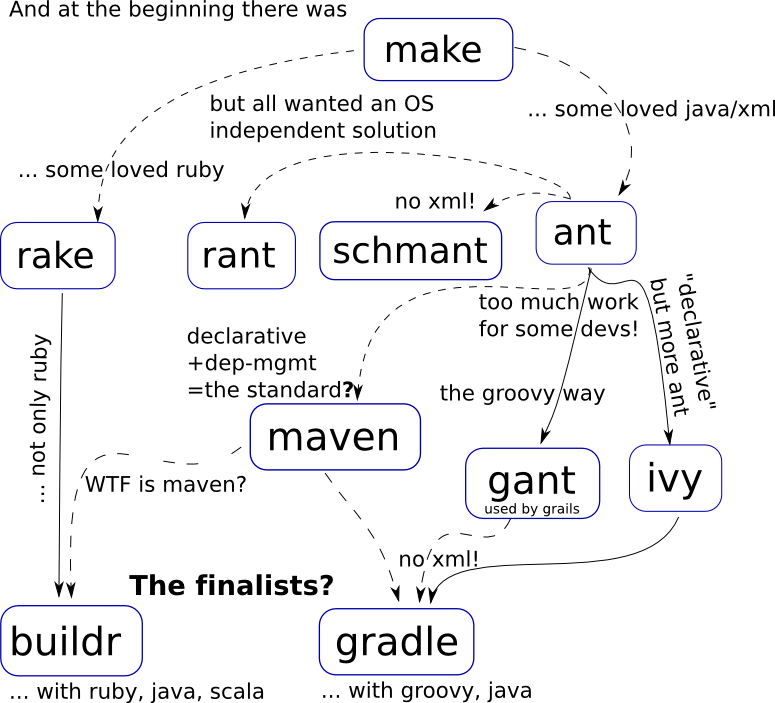
As always I would like to know where I was correct and where the picture has holes or even mistakes.
You could use the comment functionality to make suggestions!
And check this post for a buildr vs. gradle comparison.
Xvantage – Yet Another Xml Serializer!
In one of my last posts I listed some xml serializers and binding tools. After trying XStream, JAXB, XmlEncoder, Apache Digester and X2JB I decided to create another one: xvantage!
Why yet another xml tool?
To make it clear: At the moment xvantage is in its early stage (one week old) and I hacked it down in some hours of my spare time. So it is not a fully fledged and bugless solution like the other ones should be.
But it has some new ideas included to make the serialization as easy as XStream and XmlEncoder, but to make the xml checkable through an xsd file. The advantage of a valid xml is first of all: “then you know all is fine” and second “It is nice to read and editable from a person!”. The latter one was very important for me and is really important for xml configuration files.
Apache Digester was another candidate but the set up was relative complex and the dependencies are to big for me. And last but not least: you need an additional, not further developed library (Betwixt) to make writing working too! So xvantage seems to solve at least these two problems: it is small and it can write xml from your POJOs and read it back.
How would it look like to write my objects?
// Create a data pool with all your POJOs you want to serialize
DataPool pool = new DefaultDataPool();
Map<Long, SimpleObj> map = pool.getData(SimpleObj.class);
map.put(0L, new SimpleObj("test"));
StringWriter writer = new StringWriter();
xadv.mount("/path/", SimpleObj.class);
xadv.saveObjects(pool, writer);
The resulting xml looks like
<?xml version="1.0" encoding="UTF-8"?>
<path>
<simpleObj id="0">
<name>test</name>
</simpleObj>
</path>
And reading?
// get xml from somewhere
StringReader iStream = new StringReader(
 "<path>" +
 "   <myobject><name>test</name></myobject>" +
 "</path>");

// mount to /path/ with an alternative name 'myobject' instead of the default which would be simpleObj
// this is the preferred way for mounting, because otherwise class refactoring results in different xml
xadv.mount("/path/myobject", SimpleObj.class);
DataPool pool = xadv.readObjects(iStream);

// get the first SimpleObj and check the name
SimpleObj obj = pool.getData(SimpleObj.class).values().iterator().next();
assertEquals("test", obj.getName());
Why does xvantage needs the DataPool interface?
Without it it couldn’t handle references properly. And now with this DataPool interesting use cases arises, e.g. where parts of an object graph should be refreshed through xml (imagine you grab some objects as xmls through HTTP GET …)
Why do we need to mount classes?
To mount a class means: xvantage should track every occurance of that class as references and should NOT nest the object within other objects.
This looks interesting, but does it works for more complex objects?
Yes, it should. I could successfully embed this in my TimeFinder project, where I tried to persist 4 entities (some of them with hundreds of objects and several references) and read them successfully back. Objects which are not mounted explicitly will be nested within mounted objects like in xstream.
Look into this for more information.
Is xvantage an xml binding tool?
No, it is an xml processor. So serialization and deserialization is easily possible if you start from Java code. At the moment it is nearly impossible to start from xml. Use JAXB or JiBX in that case.
What is are the disadvantages?
- As I mentioned earlier: it is may be not so stable like all the others, because it is in early development
- It is not (yet?) so powerful and configurable like JAXB and all the others. So at the moment you cannot make your dream xml happen (i.e. not suited for binding)
- may be not so fast
- not thread save, you have to use multiple instances of xvantage
- a no-arg constructor (at least private), getter and setters for all classes are required to use xvantage
And what are the advantages?
There are several
- easy xml (de-)serialization
- small library <50KB (without dependencies!)
- junit tested
- cross references are allowed! So you can reference even between documents and you could read/write from/to multiple files!
- the xml could be checked via xsd (but no must)
- no deeply nested unreadable xml (the same as 6.)
- no checked exceptions
- no license issues and free source code (public domain!)
How can I use it?
Just clone the git repository:
git clone git://github.com/karussell/xvantage.git
cd xvantage
mvn clean install -Dmaven.test.skip=true
Currently it is a netbeans project and the tests in maven will not pass because some resource files are not available.(?)
How does it work in theory?
Writing
- Xvantage writes the object to xml (via SAX). The object will be directly converted to xml if it is a primitive type, a collection (list, set), a map, an array, your own implementations of such an interface or a BitSet.
- If the values of a collection or a property references to a mounted POJO it will write only the id
- If no id was found (in case we have an unmounted POJO) the POJO will be written directly as subtree to the current object.
Reading
- It reads the xml tree via SAX and reads discrete objects according to the mounted classes via DOM
- If the object is a mounted POJO it will read the id and try to set the properties from the xml structure. If an object with the given id already exist, this instance will be used to fill in the properties from the xml nodes.
- If a setter is one of the mounted classes a new object with the id (from xml) will be created and the properties will be filled later.
- If the object is a collection it will fill the collection from the values
- If the object is not a mounted POJO it will try to read the nested xml structure to set the properties
Provide Feedback!
Be constructive and tell me facts (maybe such a tool already exists :0!). Use comments or peathal at yaahooo dot de.
Thanks a lot for your attention!
Java tips on Twitter
Do you have tips on the core Java language?
Just post them after ‘#javatip‘ like I did to make them searchable for some days (called ‘Trending Topics’).
Of course you could do the same for other languages or even frameworks: #rubytip, #railstip, #grailstip, #wickettip, …
A tip should be an important or interesting fact about that specific topic. E.g. it can include
- problems and their solution (FAQ)
- performance tips
It should not include (e.g. in the case of #javatip), to keep the search phrase xytip as clean as possible
- news on a java library or webframework
- news on the jvm (of course stuff for the language itself is good …)
- and of course no advertising/spam
So a tip is more an already known fact about that topic which could be good to spread …
Plugable Spring RC? (OSGi with Spring Rich Client)
My last post was about pure Swing, which could be easily OSGified. OSGi technologie can be e.g. used to hotdeploy or undeploy jar files to your application server (at the moment only Spring’s server is suggested) or simply to update your Swing application at runtime or write plugins for them. I don’t know for sure, but it seems to me that Eclipse is the most prominent user of OSGi (equinox is one implementation of the specification…) as desktop application, although NetBeans can now use OSGi bundles.
(BTW: do you know a funny myth where the small “i” from OSGi could come from? No? Read the comments here!)
In the last post I show you several swing applications, which were successfully OSGified, today I would like to list Swing- or Eclipse-based applications which use Spring Dynamic Modules:
- https://spar.dev.java.net/
- http://sourceforge.net/projects/agilercp/
- http://max-server.myftp.org/trac/mp3m/ eclipse rcp
- http://max-server.myftp.org/trac/pm swing app framework, even webstart will work here
Then today, in contrast to my last post, I would like to show you an identical solution for the Spring Rich Client project.
Why should I use another framework on the top of OSGi? This is simple: Spring DM provides several nice features, like no dependency on the OSGi implementation (felix, equinox, knopflerfish) and even no one on OSGi at all. Everything (and think) is a bean, like always! But why Spring DM? Why not Declarative Services from OSGi itself or Apache iPOJO? This is simple: I don’t know the others and Spring Rich Client cries for the Spring solution 😉
But to make this short story very short: after struggling the last two days to get Spring Dynamic Modules integrated with Spring Rich Client I gave it up and tried the pure OSGi solution – and – it works. It might be an ugly solution for all those of you who like dependency injection, but this can be optimized later. Today this might be the first plugin for Spring Rich Client – ever:
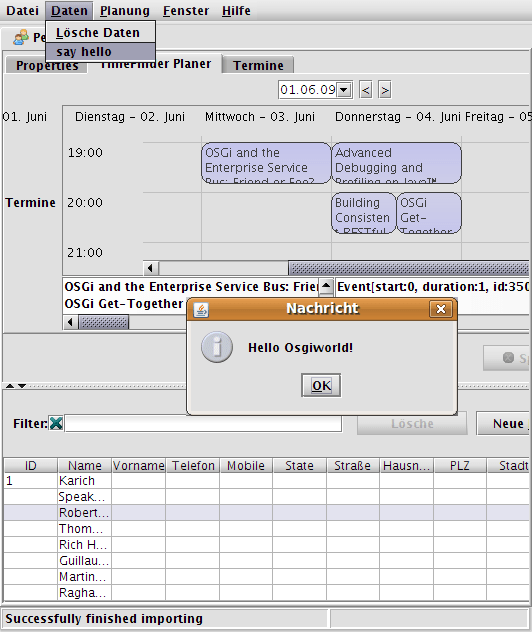
The button “say hello” with its JOptionPane message was installed through the dynamically loaded plugin. The source code is nearly identical to the one in my previous post. Just add the Spring RC startup before you grab the menu from the application to create a MenuTracker, which calls the MenuService(=plugin):
@Override public void start(BundleContext context) throws Exception { startup.start(); menuTracker = new MenuTracker(context, Application.instance().getActiveWindow().getControl().getJMenuBar().getMenu(1)); menuTracker.open(); }The source is available from my TimeFinder project via:
svn checkout -r 595 https://timefinder.svn.sourceforge.net/svnroot/timefinder/trunk timefinderBe sure to start the application from de.timefinder.core.osgi.Activator (main method!).
I hope this post inspired someone to be the first one with Spring DM + Spring RC marriage … or sb. suggests working examples how Spring DM could be started from command line or from NetBeans.
Plugable Swing – A Hello World OSGi Example
There are a lot of OSGi applications out, a minority is for the client side. Here I will list some “on swing”:
- Apache-Felix-Demo
- Swing-Application-on-OSGi from Daniel Rohe
- Dynamic Swing OSGi Demo from Kai Tödter
- Examples from the OSGi in Action book
- Sip-Communicator
- Daro
Today I tried the same and had luck. It was very fast (~1h) to get all working what I wanted, because I shamelessly stole the code from the example of Apache Felix. It is even more easier than this example but should have the same effect: it shows how one could use OSGi even for a Swing application.
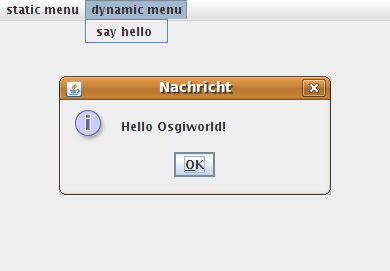
There is a host application called Swing On OSGi – Host with one JMenu which does not change (static) and one (dynamic) JMenu which could be changed from the available plugins (here only one: Swing On OSGi – PluginTest). The source code (Apache License 2) can be checkout via
svn checkout https://timefinder.svn.sourceforge.net/svnroot/timefinder/branches/swingosgi swingosgi
… you will need maven. After ‘mvn install’ for both projects you will only need to start the host application via your IDE or via
java -jar target/host-1.0.0.jar
Then if you see the “dynamic menu” with one menu entry (which was added from the plugin) all is fine:
If you have problems while building this send me an email or comment here.
I got the plugins even working in my timetabling application TimeFinder which uses the client-side framework called Spring Rich Client. The first plugin for Spring Rich Client – read more.
I had an Intelligent IDEA: Two days without NetBeans …
Yesterday and the day before I tried the unbelievable: I used not my favourite IDE NetBeans (6.7) – I used IntelliJ Idea (8.1). Five months ago I got the free license from Jetbrains for my open source timetabling application called TimeFinder, but I hadn’t the time to try it out. And why should I?
People from Pannous say Idea is the best IDE and everywhere else I could read about fantastic features. But read this to get an answer from Jetbrains and read the text below to get subjective impressions on the subject “IntelliJ IDEA as a NetBeans user”.
Every start is stony, so I tried to configure the layout and some more things to my needs. Then Idea looked good although not like a native application (which is great under gnome ;-)) The most important step I did too late, but you should do it as a first step: print the keyboard shortcut reference and highlight your important one. Another good resource for NetBeans user using Idea is the FAQ from Jetbrains, where I discovered that you can even use NetBeans shortcuts as well… and you don’t have to worry about using 2 IDEs at the same time:
“The NetBeans .nbproject directory and build.xml remain untouched, so you can continue using IntelliJ IDEA along with NetBeans.”
After this personal-warm-up I opened the root module of the maven project from TimeFinder and this worked simply by opening the project’s pom.xml. To run it a minor set up was necessary: the JDK_HOME and the M2_HOME (/usr/share/maven2 for ubuntu) needed some values. But after this I could run a file with a main method in it via CTRL+SHIFT+F10. The following points I made for myself along the days:
- To import a J2SE project Idea is pretty slick: it searches even for existing jar files and allows you to specify a dependency.
- Running single tests is possible with Idea.
- You cannot select a local variable and the usages will be highlighted
From comments: “Settings | Editor | Highlight usages of element at caret” - There is only one “Search” possible in Idea (Not several search tabs …)
From comments: the “Find Usages” dialog has an option “Open in new tab” - The built-in on-the-fly static code analysis is be a bit more fined grained in Idea
The points are based on my own experience with 8.1.3, please search on the web to proof me wrong. And please think before you post some constructive comments and facts 😉
My personal FAQ which I created to ask YOU:
- Is there really no explicit handling for unit test folders?
Answered. See comments - Does it really takes so long for project loading?
See comments - Why is there no simple create jar from J2SE project?
See comments - How can I move the tabs around?
I would like to have my todo file always on the very left … regardless of when I opened it.
See comments - Why is there no “test” button like there are “run” and “debug” buttons?
See comments
- Why I have to set the working directory for a maven configuration?
- Is it possible to have two projects opened at the same time in the same frame?
The FAQ answers this with:
Each global window with IntelliJ IDEA instance represents a single project. Is this true? - Could you get rid of the three project files for Idea?
Yes, there is a new directory-based project format available in IDEA and can be used instead of the traditional .ipr project format - Why is there a separate project called RubyMine? Is this the same like the ruby plugin?
See comments
- And how to import existing rails applications?
From comments: use “New Project”, select Ruby module type and select the existing app directory as the location. Then select Ruby on Rails and “Use existing”.
- Are there features from NetBeans that are not present in IntelliJ IDEA?
With a honest answer in the FAQ:
IntelliJ IDEA does not currently provide an RCP platform. Profiler is not available out of the box, although it can be installed as a plug-in. JavaFX support is still basic in IntelliJ IDEA and C/C++ is not supported. There are fewer visual designers in IntelliJ IDEA than in NetBeans, although visual approach seems to be less important for professional developers due to various limitations of visual designers. Other features should be on par or have better support in IntelliJ IDEA according to our current knowledge. - Are there features from IDEA that are not present in NetBeans?
Please look in the FAQ for reasons. - Where is Matisse?
You can read more about the designer used in Idea here. - BTW: Since when is Roman Strobl working for Jetbrains?But how can I run all tests in the test folder?
To come to a final conclusion I would like to know the answers on all these questions … although …
I think every IDE like eclipse, netbeans or idea is great as long as the developers are efficient with it (and knows how to configure/setup/work with). I think it is not wise for a company to force one IDE at work, because not all developer have the same knowledge or requirements. One user likes to configure everything and to work without the mouse, the other developer just want to start coding…
So, it is not really important if NetBeans is the best IDE or Idea or whatever – just use maven or ant projects (or some newer things) and every developer can get happy with its own favourite IDE.he “Find Usages” dialog has an option “Open in new tab”use “New Project”, select Ruby module type and select the existing app directory as the location. Everything will be configured automatically for you.
 Navigatone