Barchart with Wicket and pure HTML

I needed to display the tweets per day for my date filter @ jetwick.com

I tried the jfreechart approach but I didn’t like to have a generated image with an imagemap although it worked and looks nicely.

So here you have the html, css and java snippet necessary to do the same in pure html. Please comment if something is wrong (I had to edit the working code to remove the unnecessary solrJ stuff that I had within that component).

Html

<!DOCTYPE html PUBLIC "-//W3C//DTD XHTML 1.0 Strict//EN"
    "http://www.w3.org/TR/xhtml1/DTD/xhtml1-strict.dtd">
<html xmlns="http://www.w3.org/1999/xhtml" xml:lang="en" lang="en"
      xmlns:wicket="http://wicket.apache.org/dtds.data/wicket-xhtml1.4-strict.dtd">
    <head>
        <title>[Panel Test]</title>
    </head>
    <body>
        <wicket:panel>
               <div class="main-bar-chart">
               <div class="bar-chart">
                    <div wicket:id="items">
                        <a wicket:id="itemLink">
                            <span wicket:id="itemLabel">[Text]</span>
                            <div wicket:id="itemSpan"/>
                        </a>
                    </div>
              </div>
              </div>
        </wicket:panel>
    </body>
</html>

Css

.date-filter .main-bar-chart {
    background: #f2f2f2 url('../img/bottom-line.png') bottom left repeat-x;
    padding: 10px;
    width: 610px;
    height: 100px;
}
.date-filter-label {
    padding-bottom: 10px;
}
.date-filter .bar-chart, .main-bar-chart .gray  { color: gray; }

.date-filter .bar-chart .item {
    padding-left: 10px;
    float: left;
}

.date-filter .bar-chart .item span  {
    font-size: 12px;
}

.date-filter .bar-chart .item .item-span {
    background-repeat: repeat-y;
background-image: url('../img/bar-min.png');
}

Java

     private List<Object[]> entryList = new ArrayList<Object[]>();
    private long max = 1;

    public JSDateFilter(String id) {
        super(id);

        ListView items = new ListView("items", entryList) {

            @Override
            public void populateItem(final ListItem item) {
                float zoomer = MAX_HEIGHT_IN_PX / max;
                final Object[] entry = (Object[]) item.getModelObject();
                String strValue = (String) entry[0];
                Integer count = (Integer) entry[1];
                Label bar = new Label("itemSpan");

                AttributeAppender app = new AttributeAppender("title", new Model(count + " entries"), " ");
                bar.add(app).add(new AttributeAppender("style", new Model("height:" + (int) (zoomer * count) + "px"), " "));
                AjaxFallbackLink link = new AjaxFallbackLink("itemLink") {

                    @Override
                    public void onClick(AjaxRequestTarget target) {
                        //TODO
                    }
                };
                link.add(app);
                Label label = new Label("itemLabel", strValue);
                link.add(bar).add(label);
                if (count == 0) {
                    link.setEnabled(false);
                    link.add(new AttributeAppender("class", new Model("gray"), " "));
                }

//                if (selected)
//                    link.add(new AttributeAppender("class", new Model("filter-rm"), " "));
//                else
//                    link.add(new AttributeAppender("class", new Model("filter-add"), " "));

                item.add(link);
            }
        };

        add(items);
    }

    public void update(Map<String, Integer> map) {
        entryList.clear();
        max = 1;
        for (Entry<String, Integer> e : map.entrySet()) {
            entryList.add(new Object[]{e.getKey(), e.getValue()});
            if (e.getValue() > max)
                max = e.getValue();
        }
    }

You can use this code in your wicket page via the following snippet in the html:

<div wicket:id="dateFilter">[dateFilter]</div>

and add(new DateFilter(“dateFilter”)) in the Java part. The bar image is available here.
Debugging PHP with NetBeans

How easy is it to make debugging working for PHP code? With NetBeans no problem! Only 5 easy steps!

  1. Download NetBeans 6.9 (although I am using the old 6.8)
  2. If you are on ubuntu installing xdebug is a one liner:
    sudo pecl install xdebug

    write down the path to xdebug for me it is

    /usr/lib/php5/20060613+lfs/xdebug.so
  3. add the following to your php.ini (on my system at /etc/php5/apache2/php.ini):
    xdebug.remote_enable=1
    xdebug.remote_handler=dbgp
    xdebug.remote_mode=req
    xdebug.remote_host=127.0.0.1
    xdebug.remote_port=9000
    
    zend_extension=/usr/lib/php5/20060613+lfs/xdebug.so
  4. apache2ctl restart.
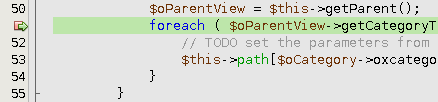
  5. Set a breakpoint via clicking on the line number. Then right click the project->Debug (Select ‘Server Side PHP’). Now you should see sth. like this:

    Check the ubuntu thread, the xdebug site and the netbeans site if you have still problems.

Now you should be able to execute your code step by step with F8, continue with F5 and e.g view the content of variables: select parts of the code and see the result:

And a lot more feature like inspecting deep objects with the ‘Variables window’:

This is not as mature as the Java Debugger but a better then printing echo statements 😉

Important Java Tweets of the last week, 20th September

My last summary cries for another week: here you have the latest news and fun tweets.

Fun

News

Important Java Tweets of the last Week

First, a funny news from twitter.com/geekgay: Feliz Dia Do Programador! http://pt.wikipedia.org/wiki/Dia_do_Programador. Look at this wikipedia link to understand the tweet.

News

Fun

  • twitter.com/rhauch
    @al3x Maybe the JDK 7 release date keeps changing because java.util.Date is mutable?
  • twitter.com/al3x
    Maybe it’s hard to predict when JDK 7 will ship because they’re using java.util.Date in their automated prediction system?
  • twitter.com/jamesiry
    To sum up Java 7’s plan: it won’t have lambdas unless it will in which case it might not.
  • twitter.com/gilad_bracha
    If you need to use Java, you should be using Scala. If you don’t need to use Java – then you have options.

Now some funny tweets from today:

  • twitter.com/kumpera
    I chatted with a friend about Java other day. Oracle charged me $10 for that.
  • twitter.com/psnively
    Struts2 + Velocity = the type safety of Rails + the verbosity of Java.
  • twitter.com/angie_design
    va de nuevo para los programadores:¿Quien fue el primer programador de la historia? Pedro Picapiedra por que dominaba el Java Daba Duu

Subjective selected via ‘many retweets‘ at jetwick/?q=java. There is also an option to find the origin of any query, which I tried really hard for every tweet. So now I hope I always found the original author of the tweet!

My Thoughts About Instant Search

You might have noticed that google is rolling out its instant search feature. Although the hype is over


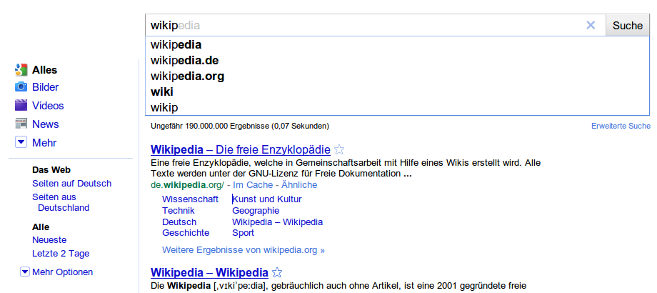
I am writing here and now my thoughts about this old news enhanced with some background information gained through jetwick. First, a screenshot of google instant in action:

(Click to Zoom)


This search is called ‘search before you type’ – it will trigger a search from the first suggestion it gave to you and so, it can guess your intent of the query and delivering matching results faster. At least this is what google hopes. In the example google will get wikipedia from the suggestion and trigger a ‘wikipedia’ search instantaneous.

‘Search as you type’ or ‘incremental search’ is an old idea and not really useful for web content, I think. Even google implemented this some months ago for other products – that idea also contains a bit of the new ‘search before you type’ feature.

Now one might think that the ‘search before you type’ is what google-developers can be proud of, but google-developers are not the first guys who ‘invented’ this, there were/are nearly equal examples from Yahoo in 2006 (!):

Watch it in fullscreen, please 🙂


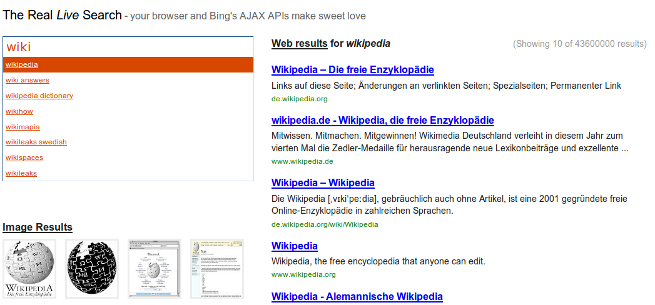
or via Bing API from Long Zheng:


(And there is a video of the officials from Bing too, showcasting its ‘new’ stuff)

The main difference is now that only the google-leads takes the risk to deploy this feature to its main site in all countries! BTW I’m sure: if it does not work as expected for the users or SEOs, google will remove it (or un-default it) after a certain time interval.

But maybe this big change is not so big as google hopes and not so many users will use this feature (you can turn it off) or weren’t affected because they are already using scroogle or their browser’s searchbox. My guess is that ‘google instant’ was and is a really nice and brave marketing campaign: a lot of news appeared about this feature in the last week. Even ‘old school’ newspapers like zeit.de or our local one had a whole site for it (and humph, yes, I am making indirectly advertising too for them now :-/). So without any additional dollars google polished its image a bit after being wrinkled in the last weeks (Network neutrality, street view here and there in Germany, …).

My personal experiences

The performance of google’s implementation is really great. No, only one word is necessary: fantastic! I know, that must be that hardest part of the whole thing and that’s why they roll it out partially.

BUT: I don’t like to be interrupted while typing. And displaying new results again and again are definitely an interruption. It’s a nice way to advertise similar sounding terms or for people wasting their time with browsing or searching for things. For me this means that I’ll see the stackoverflow site after 6 characters instead of 13 + ENTER. For me this is not a big benefit – I’m fast at typing – and it doesn’t weight out the disruption (ok, I’m using scroogle in my firefox searchbox, but thats another topic). So, I prefer the version of Long Zheng a lot, where you have to select the suggestions to update the results. With this version you would type 6 characters and select the suggestion – a very useful feature which I am missing at google! I like it that much that I implemented it for jetwick.

Another design issue with google’s instant search feature is the following. To see all results – including the first – the results have to be displayed below the suggestions. Compare this to the normal search where the suggestions overlap the first result(s). The problem now is that the number of suggestions will vary – depending on the query and as a consequence the results are moving up and down. The Yahoo and Long Zheng’s solution mentioned above, solved this easily: they put the search box on the left and the results on the right. I’m not sure if this is the best solution because the search terms sometimes can be lengthy, but its better than google solution.

At the end I am curious about three things:

  1. How yahoo/bing, ask.com and all of google’s competitors will follow … ok, if they want follow at all 😉
  2. The difference of google’s electricity bill (or in tons of CO2)
  3. The main ‘abc’ companies. Ah, okay someone already did this job 😉

Updates

Chrome will implement the same feature.

Bing is a decision engine.

Bad News: Earthquake in New Zealand (via Twitter)

If you live in New Zealand or have friends there, I really hope no one was damaged!

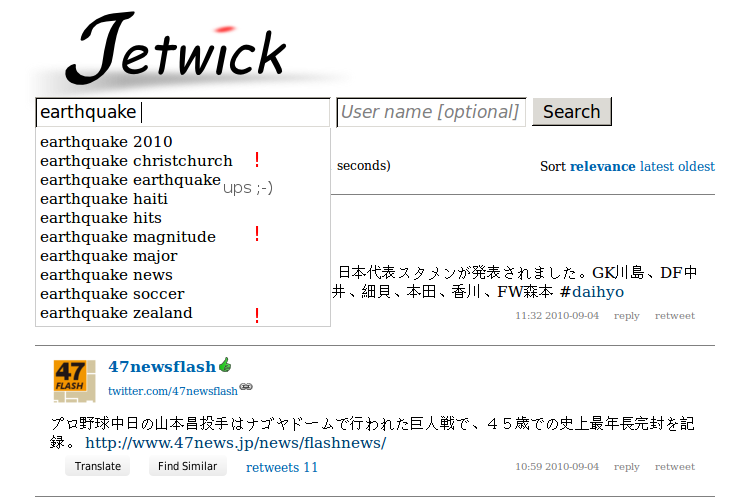
Twitter made me aware that there was an earthquake. A quick search in my twitter search prototype jetwick shows where it happened:

(The auto-suggestions were implemented with wicket’s autocomplete and a nice trick in solr.)

Twitter Search Jetwick – powered by Wicket and Solr

How different is a quickstart project from production?

Today we released jetwick. With jetwick I wanted to realize a service to find similar users at twitter based on their tweeted content. Not based on the following-list like it is possible on other platforms:

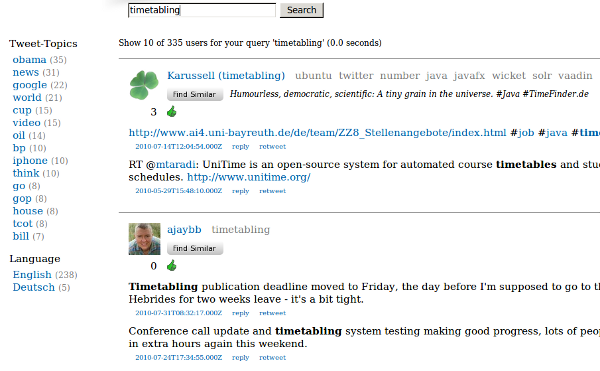
Not only the find similar feature is nice, also the topics (on the right side of the user name; gray) give a good impression about which topic a user tweets about. The first usable prototype was ready within one week! I used lucene, vaadin and db4o. But I needed facets so I switched from lucene to solr.  The tranformation took only ~2 hours. Really! Test based programming rocks 😉 !

Now users told me that jetwick is slow on ‘old’ machines. It took me some time to understand that vaadin uses javascript a lot and inappropriate usage of layout could affect performance negativly in some browsers. So i had the choice to stay with vaadin and improve the performance (with different layouts) or switch to another web UI. I switched to wicket (twitter noise). It is amazingly fast. This transformation took some more time: 2 days. After this I was convinced with the performance of the UI. The programming model is quite similar (‘swing like’) although vaadin is easier and so, faster to implement. While working on this I could improve the tweet collector which searches twitter for information and stores the results in jetwick.

After this something went wrong with the db. It was very slow for >1 mio users. I tweaked to improve the performance of db4o at least one week (file >1GB). It improves, but it wouldn’t be sufficient for production. Then I switched to hibernate (yesql!). This switch took me again two weeks and several frustrating nights. Db4o is so great! Ok, now that I know hibernate better I can say: hibernate is great too and I think the most important feature (== disadvantage!) of hibernate is that you can tweak it nearly everwhere: e.g. you can say that you only want to count the results, that you want to fetch some relationship eager and some lazy and so on. Db4o wasn’t that flexible. But hibernate has another draw back: you will need to upgrade the db schema for yourself or you do it like me: use liquibase, which works perfectly in my case after some tweeking!

Now that we had the search, it turned out that this user-search was quite useful for me, as I wanted to have some users that I can follow. But alpha tester didn’t get the point of it. And then, the shock at the end of July: twitter released a find-similar feature for users! Damn! Why couldn’t they wait two months? It is so important to have a motivation … 😦 And some users seems to really like those user suggestions. ok, some users feel disgustedly when they recognized this new feature. But I like it!

BTW: I’m relative sure that the user-suggestions are based on the same ‘more like this’ feature (from Lucene) that I was using, because for my account I got nearly the same users suggested and somewhere in a comment I read that twitter uses solr for the user search. Others seems to get a shock too 😉

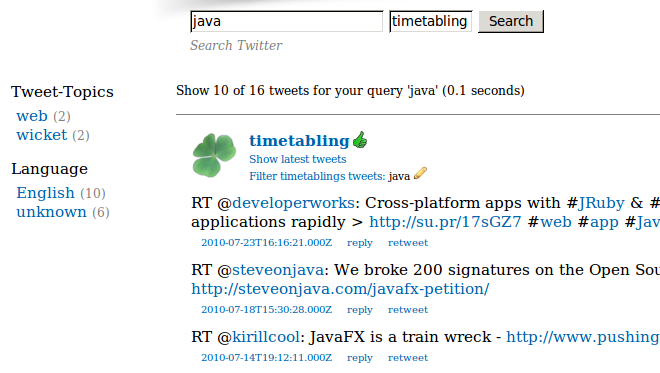
Then after the first shock I decided to switch again: from user-search to a regular tweet search where you can get more information out of those tweets. You can see with one look about which topics a user tweets or search for your original url. Jetwick tries to store expanded URLs where possible. It is also possible to apply topic, date and language filters. One nice consequence of a tweet-based index is, that it is possible to search through all my tweets for something I forgot:

Or you could look about all those funny google* accounts.

So, finally. What have I learned?

From a quick-start project to production many if not all things can change: Tools, layout and even the main features … and we’ll see what comes next.

Not A Java Web Frameworks Survey: Just use Wicket!

‘Java Web Frameworks Survey’ was my first blog posted which was reposted at dzone. Sadly there never was a follow up of it. Although I planned one with:

jZeno, SpringMVC, Seam, Vaadin (at that time: IT-Mill Toolkit), MyFaces, Stripes, Struts, ItsNat, IWebMvc

Now, today just a short, subjective mini-follow-up, maybe someone is interested after all those months … over the months I have additionally investigated JSF, Rails, Vaadin and one more:

  • No comments to JSF :-/
  • Rails is great! Especially the db migrations and other goodies. Partials are a crap: I prefer component based UI frameworks. If you don’t like ruby take a look at grails with autobase.
  • Additionally I highly recommend everyone to take a look at vaadin (‘server-side GWT’) if you need a stateful webapplication. Loading time was a problem for me. Other client-side performance problems can be solved if you use CssLayout, I think.

But for jetwick.com I chose wicket! There were/are 10 reasons:

The most important thing is: if you use ‘mvn jetty:run’ and NetBeans in combination then the development cycle feels like Rails: modify html, css or even Java code. Save and hit F5 in the browser. Nothing more.

The only problem is the database migration (wicket solves only the UI problems). For that I would use liquibase. Or simply run db4o, a nosql solution ‘or’ solr.

Heaven of Mergurial

The previous post about merging with named branches in mercurial was reposted at dzone. Daniel Neugebauer commented there that he wouldn’t use the named branch feature for every small issue instead he suggested to do the merging directly within the same repository and for bigger changes he would use a ‘clone per issue’. Although Fabrizio Giudici sayed that ‘branch per issue’ works really well in practise. Get his introduction!

And here I’ll quote python.org which compares clone vs. branch per issue:

Mercurial has two basic ways of using branches: cloned branches, where each branch is kept in a separate repository, and named branches, where each revision keeps metadata to note on which branch it belongs. The former makes it easier to distinguish branches, at the expense of requiring more disk space on the client. The latter makes it a little easier to switch between branches, but often has somewhat unintuitive results for people (though this has been getting better in recent versions of Mercurial).

The current proposal is to use named branches for release branches and adopt cloned branches for feature branches […]

Differences between named branches and cloned branches:

  • Tags in a different (maintenance) clone aren’t available in the local clone
  • Clones with named branches will be larger, since they contain more data

The Mercurial book discourages the use of named branches, but it is, in this respect, somewhat outdated. Named branches have gotten much easier to use since that comment was written, due to improvements in hg.

So, think what you want 😉

Here are the steps to do a merge from a cloned repository (clone per issue). Which is the recommended stragety for bigger changes. This merging-strategy is also covered in the official hg book.

  1. The working directory is:
    app/

    Now commit the last changes.

  2. cd ..;hg clone -r <oldrevisionnumber> app/ app-clone/
  3. cd app-clone

    DO CHANGES (add, edit, rename, delete files)

  4. hg commit -m "FIXED issueXY"
  5. cd ../app;
    hg pull ../app-clone

    Now your working copy with the folder app/ contains 2 heads. This can be fixed easily via:

  6. hg merge
  7. hg commit -m "merged fix of issueXY into development sources"

Although this strategy needs one or two more commands it is also very clear and logically. Here is a tip from Daniel:

You can also search the history by “hg log -k <keyword>”, so if you use prefixed commit messages like “ISSUE123: …” you could find changesets belonging to that issue almost as easy as using a named branch.

And finally here are the steps to do a merge directly within the repository (direct merge), recommended for smaller changes only:

  1. Working in you current repository at
    app/

    and commit the last changes

  2. hg update -C <oldrevisionnumber>
  3. DO CHANGES (add, edit, rename, delete files)
  4. hg commit -m "FIXED issueXY"

    now hg says something about that a new head was created. Try

    hg heads

    to see that the previous commit created a new head in the repository. A

    hg update

    would fail now. But the following command resolves that ‘problem’ easily:

  5. hg merge

    The working directory will now contain changes of both commits/heads!

  6. Do not forget:
    hg commit -m "merged fix of issueXY into development sources"

    Now the command

    hg heads

    only contains one head

So only 5 easy steps for a quick merge!

Conclusion

All three strategies: “direct merge”, “clone per issue” and “branch per issue” are logically and easy to remember. Nice! Personally I prefer named branches. That page and this question could show its (dis)advantages.

BTW: for people looking for a git vs. hg site. Here are is one link.

Liquibase + Hibernate (annotations): Easy and solid Database Migration

As I pointed out earlier liquibase is a stable and nice migration tool for SQL databases in the Java land. The problem I had is that I couldn’t get it working with hibernate while using annotations.

Now just for my personal memory here are the steps to get it working. Download liquibase 1.9.5 (couldn’t get it working with 2.0.0 :-() and put the following libs in the liquibase/lib folder:

dom4j-1.6.1.jar
h2-1.2.137.jar #or your prefered jdbc database driver
hibernate-annotations-3.5.1-Final.jar
hibernate-commons-annotations-3.2.0.Final.jar
hibernate-core-3.5.1-Final.jar
hibernate-jpa-2.0-api-1.0.0.Final.jar
slf4j-api-1.6.0.jar

You will need to put the 4 hibernate jars into the classpath parameter, too. To do a diff and update the changelog file via the command line do the following:

liquibase --logLevel=FINE \
 --driver=org.h2.Driver \
 --classpath=$CP \
 --url=jdbc:h2:~/.myapp/h2db \
 --username=sa \
 --password=tmp \
 --changeLogFile=src/main/resources/dbchangelog.xml \
 diffChangeLog \
 --baseUrl=hibernate:src/main/resources/hibernate.cfg.xml

This means you compare the ‘old’ database with the new hibernate config. If you have problems while set-up you can look directly into the source file.

BTW: here is the pom snippet for the hibernate deps:

<dependency>
   <groupId>org.hibernate</groupId>
   <artifactId>hibernate-core</artifactId>
   <version>3.5.1-Final</version>
 </dependency>
 <dependency>
   <groupId>org.hibernate</groupId>
   <artifactId>hibernate-annotations</artifactId>
   <version>3.5.1-Final</version>
 </dependency>