Some weeks ago I mavenized timefinder to allow developers coding in other IDEs than NetBeans. I am new to all the maven stuff, but NetBeans 6.1 support is good (I have not compared it e.g. to eclipse :-/)
Now I explored a really great feature within NetBeans: you can resolve dependencies very easy: hit ALT+Enter. For example:
and hit "Search Dependency at Maven Repository".
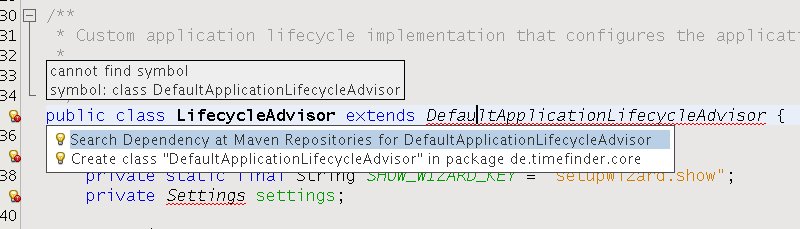
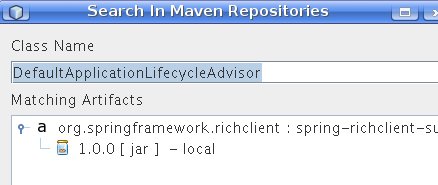
Then choose a repository and hit add. After installing the jar in your local maven repository you will be able to resolve this particular dependency via CTRL+SHIFT+I. That’s it!
One big problems remains: you cannot profile maven projects. So, I thought it would be good to create a separate ‘pure’ NetBeans-Project where I link the source which are already used from the mavenized project. But this isn’t allowed! I don’t know why. So I hacked it under linux. This is straightforward:
create symbolic links from the pure-netbeans project to the mavenized one!
go into the ‘pure’ NetBeans-Project ‘mkdir source && cd source’ then type:
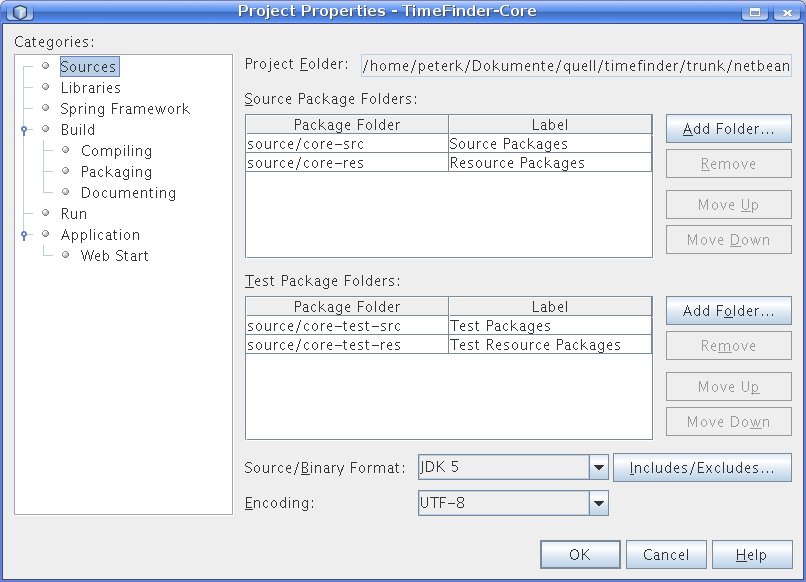
ln -s ../../../timefinder-core/src/main/resources/ core-res ln -s ../../../timefinder-core/src/main/java/ core-src ln -s ../../../timefinder-core/src/test/resources/ core-test-res ln -s ../../../timefinder-core/src/test/java/ core-test-src After this step right click the pure-project and add the source and test folders to the projectOne more reason to do this is that compilation (clean & build; without tests) and starting (until the first log statement) are slower with mavenized projects. In my simple project with approx. 100 files you get with jdk 1.6:
pure project compilation: max. 3 sec mavenized project compilation: > 15 sec pure project run: max. 1 sec mavenized project run: > 4 secThat's why I like the eclipse approach of mvn eclipse:eclipse 😉 but this has other disadvantages ...
 Navigatone
I found this, i haven’t tried it so i don’t know if it works but :
http://the-music-of-time.blogspot.com/2008/01/profiling-maven-2-apps-in-netbeans-6.html
Pingback: NetBeans = Best Maven IDE? « Java and more …